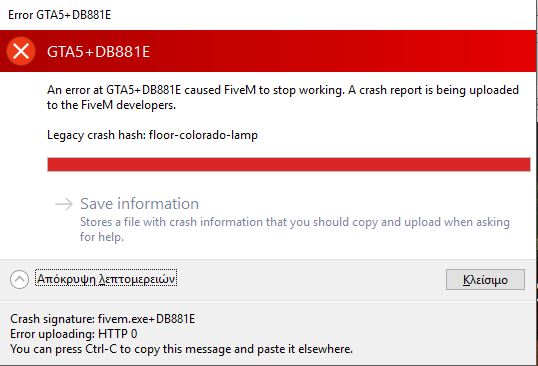
GTA V version?
Latest Up to date?
Yes Legit or Pirate copy?
Legit Steam/CD/Social Club?
Steam Windows version?
Yes Did you try to delete caches.xml and try again?
i tried + caches from my server Error screenshot (if any) System specifications
Intel i5, Nvidia 1050 ti, 16gb ram What did you do to get this issue?
i dont know, im just making my server What server did you get this issue on?
my own ESX server CitizenFX crash zip file CitizenFX.log file .dmp files/report IDs
If an issue with starting: GTA V folder screenshot GTA V/update/x64/dlcpacks screenshot Filepath to FiveM folder FiveM client folder screenshot Which antivirus/firewall software are you using? Did you try to disable/uninstall your Anti-virus?
Also add what you already tried so far.
i tried deleting my cache and restarting my pc and my server it won’t work
Hello, this is a friendly reminder because this is your first time creating a topic (or it has been a while since your last topic) in this category.
Please note that most of the support is provided by the Cfx.re community on a voluntary basis. We ask you to be patient; there is no guarantee we have a solution to your problem(s). To avoid unnecessary/duplicate topics, please browse the forums before creating a topic.
To improve your chances of your issue(s) being solved, please provide as much information as possible about the issue(s) you are having. Also —whenever possible— please use the template given to you when creating a topic.
Hi, i am not a pro at all this stuff but its worth a try attempting to assist you from my past experiences, if you have added any scripts such as Trainers, sirens Etc you might just need to go into steam and verify your GTA 5 by going to library > grand theft auto 5 > properties > local files > verify integrity of game files. This will reset your GTA 5 game files to its original state. Also i saw that you have cleared the cache of your FiveM Server but wasn’t sure if you have done it for you client so if you haven’t that’s also worth a try. And the last one i can recommend you to do is make sure you haven’t put any corrupted, outdated or broken resources into your server, when i have been joining my server i have got a crash similar and it was due to me installing a siren pack incorrectly, once i removed it my FiveM worked perfect. Hopefully your problem gets fixed very soon. Stay safe and have a great day.
Best regards Tom
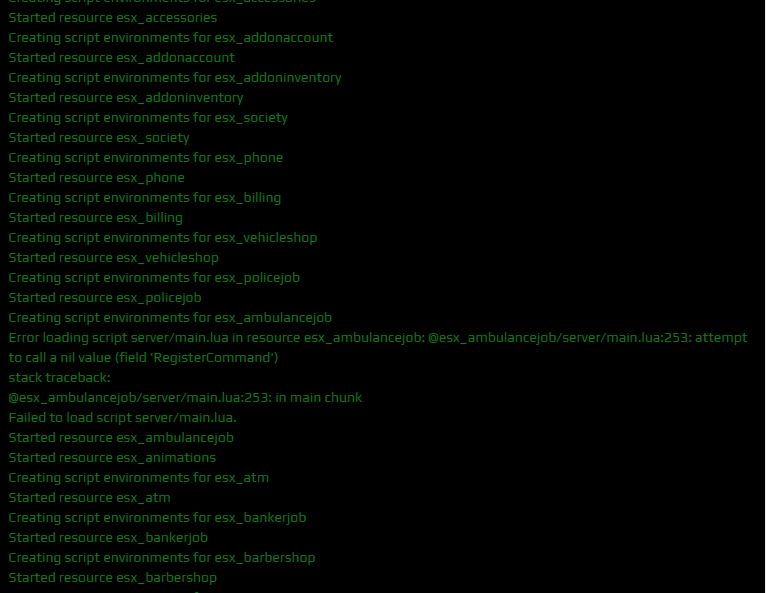
Most of that no but what i can see there seems to be a problem with the esx_ambulancejob so before doing anything to your client i would recommend you stop the resource “esx_ambulancejob” and try and join your server.
Hi, make sure you have typed it right #start esx_ambulancejob since i am not sure if you meant putting # behind it. All i can say now is i have no more ideas what that problem is, I know there are messages in crash reports that tell the FiveM Developers what the crash is caused by but i cannot see that obviously. Again i do apologise and i hope you find a solutions very soon.
Best regards Tom.