Im trying to make my chat box in my server transparent anyone know how to do this on theses the fxmanifest stuff
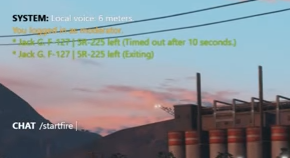
Im trying to make my chat box in my server transparent anyone know how to do this on theses the fxmanifest stuff
Hey, you can make the chatbox transparant by adjusting the style in the .css file of your chatresource. Adjust the background color of the box. It should say rgba change the last value to 0 and you should be good
However don’t modify the files of the orginal chat resource instead use a chat theme (see chat-theme-gtao)
so i go into that folder and go to the .css and change all the rgb to 0?
i change it all to 0 but it still didint work
I have exactly the same problem. I have tried to change the rgba (alpha) value to 0 everywhere, but it hasn’t helped.
I’ll look it up in my files tommorow how I’ve done it
yeah same here
thanks
Go into config.ts in the new chat folder and/or config.js and set
background: 'rgba(52, 73, 94, 0.7)
to
background: 'transparent',
The chat you linked, is just regular FiveM chat with the Civlife Theme theme, which looks like this. (Minus the OOC | Name part)
Is there a way to also remove certain commands? All the unnecessary commands for staff that are able to be used by anyone.
