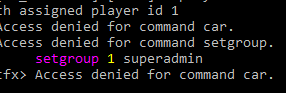
how to fix this? i can’t setgroup any players.
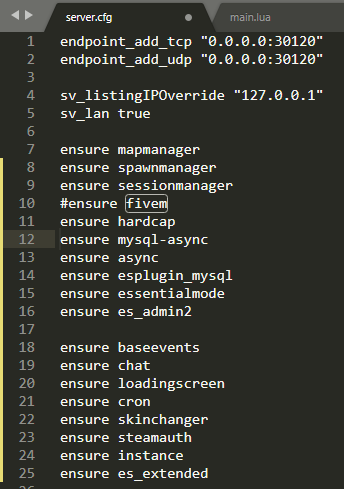
this is my server.cfg
pls help…
how to fix this? i can’t setgroup any players.
this is my server.cfg
pls help…
Hello Zhackks,
I worked with ESX a long time ago and I remember that the best way to set yourself as admin, you can do so in your database, in the “users” table, there will have a lot of information about your character, in the group collum you can change from user to superadmin. (PS. the “setgroup” command only can be used on the server chat there you will use the /setgroup id jobid roleid)
Hope that I could help.
Best Regards
i’ve done that.
i’ve set my records on field “group” to “admin” or “superadmin”
but nothing changed. still access denied to admin commands.
Its not called superadmin anymore AFAIK, “admin” should do the job.
admin, superadmin, moderator. all not working
Hello,
Sorry for the delay.
Did you put your steamhex as admin on server.cfg?
add this before the start of your scripts.
add_principal group.admin group.user
add_ace resource.es_extended command.add_ace allow
add_ace resource.es_extended command.add_principal allow
add_ace resource.es_extended command.remove_principal allow
add_ace resource.es_extended command.stop allow
Then, you add this and put your steamhex, after start all scripts.
add_ace group.admin command allow
add_ace group.admin command.quit deny
add_principal identifier.steam:000000000000 group.admin #change to your steamhex
i mean. esx didn’t recognize user group in database.
that’s the problem.
Did you add the es_extended.sql on the database?
absolutely, i’ve done everything. i’m not stupid as that fyi.
This topic was automatically closed 30 days after the last reply. New replies are no longer allowed.