hi i have a problem when the user join for the first time in the server and start esx_identity for create player, the character is moving and they cannot continue the creation somebody knows how to block the character during the char creation? thnaks
Can you share the link of the esx_identity addon you are using? @snakez
Ofc and thanks https://github.com/snakezdigital/esx_identity i just uploaded the rar on github
Have you uploaded the .sql files into your database from this addon and it’s dependencies? As well are it’s dependencies started?
the script start after police_job esx_skin and esx_society. What about sql what should i do? thanks
You need to put the .sql files in your database. Otherwise it’s just a HUD which will cause this issue. As it can’t put the data into a table that doesn’t exist.
Here’s an example:
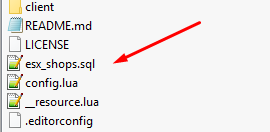
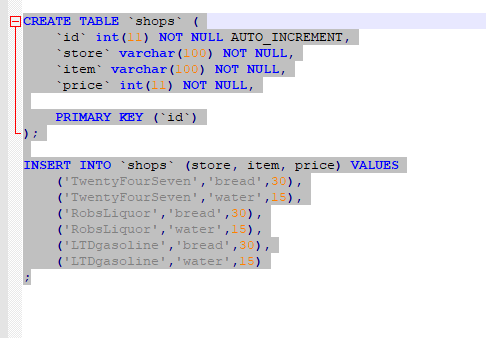

You need to do this for es_extended, esplugin_mysql, and whatever other scripts have a .sql file.
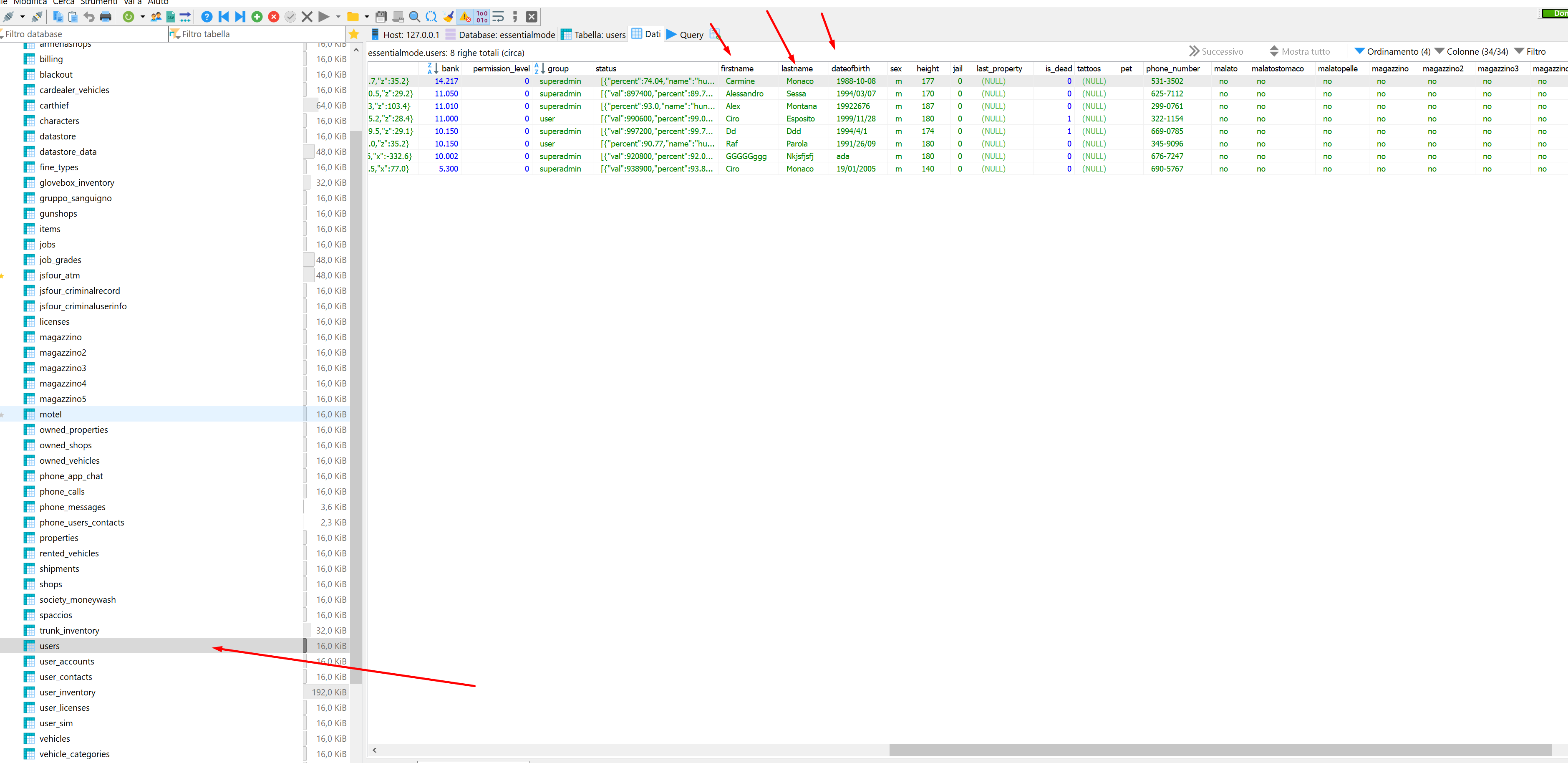
Add Identity Popup box delay of 10 seconds, controls will become disabled.
in order for the character to remain parked, access to the movement keys must be blocked, that is done by entering the client’s part
“esx_identity”
If you want the ped to be blocked like when a policeman handcuffs someone you would have to copy and paste the handcuffed “DisableControlAction” and place it in the “esx_identity”
If you use the default esx_identity follow this guide.
on the part esx_identity/client/main.lua look for these lines
Citizen.CreateThread(function()
	while true do
		if guiEnabled then
			DisableControlAction(0, 1,   true) -- LookLeftRight
			DisableControlAction(0, 2,   true) -- LookUpDown
			DisableControlAction(0, 106, true) -- VehicleMouseControlOverride
			DisableControlAction(0, 142, true) -- MeleeAttackAlternate
			DisableControlAction(0, 30,  true) -- MoveLeftRight
			DisableControlAction(0, 31,  true) -- MoveUpDown
			DisableControlAction(0, 21,  true) -- disable sprint
			DisableControlAction(0, 24,  true) -- disable attack
			DisableControlAction(0, 25,  true) -- disable aim
			DisableControlAction(0, 47,  true) -- disable weapon
			DisableControlAction(0, 58,  true) -- disable weapon
			DisableControlAction(0, 263, true) -- disable melee
			DisableControlAction(0, 264, true) -- disable melee
			DisableControlAction(0, 257, true) -- disable melee
			DisableControlAction(0, 140, true) -- disable melee
			DisableControlAction(0, 141, true) -- disable melee
			DisableControlAction(0, 143, true) -- disable melee
			DisableControlAction(0, 75,  true) -- disable exit vehicle
			DisableControlAction(27, 75, true) -- disable exit vehicle
		end
		Citizen.Wait(10)
	end
end)
and replace scant for this
Citizen.CreateThread(function()
	while true do
		if guiEnabled then

			DisableControlAction(0, 245, true) -- LookLeftRight
			DisableControlAction(0, 309, true) -- LookLeftRight
			DisableControlAction(0, 1, true) -- Disable pan
			DisableControlAction(0, 2, true) -- Disable tilt
			DisableControlAction(0, 24, true) -- Attack
			DisableControlAction(0, 257, true) -- Attack 2
			DisableControlAction(0, 25, true) -- Aim
			DisableControlAction(0, 263, true) -- Melee Attack 1
			DisableControlAction(0, 32, true) -- W
			DisableControlAction(0, 34, true) -- A
			DisableControlAction(0, 31, true) -- S
			DisableControlAction(0, 30, true) -- D

			DisableControlAction(0, 45, true) -- Reload
			DisableControlAction(0, 22, true) -- Jump
			DisableControlAction(0, 44, true) -- Cover
			DisableControlAction(0, 37, true) -- Select Weapon
			DisableControlAction(0, 23, true) -- Also 'enter'?

			DisableControlAction(0, 288,  true) -- Disable phone
			DisableControlAction(0, 289, true) -- Inventory
			DisableControlAction(0, 170, true) -- Animations
			DisableControlAction(0, 167, true) -- Job

			DisableControlAction(0, 0, true) -- Disable changing view
			DisableControlAction(0, 26, true) -- Disable looking behind
			DisableControlAction(0, 73, true) -- Disable clearing animation
			DisableControlAction(2, 199, true) -- Disable pause screen

			DisableControlAction(0, 59, true) -- Disable steering in vehicle
			DisableControlAction(0, 71, true) -- Disable driving forward in vehicle
			DisableControlAction(0, 72, true) -- Disable reversing in vehicle

			DisableControlAction(2, 36, true) -- Disable going stealth

			DisableControlAction(0, 47, true)  -- Disable weapon
			DisableControlAction(0, 264, true) -- Disable melee
			DisableControlAction(0, 257, true) -- Disable melee
			DisableControlAction(0, 140, true) -- Disable melee
			DisableControlAction(0, 141, true) -- Disable melee
			DisableControlAction(0, 142, true) -- Disable melee
			DisableControlAction(0, 143, true) -- Disable melee
			DisableControlAction(0, 75, true)  -- Disable exit vehicle
			DisableControlAction(27, 75, true) -- Disable exit vehicle
		end
		Citizen.Wait(10)
	end
end)
with this you have to solve your problem and apart place two lines to fix an error when you press “T” do not get the chat and do not freeze your character … 
1 Like
hi karen i tried your solution but unfortunately it doesn’t work. On the first spawn the char is moving and when player type the name of char it becomes buggy 
hi alex where i need to put the 10 seconds? which line?
			getIdentity(xPlayer.source, function(data)
				if data.firstname == '' then
					TriggerClientEvent('esx_identity:identityCheck', xPlayer.source, false)
					TriggerClientEvent('esx_identity:showRegisterIdentity', xPlayer.source)
after TriggerClientEvent('esx_identity:identityCheck', xPlayer.source, false)
(Line 236-240 in esx_identity\server\main.lua)
1 Like
This topic was automatically closed 30 days after the last reply. New replies are no longer allowed.