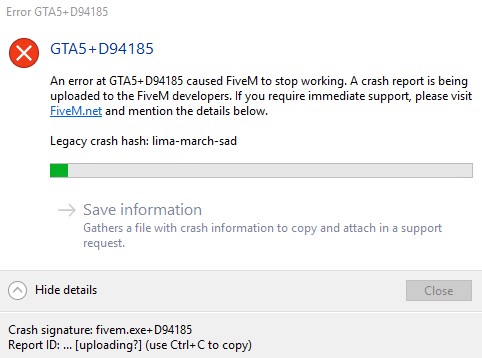
GTA5+D94185 Lima-March-Sad

GTA V version?
Latest Update as GTA V loads normally.

Up to date?
FiveM latest update (FiveM works until it doesn’t)

Legit or Pirate copy?
Legit Steam Copy

Steam/CD/Social Club?
Steam

Windows version?
Version 1803 (OS Build 17132.829) Windows 10

Did you try to delete caches.xml and try again?
Reinstalled FiveM from scratch, cleared all relevant caches and appdata, etc. It was working perfectly a month or so ago.

Error screenshot (if any)
I will post one next time this happens, half the time there is no error, other half it is Lima-March-Sad Legacy Crash

System specifications
8 GB RAM, 4 GB VRAM (GTX 760), 5 core Intel I-5 3570

What did you do to get this issue?
Play in any FiveM server for about 2 minutes up to sometimes 20ish minutes, then random crash, not script related, not server related, not related to any menu actions or anything I can possibly see a pattern of. I do have notably poor internet however, but that should not be an issue.

What server did you get this issue on?
Multiple Public and Private Servers such as RARRP, SASRP, LIRP (A long time ago), DOJRP (Similar but different name of the error, as it has returned with different crash messages, but same symptoms which last months, then disappear suddenly overnight), MFG, IRP, SADPS, SCRP, CSRP, SALRP, more…

CitizenFX.log file
Which one? Crash files are not showing up otherwise I would upload them.

.dmp files/report IDs
Lima-March-Sad

If an issue with starting:
GTA V folder screenshot
GTA V/update/x64/dlcpacks screenshot
Filepath to FiveM folder
FiveM client folder screenshot
Did you try to disable/uninstall your Anti-virus?

Also add what you already tried so far.

I have tried reinstalling GTA V and FiveM
-Using mobile data for better internet speeds
-Closing all background applications besides FiveM (Closing Teamspeak, discord, desktop apps, and other processes besides steam and FiveM, even turning off virus protection and firewall.)
-Updating PC drivers, and Gaming Drivers (Graphics NVidia GeForce Experience Drivers)
-Checking Windows updates and installing them along with Steam and other updates for all applications.
-Updated Computer BIOS and Motherboard settings according to technician’s advice (There should be no issue).
-Checked, cleaned, and reseeded computer components to check if hardware issues. Did not do a swap test.
FiveM/ GTA graphics to minimal settings, Direct X version to most stable (10.1) as I tested each version, and that one lets me stay in game longer. (PC DirectX version is 12.0 I believe).

Most recently, many other steam games that are PC intensive seems to be having the same issues. I did temperature tests with MSI Afterburner, and everything was at a safe 40-60 C, peaking once in a while into the 70s which is safe for my CPU, Graphics Card does not heat up too much at all since I normally play on low or normal graphic settings.

If anyone has any advice, please let me know, as this has been a large hindrance in my ability to do dev work on FiveM scripts, maps, and liveries and such, as well as from me being able to do in depth roleplay on the many servers I am a part of.

Thank you <3

Already had someone in discord message me about my issue, which they say matches some others.

From what I can tell, it potentially is my CPU that gives out on me, as the guy on discord pointed out the same CPU on other member’s computers seems to have issues with FiveM for whatever reason. It runs so smoothly until it doesn’t. No idea what is the solution except potentially getting a new CPU, or new PC altogether.

Hello, this is a friendly reminder because this is your first time creating a topic (or it has been a while since your last topic) in this category.

Please note that most of the support is provided by the FiveM community on a voluntary basis. We ask you to be patient; there is no guarantee we have a solution to your problem(s). To avoid unnecessary/duplicate topics, please browse the forums before creating a topic.

To improve your chances of your issue(s) being solved, please provide as much information as possible about the issue(s) you are having. Also —whenever possible— please use the template given to you when creating a topic.

Thanks for keeping these forums tidy!
:mascot:

Provide more info ? Complete support template

Please upload the crash dump by clicking save information

I have not got one, which is the larger issue. Sometimes the crash is not detected. I am able to connect and play FiveM in a server, then screen freezes for a second or two, then the game quits, sometimes with the error, and sometimes without it. It is very random, which is why I have had so many difficulties with it unfortunately.

Thank you for your reply. <3

1 Like

I have completed the support template. The rest of the template is for crashes upon starting FiveM, which is not the issue I have.

I still am having the same issue. :confused:

It didn’t work, also I am having this issue when connecting to non one sync servers. :confused:

Got it again, Lima-March-Sad :frowning: Randomly while driving around in an Albany Bucaneer, no reason for the crash. :confused:

Hard to assist with no information to go off, such as CitizenFX.log file and or dmp file maybe even a screenshot of the error message.

and perhaps fill this bit out as well.

I filled out the template, I do not have an issue with FiveM starting, but here is the extra stuff you asked for. :slight_smile:

Screenshot_4

The crash file I sent to a few others, but it didn’t help, Ill try uploading it shortly. :slight_smile:

in this case the other information is useful, please fill it out.

I just got back with my community tech support, and from the controls we put in place, it appears to be my ping and internet, the other crashes I have been getting is because of my CPU most likely, but the Lima-March-Sad I keep getting over and over again, because of this…

Now even with a beefed up internet connection, reverifying the game files, clearing the game cache again, and going back on all the steps I mentioned, somehow, I will spontaneously crash, even after making sure to monitor for temperature issues, keep all drivers including game drivers updated, closing all background apps besides necessary ones such as teamspeak or discord (Even tried only teamspeak since I suspected being messaged in Discord was causing my issues).

And once again, going through the saved crash files shows a standard format, with no deviations or issues, even when I provided the files to multiple devs both here on the FiveM forums through PMs, and within the various communities I am in.

I tried adjusting every GTA V graphic setting, including setting everything to minimal. Turning off my antivirus, changing firewall settings, and even temporarily disabling it entirely.

All my temps are well below 70 celcius most of the time, with only peaks during loading times, but since I am not crashing during loading times, that should not be an issue. With my current hardware, I should be able to run GTA V and FiveM fluidly, as I have the same PC as I did in the past, and even better when I lower all my settings to well below what is normal.

Essentially, I don’t know why, but as time progresses, it seems to get worse and worse.

Sometimes I have blue screens once in a while, though I have plenty of storage space, and a boot drive that also has plenty of space. Once again, those I spoke with said due to the crash patterns, and how FiveM behaves. In one of the servers I am in, high quality vehicle textures, and uniforms for EUP seem to cause issue, and when I stand nearby too many of such of these textures, I tend to cause my RP session to be a lot shorter than average.

If anyone else has had this issue (Not always Lima-March-Sad, but tends to be the most common one I see), and has solved it, please message me and let me know what you did that might have solved it.

Thank you.

Hello Rika, good to see you again.


You’ve likely seen this post already, and I can see that you’ve already tried updated your BIOS, but I’ll post it anyway:

Looks like you’re in a very small minority unfortunately, and as much as it’s a throw away comment to say, it might just be one of those strange bugs that can’t be fix, and you might need a new PC to continue playing FiveM :confused: The other thing you could try is emailing support@fivem.net, can see if the Elements have had any breakthroughs since February. Best of luck to you.

Yeah, that might be why everyone has been pointing at my CPU, since mine is a Intel i5 3570k I believe. The weird thing is that it used to work perfectly until early 2019. :frowning: Before then, the only crashes I had were from internet, but with my mobile hotspot, I have better internet than ever before, and still crash constantly.

Most recent crash says it is Nvidia GPU Drivers, even though they are newly updated, and everything else is perfectly fine. :confused:

Could be this:

Try updating your Windows to the latest version.

lima-march-sad is a very uncommon crash - only ~40 users have received it at any point - it seems to be related to some ped/camera rendering stuff.

For crashes without any error message displaying, try enabling local dump reporting for FiveM_GTAProcess.exe. You might have to set the dump type to 2 for a ‘full dump’ and compress it to upload a 2 GB file to get something meaningful, but often type 1 (for a ‘mini dump’) is sufficient,.

2 Likes

During the time I created this Support request, windows was updated to that build, I have since then updated it, as I updated within 24 hours whenever a new update is presented.

Current one I just checked for my PC is Windows Version 1903 (OS Build 18362.356)