What is the issue you’re having?
I’m having an issue with GTA V ownership.
- I bought GTA V on Steam
- My Steam account is linked to Social Club
- When I launch the game, it asks for an activation code
- When I enter the code, it says the code is already in use
- The game will not launch
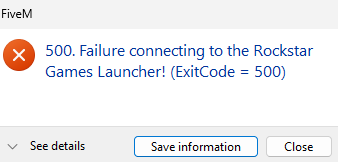
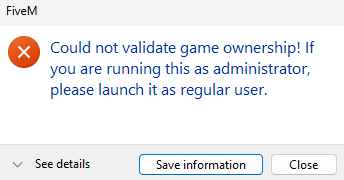
- FiveM cannot verify ownership
I think the GTA V entitlement is linked to the wrong Social Club account or not attached properly.
Can someone help me fix this or tell me how to relink it?
What have you tried already to fix the issue?
I have tried rockstar support and they said they cant help
Error screenshot(s)
Windows version
11
System specifications
Operating System: Windows 11 Home 64-bit (10.0, Build 26200) (26100.ge_release.240331-1435)
Language: Portuguese (Regional Setting: Portuguese)
System Manufacturer: Alienware
System Model: Alienware x17 R2
BIOS: 1.21.0 (type: UEFI)
Processor: 12th Gen Intel(R) Core™ i9-12900HK (20 CPUs), ~2.5GHz
Memory: 32768MB RAM
Available OS Memory: 32440MB RAM
Page File: 41428MB used, 16610MB available
Windows Dir: C:\WINDOWS
DirectX Version: DirectX 12
DX Setup Parameters: Not found
User DPI Setting: 96 DPI (100 percent)
System DPI Setting: 96 DPI (100 percent)
DWM DPI Scaling: Disabled
Miracast: Available, with HDCP
Microsoft Graphics Hybrid: Supported
DirectX Database Version: 1.8.2
Auto Super Res Version: Unknown
System Mux Support: Mux Support Inactive - Ok
Mux Target GPU: dGPU
Mux Incompatible List: Unknown
Antivirus software
Windows Defender (default Windows security)
CitizenFX crash zip file (‘Save information’ on a crash)
Screenshot 2026-04-30 152617.zip (8.51 KB)
Screenshot 2026-04-09 095659.zip (7.78 KB)
Additional comments
help pls