Hey!
Is there any way to get the coordinates of the position that we are looking at?
That would be really useful to get vehicles, peds or objects that we are looking at
Hey!
Is there any way to get the coordinates of the position that we are looking at?
That would be really useful to get vehicles, peds or objects that we are looking at
the heading is what you are looking for
local Heading = GetEntityHeading(GetPlayerPed(-1))
I’m not talking about the entity heading, i’m taking about the camera position so if you look for example behind using your camera you get the point where you are looking at. Something like GetEntityPlayerIsFreeAimingAt but without aiming.
Maybe? GetGameplayCamRelativeHeading()
I’ve found something like this:
Vector3 rot_to_direction(Vector3* rot)//scripthookdotnet source
{
    float radiansZ = rot->z * 0.0174532924f;
    float radiansX = rot->x * 0.0174532924f;
    float num = std::abs((float)std::cos((double)radiansX));
    Vector3 dir;
    dir.x = (float)((double)((float)(-(float)std::sin((double)radiansZ))) * (double)num);
    dir.y = (float)((double)((float)std::cos((double)radiansZ)) * (double) num);
    dir.z = (float)std::sin((double)radiansX);
    return dir;
}

Vector3 multiply(Vector3* vector, float x)
{
    Vector3 result;
    result.x = vector->x;
    result.y = vector->y;
    result.z = vector->z;

    result.x *= x;
    result.y *= x;
    result.z *= x;

    return result;
}
Vector3 add(Vector3* vectorA, Vector3* vectorB)
{
    Vector3 result;
    result.x = vectorA->x;
    result.y = vectorA->y;
    result.z = vectorA->z;

    result.x += vectorB->x;
    result.y += vectorB->y;
    result.z += vectorB->z;

    return result;
}

...

Vector3 camPosition = CAM::GET_GAMEPLAY_CAM_COORD();
Vector3 rot = CAM::GET_GAMEPLAY_CAM_ROT(0);
Vector3 dir = rot_to_direction(&rot);
float distance = 10.0f;
Vector3 lengthVector = multiply(&dir, distance);
Vector3 posLookAt = add(&camPosition, &lengthVector);
But I have no idea how to write this in lua
What you are looking for (probably) is GET_CAM_MATRIX
local cam = GetRenderingCam()
local camRight, camForward, camUp, camPosition = GetCamMatrix(cam)
As where camForward represents the forward direction of the camera with the matrix being applies to the cameras position/rotation. To get an object infront of the camera, you could use shape tests to figure this out. i.e:
local cam = GetRenderingCam()
local camRight, camForward, camUp, camPosition = GetCamMatrix(cam)

//Camera positions decomposed to their vector components.
local cx, cy, cz = table.unpack(camPosition)

//Camera forward decomposed to the components of the vector.
//Note that this is a normalized vector, so |camForward| == 1.
local fx, fy, fz = table.unpack(camPosition)

//The distance we want the raycast/shape test to reach.
//These are probably meters... or some ingame unit.
local distance = 20

//Find the destination position to satisfy raycasting from a to b.
//Where a is our camera position, and b is b + a * distance.
local dx = cx + fx * distance
local dy = cy + fy * distance
local dz = cz + fz * distance

//We want to ignore the player when ray casting
//We dont want to hit ourselves and return a false positive.
local player = PlayerPedId()

/*
1 -> map, 2 -> vehicles, 4 and 8 -> peds, 16 -> objects.
*/
local flag = 4

//Dunno what this does, assume 0 for now.
local p8 =0

local rayHandle = StartShapeTestRay(cx, cy, cz, dx, dy, dz, flag, player, 0)
local rayResult, hit, hitPoint, hitNormal, hitEntity = GetShapeTestResult(rayHandle)
/*
    hit -> A boolean for wether we hit something.
    hitPoint -> The coordinates we hit something, in vector3 format ofc.
    hitNormal -> The surface normal of the object we hit.
    hitEntity -> The entity we hit.
    All of these are invalid if hit == false of course.
   Now do some fun stuff :slight_smile:
*/
Note: The code is untested, so it might work or fail completely. This is mainly for educational purposes.
Note(II): The vector stuff could probably be less explicit 
Note(III): Comments don’t work this way in Lua as @Woopi suggested lol
btw, those comments dont work on lua 
It’s not exactly what i’m looking for  To get this working you have to create a cam. I did not specify myself. I want to get these entities by looking at them while just walking around
yeh they do lmao
That where the “GetRenderingCamera()” native is for. Fetches the camera of the player (or the one that is rendering).
no they don’t smh
they work on javascript, c# ect
in lua you use - - and --[[]]
Unfortunately from my testing it seems like it doesn’t work on the player camera.
I tried to test it and change the fov on the normal camera but no luck. I think GetRenderingCam() works only on created cameras. Same with your script - I managed to get some objects only with created camera.
Citizen.CreateThread(function()

	while true do
		Wait(1)

		local camera = GetRenderingCam()
		SetCamFov(camera, 120.0)

	end
end)
Here you go. The thread at the bottom is just to illustrate how to use the two functions above. It will draw a red line from you to the ped or vehicle. You can adjust the distance that you pass into to RayCastGamePlayCamera as required.
client.lua
local function RotationToDirection(rotation)
	local adjustedRotation =
	{
		x = (math.pi / 180) * rotation.x,
		y = (math.pi / 180) * rotation.y,
		z = (math.pi / 180) * rotation.z
	}
	local direction =
	{
		x = -math.sin(adjustedRotation.z) * math.abs(math.cos(adjustedRotation.x)),
		y = math.cos(adjustedRotation.z) * math.abs(math.cos(adjustedRotation.x)),
		z = math.sin(adjustedRotation.x)
	}
	return direction
end

local function RayCastGamePlayCamera(distance)
	local cameraRotation = GetGameplayCamRot()
	local cameraCoord = GetGameplayCamCoord()
	local direction = RotationToDirection(cameraRotation)
	local destination =
	{
		x = cameraCoord.x + direction.x * distance,
		y = cameraCoord.y + direction.y * distance,
		z = cameraCoord.z + direction.z * distance
	}
	local a, b, c, d, e = GetShapeTestResult(StartShapeTestRay(cameraCoord.x, cameraCoord.y, cameraCoord.z, destination.x, destination.y, destination.z, -1, -1, 1))
	return b, c, e
end

Citizen.CreateThread(function()
	while not NetworkIsPlayerActive do
		Citizen.Wait(0)
	end

	while true do
		Citizen.Wait(0)

		local hit, coords, entity = RayCastGamePlayCamera(1000.0)

		if hit and (IsEntityAVehicle(entity) or IsEntityAPed(entity)) then
			local position = GetEntityCoords(GetPlayerPed(-1))
			DrawLine(position.x, position.y, position.z, coords.x, coords.y, coords.z, 255, 0, 0, 255)
		end
	end
end)
Gameplay Camera points a bit to the right of where you think it should be while in third person view while it points straight forward in first person view. Just in case you think that’s an issue, it’s normal behavior.
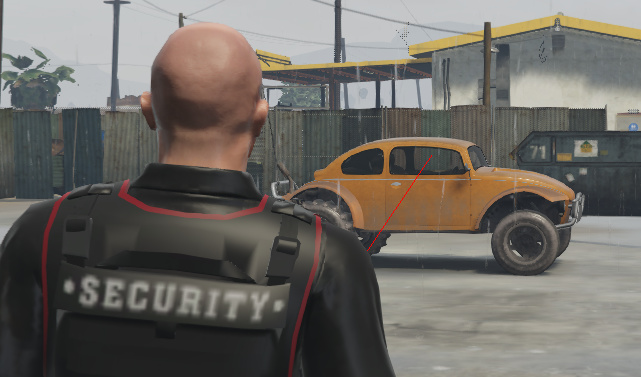
Oh, man! thank you so much 
No problem, if you’re looking for something that points straight forward of your player ped whether you’re in first or third person view then you can use the GetEntityForwardVector(GetPlayerPed(-1)) and skip the whole rotation to direction requirement. I use that method instead in game modes where it’s necessary to get the closest something but you don’t want to get that something if it is behind or beside the origin, only directly infront of it. This gameplaycam method is more useful as a development tool and I think I’ve also used that function in noclip fly scripts.
Everything works great, but now I’m wondering if there is any way to get player id when aimed entity is a player.
Depends on what you mean by an ID? Like literally the player id, the player ped id or some random id that frameworks provide?
Player server id, but I just managed to do that using this function:
function GetPlayers()
    local players = {}

    for i = 0, 31 do
        if NetworkIsPlayerActive(i) then
            table.insert(players, i)
        end
    end

    return players
end