FxRadialMenu - The Ultimate Hexagon Interaction Ecosystem
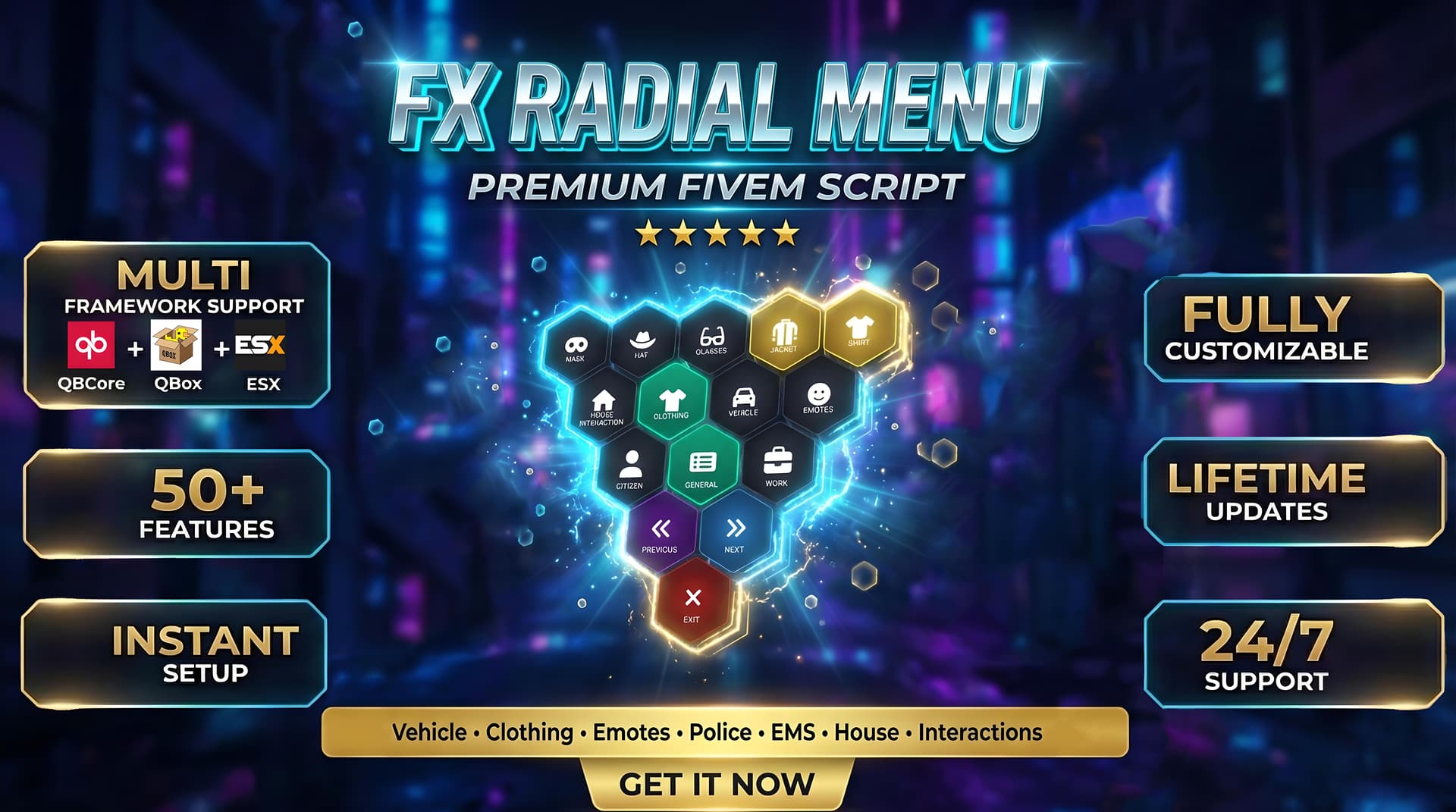
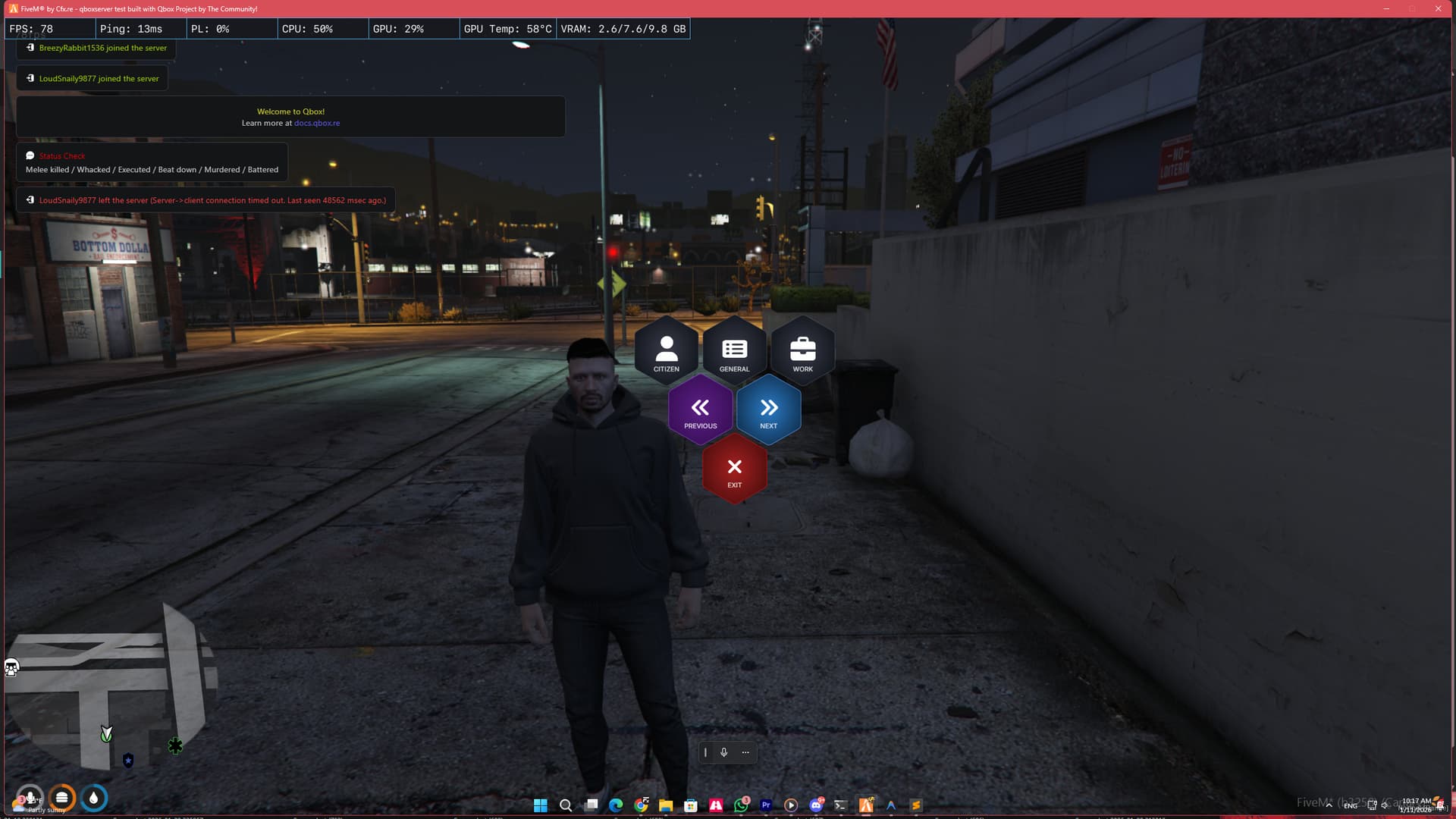
FxRadialMenu brings a sleek Hexagon UI design packed with advanced systems like AI Police Backup, Vehicle Parking, and EMS Tools into one optimized resource.
 Screenshots
Video Preview
Youtube Link :- https://www.youtube.com/watch?v=GlT7hLDT1AQ
EXCLUSIVE TECHNOLOGIES
Advanced Server-Wide Synchronization
We don’t just “play animations”. We sync them.
-
Lag-Free Interactions: Whether you are cuffing a suspect, pushing a stretcher, or carrying a friend, our robust Server-Side State Machine ensures every player sees the exact same thing at the exact same time.
-
No More “Stuck” Players: Our system prevents the common “glued together” bugs found in other interaction scripts.
Real-Time Hexagon UI
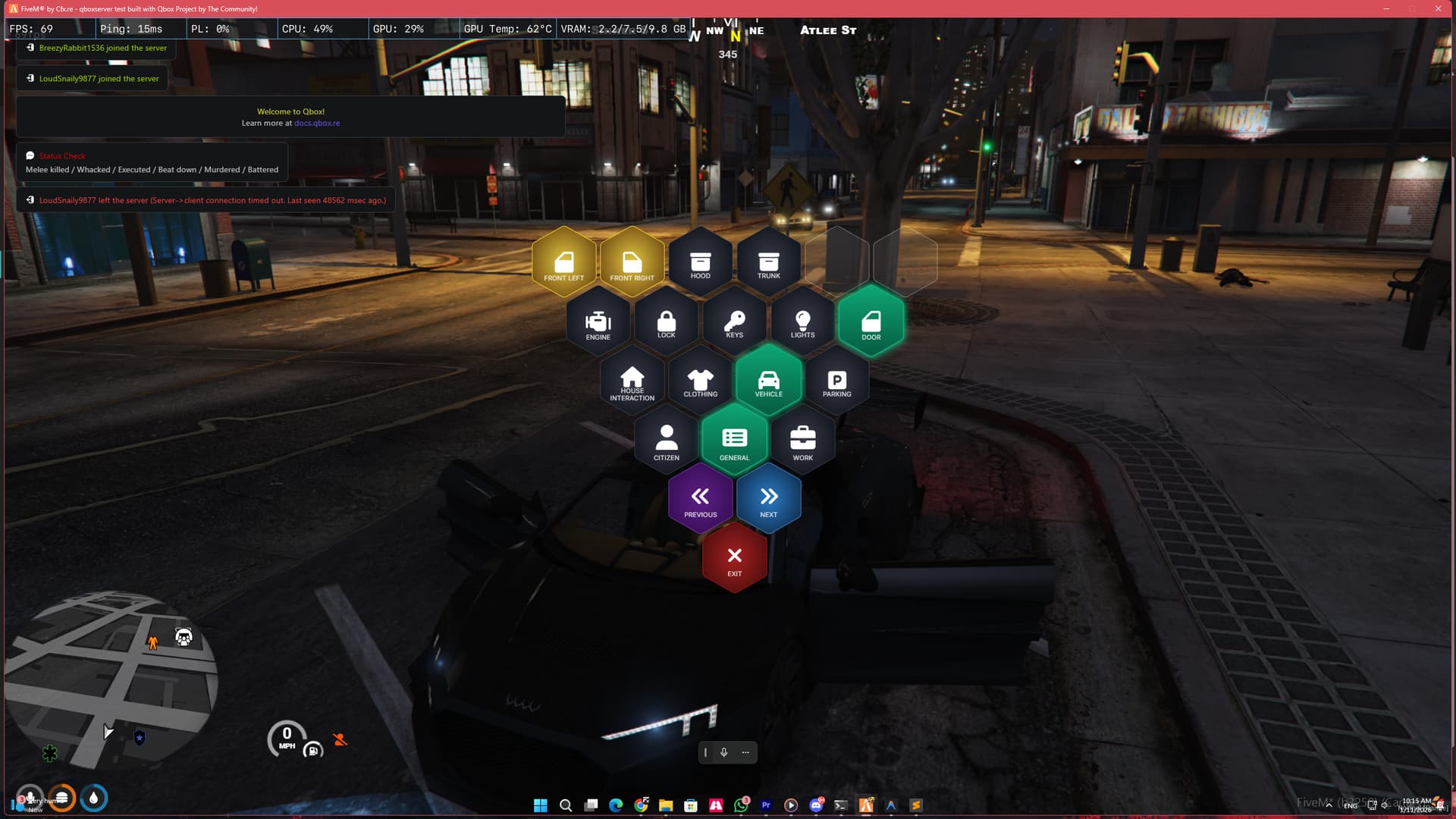
- Interactive Highlighting: Buttons react instantly to your mouse movements with real-time visual feedback, making navigation smooth and satisfying.
- Dynamic Submenus: Infinite menu layers that flow naturally without freezing your screen.
GAMEPLAY SYSTEMS
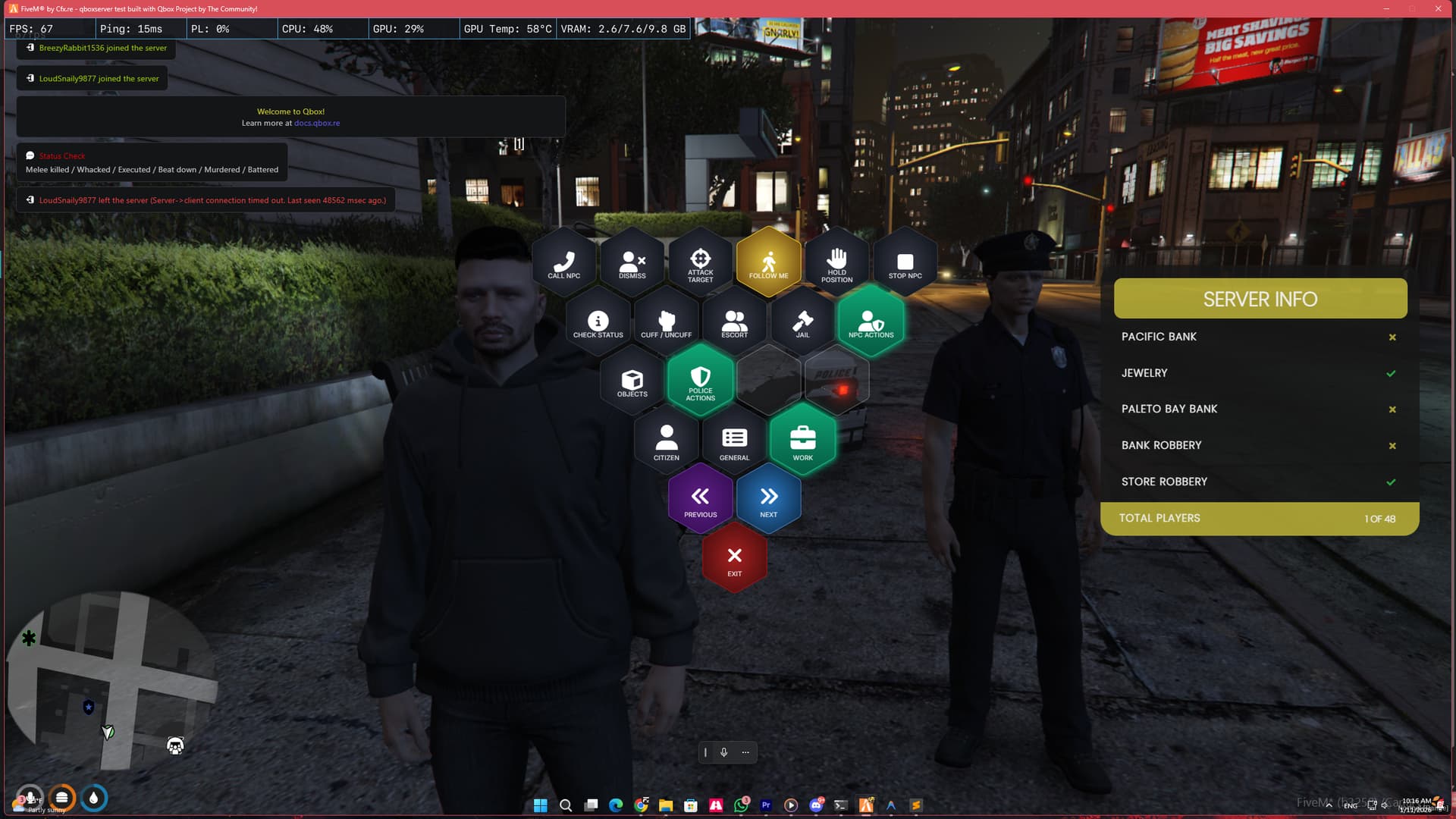
1. Advanced AI NPC Cop System
Struggling with low police count? Players can’t start robberies?
- Robbery Count Integration: The NPC cop counts towards the “Required Police” for heists. Let your players rob banks even when real cops are offline!
- Smart Backup: Call a unit that follows, guards, or attacks on command.
- Loot System: Dead NPC cops drop loot bags (ammo, armor) for criminals to steal.
2. Integrated Parking System
Delete your standalone garage script. We handle it all.
- Garage Zones: Configure parking zones anywhere via config.
- Vehicle Control: Full control over doors, windows, hood, and engine.
- Trunk Hiding: Hide inside vehicle trunks with proper camera handling.
EMOTES & OBJECTS
Ultimate Expression Suite
- Emote Styles: Instantly change your Walking Style (Gangster, Posh, Injured) and Facial Moods (Angry, Happy, Drunk).
Emotes:** Dances, props, and shared interactions.
- Duo Emotes: High-quality synced animations for hugs, handshakes, and bro-fists.
Object Spawner
- Place Props: Easily spawn and place objects like Cones, Barriers, Spikes, or DJ Decks directly from the menu.
- Job Integration: Limit specific objects to specific jobs (Police, EMS, Mechanic).
 CUSTOMIZATION & SUPPORT
Framework Support
Switching frameworks? No problem. The script automatically detects your core.
 QBCore
- QBox Project
- ESX Legacy
 Easy Configuration
- Add Buttons: Copy-paste config blocks to add new features.
- Trigger Anything: Supports Client Events, Server Events, and Exports.
 Optimized Performance
This script is highly optimized and lightweight. It ensures zero impact on your server performance.
- Resmon: 0.01ms (Idle)

Example Configuration
    ╔═══════════════════════════════════════════════════════════════════════════╗
    ║                        FxRadialMenu Configuration                         ║
    ║                                                                           ║
    ║  This file contains ALL menu buttons and settings.                        ║
    ║  Modify this file to add, remove, or customize menu items.                ║
    ╚═══════════════════════════════════════════════════════════════════════════╝

    ============================================
    BUTTON PROPERTIES REFERENCE
    ============================================
    Each button can have the following properties:

    icon      = 'fas fa-icon'        -- FontAwesome icon class (required)
    event     = 'eventName'          -- Client event to trigger
    export    = 'resource:function'  -- Export to call (alternative to event)
    exportData = { key = 'value' }   -- Data to pass to export function
    data      = { key = 'value' }    -- Data to pass to event
    children  = { ... }              -- Submenu items (if this is a category)

    ============================================
    EXPORT SYNTAX EXAMPLES
    ============================================
    -- Basic export call (no data):
    ['Open Phone'] = {
        icon = 'fas fa-phone',
        export = 'qb-phone:OpenPhone'
    }

    -- Export with data:
    ['Custom Action'] = {
        icon = 'fas fa-star',
        export = 'myresource:myFunction',
        exportData = { type = 'something', value = 123 }
    }

    -- Event call (existing method):
    ['My Button'] = {
        icon = 'fas fa-cog',
        event = 'myEvent',
        data = { param = 'value' }
    }
]]

Config = {}

-- ============================================
-- FRAMEWORK CONFIGURATION
-- ============================================
-- 'auto'   = Automatically detect framework (recommended)
-- 'qbcore' = Force QBCore mode
-- 'qbox'   = Force QBox mode
-- 'esx'    = Force ESX Legacy mode
Config.Framework = 'auto'

-- Notification system preference
-- 'auto'    = Use framework default
-- 'qbcore'  = Use QBCore.Functions.Notify
-- 'ox_lib'  = Use lib.notify (ox_lib required)
-- 'esx'     = Use ESX notifications (esx_notify or ESX.ShowNotification)
Config.NotificationSystem = 'auto'

-- ============================================
-- PARKING SYSTEM SETTINGS
-- ============================================
-- true  = Enable Radial Menu Parking (Use this if you DON'T have a garage script)
-- false = Disable Radial Menu Parking Button (Use this if you ALREADY HAVE a garage script like cd_garage)
Config.EnableParkingSystem = true

-- ============================================
-- HOUSING SYSTEM SETTINGS
-- ============================================
-- true  = Enable Radial Menu Housing (Use this if you have qb-houses/qbx_properties)
-- false = Disable Radial Menu Housing Button
Config.EnableHousingSystem = true

-- ============================================
-- GENERAL SETTINGS
-- ============================================
Config.OpenKey = "F1"                    -- Default Key to open menu (Can be changed in Game Settings > Key Bindings > FiveM)
Config.DownedHealthValue = 150           -- Health value for "downed" detection
Config.VehicleMaxDistance = 10.0         -- Maximum distance (meters) to detect vehicles when outside

-- ============================================
-- OBJECT SPAWN SETTINGS (Advanced Placement)
-- ============================================
-- Define how many objects a player can place based on their job
Config.ObjectLimits = {
    -- [Job Name] = Max Objects allowed
    ['police'] = 10,
    ['sheriff'] = 10,
    ['statepolice'] = 10,
    ['trooper'] = 10,
    ['sasp'] = 10,
    ['ranger'] = 10,

    ['ambulance'] = 10,
    ['ems'] = 10,
    ['doctor'] = 10,
    ['fire'] = 10,

    ['mechanic'] = 5,
    ['tow'] = 5,

    -- Everyone else (Civilians)
    ['default'] = 1
}

-- ============================================
-- TRUNK SYSTEM SETTINGS
-- ============================================
-- Disabled Trunks (Vehicles where you can't get in)
Config.DisabledTrunks = {
    [`zentorno`] = true,
    [`bullet`] = true,
    [`infernus`] = true,
    [`comet`] = true,
    [`comet2`] = true,
    [`comet3`] = true,
    [`comet4`] = true,
    [`jester`] = true,
    [`ninef`] = true,
    [`dune`] = true,
    [`tractor`] = true,
    [`rcbandito`] = true,
}

-- Trunk Offsets by Vehicle Class
-- Class IDs: https://docs.fivem.net/natives/?_0x29439776AAA00A62
Config.TrunkClasses = {
    [0]  = { y = -1.6, z = 0.5 },  -- Compacts
    [1]  = { y = -2.0, z = 0.4 },  -- Sedans
    [2]  = { y = -2.1, z = 0.3 },  -- SUVs
    [3]  = { y = -1.7, z = 0.4 },  -- Coupes
    [4]  = { y = -2.0, z = 0.35 }, -- Muscle
    [5]  = { y = -1.8, z = 0.4 },  -- Sports Classics
    [6]  = { y = -1.9, z = 0.35 }, -- Sports
    [7]  = { y = -2.0, z = 0.5 },  -- Super
    [8]  = { y = -1.2, z = 0.3 },  -- Motorcycles
    [9]  = { y = -1.9, z = 0.55 }, -- Off-road (Trucks/Pickups) - Raised for Camacho, etc.
    [10] = { y = -2.5, z = 0.5 },  -- Industrial (Trucks)
    [11] = { y = -1.5, z = 0.5 },  -- Utility
    [12] = { y = -2.4, z = 0.3 },  -- Vans
    [13] = { y = -1.0, z = 0.5 },  -- Cycles
    [14] = { y = -1.5, z = 0.5 },  -- Boats
    [15] = { y = -3.5, z = 0.5 },  -- Helicopters
    [16] = { y = -1.5, z = 0.5 },  -- Planes
    [17] = { y = -1.5, z = 0.5 },  -- Service
    [18] = { y = -2.0, z = 0.5 },  -- Emergency
    [19] = { y = -2.0, z = 0.5 },  -- Military
    [20] = { y = -2.5, z = 0.5 },  -- Commercial
    [21] = { y = -1.5, z = 0.5 },  -- Trains
}

-- Model-Specific Trunk Offsets (Checked FIRST before TrunkClasses)
-- Use vehicle model name (lowercase) as key
-- If a model is here, it uses these values. Otherwise, falls back to TrunkClasses.
Config.TrunkModelOverrides = {
    ['kamacho'] = { y = -1.8, z = 0.69 }, -- Kamacho (Off-road pickup) - Adjusted height
    ['sandking'] = { y = -1.8, z = 0.87 }, -- Sand King (Off-road) - Higher than Kamacho
    ['sandking2'] = { y = -1.8, z = 0.87 }, -- Sand King XL (Off-road) - Higher than Kamacho
    ['caracara'] = { y = -1.8, z = 0.65 }, -- Caracara (Off-road pickup) - Slight raise
    ['caracara2'] = { y = -1.8, z = 0.65 }, -- Caracara 4x4 variant
    ['rebel'] = { y = -1.5, z = 0.85 }, -- Karin Rebel (Off-road pickup) - Raised
    ['rebel2'] = { y = -1.5, z = 0.85 }, -- Karin Rebel V8 variant - Raised
    ['rebel01'] = { y = -1.5, z = 0.85 }, -- Karin Rebel custom variant - Raised
    -- Add more models here as needed:
    -- ['modelname'] = { y = -1.5, z = 0.6 },
}

-- ============================================
-- ROBBERY SETTINGS
-- ============================================
Config.Robbery = {
    -- true = Player must have a weapon equipped to rob someone
    -- false = Player can rob without a weapon
    RequireWeapon = true,
}


-- ============================================
-- ROW SIZE INFO (AUTOMATIC PYRAMID STRUCTURE)
-- ============================================
-- Rows are sized automatically based on their level:
-- Row 3 = 3 buttons (Main categories: CITIZEN, GENERAL, WORK)
-- Row 4 = 4 buttons (First submenu level)
-- Row 5 = 5 buttons (Second submenu level)
-- Row 6 = 6 buttons (Third submenu level)
-- Row N = N buttons
-- If active buttons < row size, empty placeholders fill the remaining slots.

-- ============================================
-- MAIN MENU CATEGORIES
-- ============================================
-- These are the 4 main hexagon buttons at the bottom
-- DO NOT change the keys (CITIZEN, GENERAL, WORK) - only modify children
Config.MainCategories = {
    CITIZEN = {
        icon = 'fas fa-user',
        label = 'CITIZEN'
    },
    GENERAL = {
        icon = 'fas fa-list-alt',
        label = 'GENERAL'
    },
    WORK = {
        icon = 'fas fa-briefcase',
        label = 'WORK'
    }
}

-- ============================================
-- CITIZEN MENU - Player Interaction Actions
-- ============================================
Config.CitizenMenu = {
    -- Order: 1=Interaction (first), 2=Contact, 3=Trunk, 4-5=Selling (last)

    -- Interaction Submenu (FIRST)
    ['1. INTERACTION'] = {
        icon = 'fas fa-handshake',
        children = {
            ['1. CUFF / UNCUFF'] = {
                icon = 'icon-handcuffs-custom',
                event = 'fxradialmenu:client:requestCuff'
            },
            ['2. PUT IN VEHICLE'] = {
                icon = 'fas fa-car-side',
                event = 'putInVehicle'
            },
            ['3. TAKE OUT OF VEHICLE'] = {
                icon = 'fas fa-car-side',
                event = 'takeOutOfVehicle'
            },
            ['4. ROB'] = {
                icon = 'fas fa-mask',
                event = 'robPlayer'
            },
            ['5. HOSTAGE'] = {
                icon = 'fas fa-user',
                event = 'takeHostage'
            },
            ['6. ESCORT'] = {
                icon = 'fas fa-user-friends',
                event = 'escortPlayer'
            },
            ['7. CARRY'] = {
                icon = 'fas fa-people-carry',
                event = 'kidnapPlayer'
            }
        }
    },

    -- Direct Actions
    ['2. GIVE CONTACT DETAILS'] = {
        icon = 'fas fa-address-card',
        event = 'giveContactDetails'
    },

    -- Trunk Submenu
    ['3. TRUNK'] = {
        icon = 'fas fa-truck-loading',
        children = {
            ['1. GET IN'] = {
                icon = 'fas fa-sign-in-alt',
                event = 'getInTrunk'
            },
            ['2. PUT IN'] = {
                icon = 'fas fa-sign-out-alt',
                event = 'putInTrunk'
            },
            ['3. PULL OUT'] = {
                icon = 'fas fa-box-open',
                event = 'fxradialmenu:client:pullOutTrunk'
            }
        }
    },

    ['4. FLIP VEHICLE'] = {
        icon = 'fas fa-car-crash',
        event = 'fxradialmenu:client:flipVehicle'
    },

    ['5. WEED PLANTING'] = {
        icon = 'fas fa-cannabis',
        children = {
            ['1. PLANT SEED'] = {
                icon = 'fas fa-seedling',
                export = 'ps-weedplanting:useWeedSeed'
            },
            ['2. CHECK NEARBY'] = {
                icon = 'fas fa-search',
                event = 'fxradialmenu:client:checkNearestPlant'
            }
        }
    }
}

-- ============================================
-- GENERAL MENU - Personal Actions & Settings
-- ============================================
Config.GeneralMenu = {
    -- House Interaction Submenu (FIRST)
    -- House Interaction Submenu (FIRST)
    -- Controlled by Config.EnableHousingSystem
    ['1. HOUSE INTERACTION'] = (Config.EnableHousingSystem and {
        icon = 'fas fa-home',
        children = {
            ['INTERACTION LOCATIONS'] = {
                icon = 'fas fa-map-marker-alt',
                children = {
                    ['SET STASH'] = {
                        icon = 'fas fa-box-open',
                        event = 'setHouseLocation',
                        locationType = 'stash'
                    },
                    ['SET WARDROBE'] = {
                        icon = 'fas fa-tshirt',
                        event = 'setHouseLocation',
                        locationType = 'wardrobe'
                    },
                    ['SET LOGOUT'] = {
                        icon = 'fas fa-door-open',
                        event = 'setHouseLocation',
                        locationType = 'logout'
                    }
                }
            },
            ['GIVE HOUSE KEYS'] = {
                icon = 'fas fa-key',
                event = 'giveHouseKey'
            },
            ['DECORATE HOUSE'] = {
                icon = 'fas fa-couch',
                event = 'decorateHouse'
            },
            -- REMOVED: House key removal disabled per user request
            -- ['REMOVE HOUSE KEYS'] = {
            --     icon = 'fas fa-key',
            --     event = 'removeHouseKey'
            -- },
            ['TOGGLE DOORLOCK'] = {
                icon = 'fas fa-door-closed',
                event = 'toggleDoorLock'
            }
        }
    } or nil),


}

--[[
    ╔═══════════════════════════════════════════════════════════════════════════╗
    ║                         HOW TO ADD NEW BUTTONS                            ║
    ╠═══════════════════════════════════════════════════════════════════════════╣
    ║                                                                           ║
    ║  1. SIMPLE BUTTON (triggers an event):                                    ║
    ║     ['Button Name'] = {                                                   ║
    ║         icon = 'fas fa-icon-name',    -- FontAwesome icon                 ║
    ║         event = 'yourEventName'       -- Event to trigger                 ║
    ║     }                                                                     ║
    ║                                                                           ║
    ║  2. BUTTON WITH SUBMENU:                                                  ║
    ║     ['Menu Name'] = {                                                     ║
    ║         icon = 'fas fa-icon-name',                                        ║
    ║         children = {                                                      ║
    ║             ['Child Button 1'] = { ... },                                 ║
    ║             ['Child Button 2'] = { ... }                                  ║
    ║         }                                                                 ║
    ║     }                                                                     ║
    ║                                                                           ║
    ║  3. EMOTE BUTTON:                                                         ║
    ║     ['Emote Name'] = {                                                    ║
    ║         icon = 'fas fa-smile',                                            ║
    ║         event = 'playEmote',                                              ║
    ║         emote = {                                                         ║
    ║             dict = 'animation_dictionary',                                ║
    ║             anim = 'animation_name',                                      ║
    ║             flag = 1                  -- 1=loop, 2=freeze at end          ║
    ║         }                                                                 ║
    ║     }                                                                     ║
    ║                                                                           ║
    ║  4. CLOTHING TOGGLE BUTTON:                                               ║
    ║     ['Item Name'] = {                                                     ║
    ║         icon = 'fas fa-tshirt',                                           ║
    ║         event = 'FxRadialMenu:ToggleClothing',                            ║
    ║         ['data-item'] = 'itemId',     -- mask, hat, glasses, etc.         ║
    ║         data = { item = 'itemId' }                                        ║
    ║     }                                                                     ║
    ║                                                                           ║
    ║  5. OBJECT SPAWNER BUTTON (for jobs):                                     ║
    ║     ['Object Name'] = {                                                   ║
    ║         icon = 'fas fa-cube',                                             ║
    ║         event = 'spawnObject',                                            ║
    ║         model = 'prop_model_name'     -- GTA prop model name              ║
    ║     }                                                                     ║
    ║                                                                           ║
    ╚═══════════════════════════════════════════════════════════════════════════╝

    ICON REFERENCE:
    - FontAwesome: https://fontawesome.com/icons
    - Custom Icons: icon-handcuffs-custom, icon-jacket-custom, icon-pants-custom,
                   icon-vest-custom, icon-earrings-custom, icon-necklace-custom,
                   icon-watch-custom, icon-bracelet-custom, icon-engine-custom,
                   icon-door-custom, icon-door-left-custom, icon-door-right-custom,
                   icon-seat-shuffle-custom, icon-seat-left-custom, icon-seat-right-custom
]]
DOWNLOAD NOW
Get it now and save compared to buying separate scripts!
| Version | Link |
|---|---|
| Escrowed | BUY HERE (Tebex) |
Resource Information
| Field | Details |
|---|---|
| Code is accessible | No (Escrow) |
| Subscription-based | No |
| Lines (approximately) | 3500+ |
| Requirements | oxmysql |
| Support | Yes (Discord) |
