Yes It crashes
show us it works for me 100% without crashing my server.
1 Like
Aren’t you starting the script automatically on a server start?
You say you are using the same car. The car comes with the script, so the script must already be started if you are indeed using the car.
So it does not really make sense that you crash when starting the script 
I would love to help you, but you need to be a bit more clear on the exact issue, and the steps that you are following to reproduce it.
I have a problem. I am using it 100% Standalone, vmenu server. I can not get the tow script to work, nothing pops up when i am on the bed of the flatbed. No popup to push “E” nothing.
I have looked over the script and everything is configured correctly. Just not working for me.
Would love to get this working.
Thanks.
Hi @Supaman1982,
Are you trying it on one of the pre-configured vehicles, like the mesa for example? (since these should for sure be correctly configured)
I also assume you have either set Config.RequiredJobs = null or you have the correct job assigned to pass the job check?
If you are sure about the above, could you try replacing your gs_towrope/client/cl_main.js file with this one: cl_main.js (17.0 KB)
I have added prints here. So when using this file on your server, walk up to a vehicle and try to pick up a rope. In your f8-console, you should be seeing prints that tell you the reason why you are not seeing 3d-text to pick up the rope.
I replaced the cl_main.js and it worked. Thank you for your help.
1 Like
Oh, well nothing functional changed in this file, I only added prints. My guess is that something else changed as well. But I am glad it works now 
1 Like
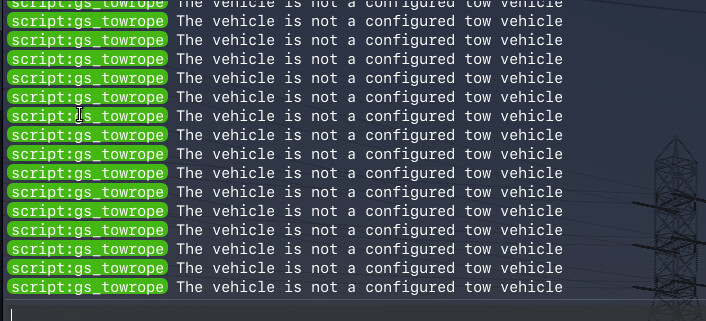
These prints come from the cl_main.js file I shared in one of my earlier comments for debugging purpuses, since someone was experiencing an issue. But you should use the version that is shared on Github without any edits
1 Like
why when use addon car arrow up not function?
I wouldn’t really be able to tell you 
The tow-rope works the same for all vehicles, as long as it is correctly configured. Perhaps another script in your server is blocking the arrow-up key when driving that specific addon vehicle?
for vanilla car its works for me…but for addons car its now working for press arrow up
i think i see the problem is when in vehicle.meta if vehicle class different u cant use arrow up
example if use VC_EMERGENCY u cant press arrow up
The tow rope script itself does not really do anything with vehicle classes. It’s not that you are using an els-system which blocks the usage of the arrow-up key?
Maybe the easiest fix is to just change the keybind to something else, you can change it in the configuration file 
I try to figure out, how to change the pickup-point if the bed is lowered. Im using an addon-flatbed from GTA-V mods ( CXT flatbed tow truck [Add-On / Replace | FiveM | ELS / non-ELS] - GTA5-Mods.com ).
I know, that the model doesnt despawn its original flatbed but thats okay. But if i change the point for the pickup-point if lowered, i can see for a tick the message for picking it up, but then it vanishes. If i set the point more far away, it didnt show up at least.
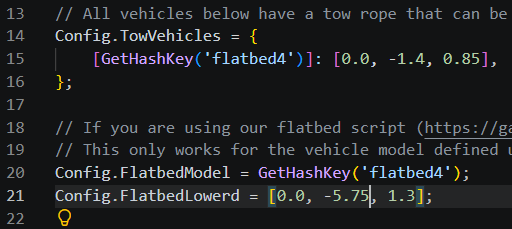
i tried ur cl_main.js for prits, only prints i get are the ones shown in the picture. Is there something else to change that the pickup-point will shown? The second picture shows my actual settings.

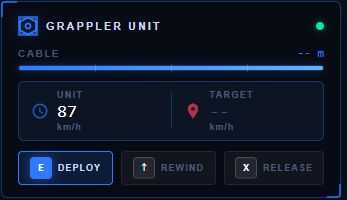
I absolutely love your script  it’s insanely well made. I wrote a few lines inspired by your work to create a police vehicle intervention grappler system, in case anyone’s interested. I’m not sure if there are mistakes or not, but if someone wants to develop it further for the community, feel free.

cl_functions.js (6.1 KB)
cl_hud.js (964 Bytes)
cl_grappler.js (20.4 KB)
sv_main.js (4.8 KB)
README.md (3.6 KB)
hud.js (6.2 KB)
hud.css (10.7 KB)
fxmanifest.lua (467 Bytes)
config.js (3.8 KB)
cl_playerjob.js (1.1 KB)
GS Grappler HUD
hud.htlm (i can't upload)
<!-- Top badge -->
<div class="hud-badge">
    <div class="badge-icon">
        <svg viewBox="0 0 24 24" fill="none" stroke="currentColor" stroke-width="2">
            <path d="M12 2L2 7v10l10 5 10-5V7L12 2z"/>
            <circle cx="12" cy="12" r="3"/>
        </svg>
    </div>
    <span class="badge-label">GRAPPLER UNIT</span>
    <div id="status-dot" class="status-dot ready"></div>
</div>

<!-- Cable visualizer -->
<div class="cable-bar-wrap">
    <div class="cable-label-row">
        <span class="cable-label">CABLE</span>
        <span id="rope-length" class="cable-value">--</span>
    </div>
    <div class="cable-track">
        <div id="cable-fill" class="cable-fill"></div>
        <div class="cable-tick t25"></div>
        <div class="cable-tick t50"></div>
        <div class="cable-tick t75"></div>
    </div>
</div>

<!-- Speed row -->
<div class="speed-row">
    <div class="speed-block own">
        <div class="speed-icon">
            <svg viewBox="0 0 24 24" fill="currentColor">
                <path d="M12 2a10 10 0 1 0 10 10A10 10 0 0 0 12 2zm0 18a8 8 0 1 1 8-8 8 8 0 0 1-8 8zm.5-13v5.25l4.5 2.67-.75 1.23L11 13V7z"/>
            </svg>
        </div>
        <div class="speed-data">
            <span class="speed-label">UNIT</span>
            <span id="own-speed" class="speed-val">0</span>
            <span class="speed-unit">km/h</span>
        </div>
    </div>

    <div class="speed-divider"></div>

    <div class="speed-block target">
        <div class="speed-icon target-icon">
            <svg viewBox="0 0 24 24" fill="currentColor">
                <path d="M12 2C8.13 2 5 5.13 5 9c0 5.25 7 13 7 13s7-7.75 7-13c0-3.87-3.13-7-7-7zm0 9.5c-1.38 0-2.5-1.12-2.5-2.5s1.12-2.5 2.5-2.5 2.5 1.12 2.5 2.5-1.12 2.5-2.5 2.5z"/>
            </svg>
        </div>
        <div class="speed-data">
            <span class="speed-label">TARGET</span>
            <span id="target-speed" class="speed-val dim">--</span>
            <span class="speed-unit">km/h</span>
        </div>
    </div>
</div>

<!-- Action keys -->
<div class="keys-row">
    <div class="key-item" id="key-fire">
        <div class="key-cap">E</div>
        <span class="key-label">DEPLOY</span>
    </div>
    <div class="key-item" id="key-rewind">
        <div class="key-cap">↑</div>
        <span class="key-label">REWIND</span>
    </div>
    <div class="key-item" id="key-release">
        <div class="key-cap">X</div>
        <span class="key-label">RELEASE</span>
    </div>
</div>

<!-- Cooldown overlay bar -->
<div id="cooldown-bar-wrap" class="cooldown-bar-wrap hidden">
    <div class="cooldown-label">
        <span>RELOADING</span>
    </div>
    <div class="cooldown-track">
        <div id="cooldown-fill" class="cooldown-fill"></div>
    </div>
</div>

<!-- State flash banner -->
<div id="state-banner" class="state-banner hidden"></div>
1 Like
I can’t share the full hud.html code because a few opening and closing HTML lines are missing. If you have any questions or need help setting it up, feel free to ask me.
Hi @porterslug,
Are you also using our flatbed script ([FREE] Flatbed Script - FiveM Releases - Cfx.re Community)? The two configuration settings at the bottom of your screenshot only work when using our script.
Alternatively, in gs_towrope/client/cl_main.js at line 62, you can increase dist > 1.5 to something like dist > 3.0. Then the 3d-text appears when you are further away from the vehicle already.
1 Like
Cool! Thanks for sharing @SkeXx_Dev