Features
- Simple timer system
- Easy-to-use settings UI
- Sound notification when the timer ends
Installation
- Download the zip file
- Extract the downloaded zip file
- Place
rnl-timerin theresourcefolder - Add
ensure rnl-timertoserver.cfg - Restart the server
Usage
Use the /timer command to show/hide the UI.
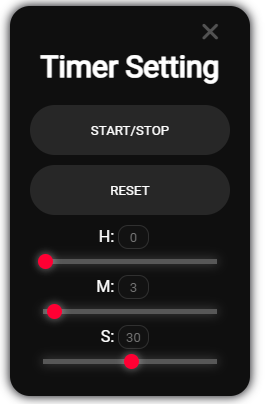
START/STOP
Toggles the timer start/stop.
While the timer is running, the button can be pressed, but it will be temporarily disabled when the timer ends.
This is to prevent issues.
RESET
Resets the timer display.
It will reset to either the default value set in the program or the time set when START/STOP was last pressed.
H:
Sets the “hour” unit for the timer.
You can adjust it using the input field next to the text or the slider below.
Minimum: 0, Maximum: 23.
M:
Sets the “minute” unit for the timer.
You can adjust it using the input field next to the text or the slider below.
Minimum: 0, Maximum: 59.
S:
Sets the “second” unit for the timer.
You can adjust it using the input field next to the text or the slider below.
Minimum: 0, Maximum: 59.
Dependencies
Confirmed:
QBCore
Download: Github
Preview: Youtube
| Code is accessible | Yes |
| Subscription-based | No |
| Lines (approximately) | 500 |
| Requirements | QBCore |
| Support | No |