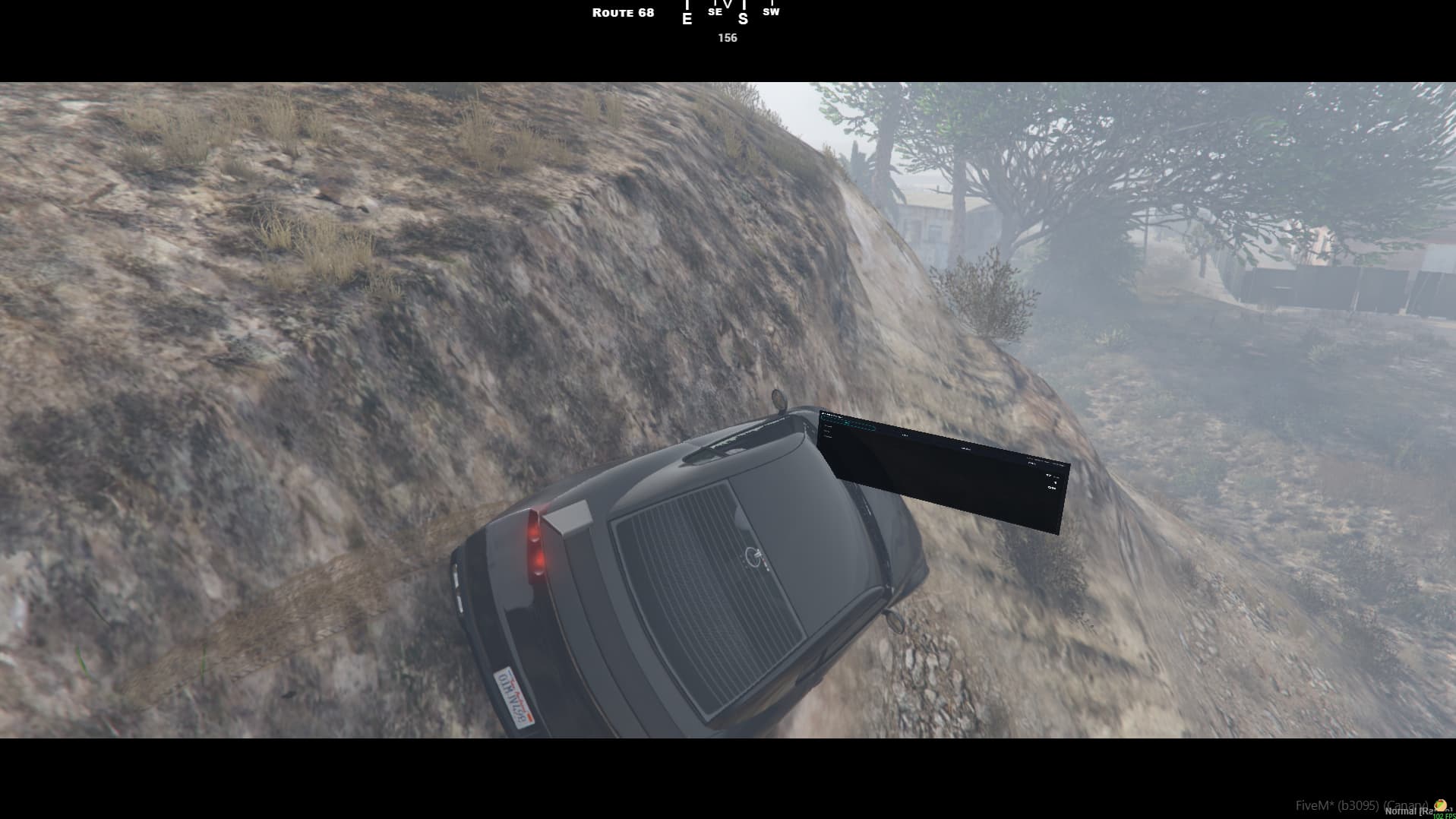
this is just to share my progress in using this. this is in fact the coolest script ive played with
this is just to share my progress in using this. this is in fact the coolest script ive played with
That looks really good, the camera detach is excellent!
This is literally what I envisioned when I thought of this… walk up to ATM and actually press the buttons kind of thing
It’s also makes me very happy that you’re making this and using my library!
But more importantly you’re helping me shape it by giving me these little edge cases so I could put up guard rails making it much easier for devs to strap in.
Tonight when I’m done with my day job I will crack at the new mouse input interactions.
I’ve been iterating hard based on real-world use cases + edge cases.
Many GTA/FiveM monitor models are not perfectly flat (slightly tilted back), which can cause bezel clipping even when your normal looks “correct”.
New options to make panels behave more like a real screen:
depthCompensation = "screen" — safer depth bias for tilted props / bezel clippingfrontOnly = true — only render + accept input when viewing the front (prevents backside interaction)If a panel looks “stuck” when attached to an entity/bone, it’s usually not updating transforms.
To make it behave like a real attachment (like the vehicle demo):
updateInterval = 0 — per-frame transform updatesupdateMaxDistance = 120 — optional distance cullingThe whiteboard demo now supports both:
KEY2DUI is especially useful for constrained camera scenarios (vehicles / tight desks) because it avoids the “UV fighting the camera” feeling.
Core client code was split into smaller modules for maintainability. Exports remain backwards compatible.
been loving following the quick progress on this. keep up the good work!
panel → prop → bone
prop → bone + panel → bone
-- Keep the PROP as the bone-attached visual object (true entity parenting),
-- but keep the PANEL attached to the VEHICLE using a baked offset/normal derived from the prop.
-- This removes jitter while still looking like the panel is mounted to the prop.

-- Helper: normalize a vector3
local function vNorm(v)
  local l = #(vector3(v.x, v.y, v.z))
  if l < 0.000001 then return vector3(0.0, 0.0, 1.0) end
  return vector3(v.x / l, v.y / l, v.z / l)
end

-- 1) Spawn prop and attach it to a vehicle bone (inherits full bone animation)
local function attachPropToBone(veh, boneName, model, off, rot)
  local bone = GetEntityBoneIndexByName(veh, boneName)
  if bone == -1 then return nil end

  RequestModel(model)
  while not HasModelLoaded(model) do Wait(0) end

  local prop = CreateObject(model, 0.0, 0.0, 0.0, false, false, false)

  -- make it non-physical (no collision, no damage)
  SetEntityCollision(prop, false, false)
  SetEntityCompletelyDisableCollision(prop, true, true)
  SetEntityHasGravity(prop, false)

  AttachEntityToEntity(
    prop, veh, bone,
    off.x, off.y, off.z,
    rot.x, rot.y, rot.z,
    false, false, false, true, 2, true
  )

  SetModelAsNoLongerNeeded(model)
  return prop
end

-- 2) Bake the panel transform from the prop into VEHICLE LOCAL space
local function bakePanelFromProp(veh, prop, panelLocalOffsetOnProp, panelLocalNormalOnProp)
  -- where the panel should be in WORLD space (prop-local offset)
  local worldPos = GetOffsetFromEntityInWorldCoords(
    prop,
    panelLocalOffsetOnProp.x,
    panelLocalOffsetOnProp.y,
    panelLocalOffsetOnProp.z
  )

  -- convert that WORLD position into VEHICLE LOCAL offset (for stable attach)
  local bakedOffset = GetOffsetFromEntityGivenWorldCoords(veh, worldPos.x, worldPos.y, worldPos.z)

  -- compute WORLD normal direction from prop-local "normal"
  local propOrigin = GetEntityCoords(prop)
  local worldDirPoint = GetOffsetFromEntityInWorldCoords(
    prop,
    panelLocalNormalOnProp.x,
    panelLocalNormalOnProp.y,
    panelLocalNormalOnProp.z
  )
  local worldDir = vNorm(vector3(worldDirPoint.x - propOrigin.x, worldDirPoint.y - propOrigin.y, worldDirPoint.z - propOrigin.z))

  -- convert that WORLD direction into VEHICLE LOCAL direction (baked normal)
  local vehOrigin = GetEntityCoords(veh)
  local vehLocalDirPoint = GetOffsetFromEntityGivenWorldCoords(
    veh,
    vehOrigin.x + worldDir.x,
    vehOrigin.y + worldDir.y,
    vehOrigin.z + worldDir.z
  )
  local bakedNormal = vNorm(vehLocalDirPoint)

  return bakedOffset, bakedNormal
end

-- 3) Stable setup: prop -> bone, panel -> vehicle (baked from prop)
local function mountDashPanelStable(veh)
  local prop = attachPropToBone(veh, DASH_BONE, DASH_PROP_MODEL, DASH_PROP_OFFSET, DASH_PROP_ROT)
  if not prop then return nil, nil end

  local bakedOffset, bakedNormal = bakePanelFromProp(veh, prop, MONITOR_LOCAL_OFFSET, MONITOR_LOCAL_NORMAL)

  local panelId = exports["cr-3dnui"]:AttachPanelToEntity({
    entity      = veh,
    localOffset = bakedOffset,   --  stable position
    localNormal = bakedNormal,   --  correct facing (vehicle-local)
    width       = MONITOR_W,
    height      = MONITOR_H,
    rotateNormal = true,         --  keep it vehicle-relative
  })

  return panelId, prop
end
attaching a panel to a prop then attaching that prop to a bone creates limitations with updating the position of the panel fast enough with the position of the car
its basically extra math for no reason since your no calculating car/prop/panel
meaning more steps
but if we instead use the prop to calulate the offset then attach panel to bone from that offset we could fake it being attached to the prop but have no jitter when moving fast or driving
the only limitation this really presents is that each vehicle will have unique offsets for the position of the panel
so ive created a simple tool to move the prop XYZ and ROT
and you simply use your mouse wheel to modify values
this way (if needed) you can modify the positions and use a prop based panel in any car – *instead of 8 hours of hair pulling–
1 /nuidash
this is the command to attach the panel and the prop to your car.
(dont worry if they arent lined up even with your offset)
2 /nuidashprop
to bind the panel to prop ( this is REQUIRED to be used BEFORE /dashprint)
3 /dashtune
this will enter the mode that allows you to modify the X/Y/Z/rX/rY/rZ
simply use your scroll wheel to adjust the location + or -
for small adjustments hold CTRL
for big adjustments hold SHIFT
4/dashaxis <x|y|z|rx|ry|rz>
use commands like /dashaxis x or /dashaxis rz to modify individual parameters
rx/ry/rz are rotational variables
5/dashprint
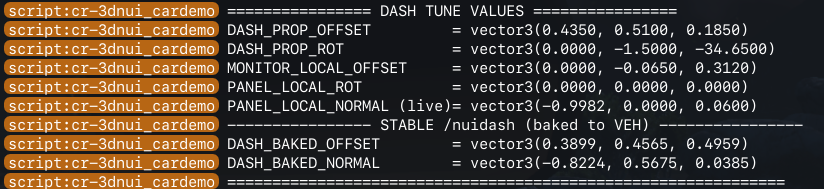
once your happy with the positions this command will print to the F8 console for easy copy pasta
MUST USE
/nuidashpropBEFORE/dashprintto have the COMPLETE output like image below:
Note:
(The debug tools default settings use theElegy2as the car andprop_monitor_01aas the prop but you can change them but each car and prop must be tuned individually)
3D-NUI panels are not real entities, so they do not automatically inherit full parent rotation; their orientation must be explicitly recomputed from the parent’s live transform if you want true roll/pitch/yaw behavior.
lol - seriouslyThe solution is to stop baking the panel’s normal – and instead recompute it continuously from the vehicle’s live right/forward/up vectors, using the panel’s vehicle-space rest orientation as input.
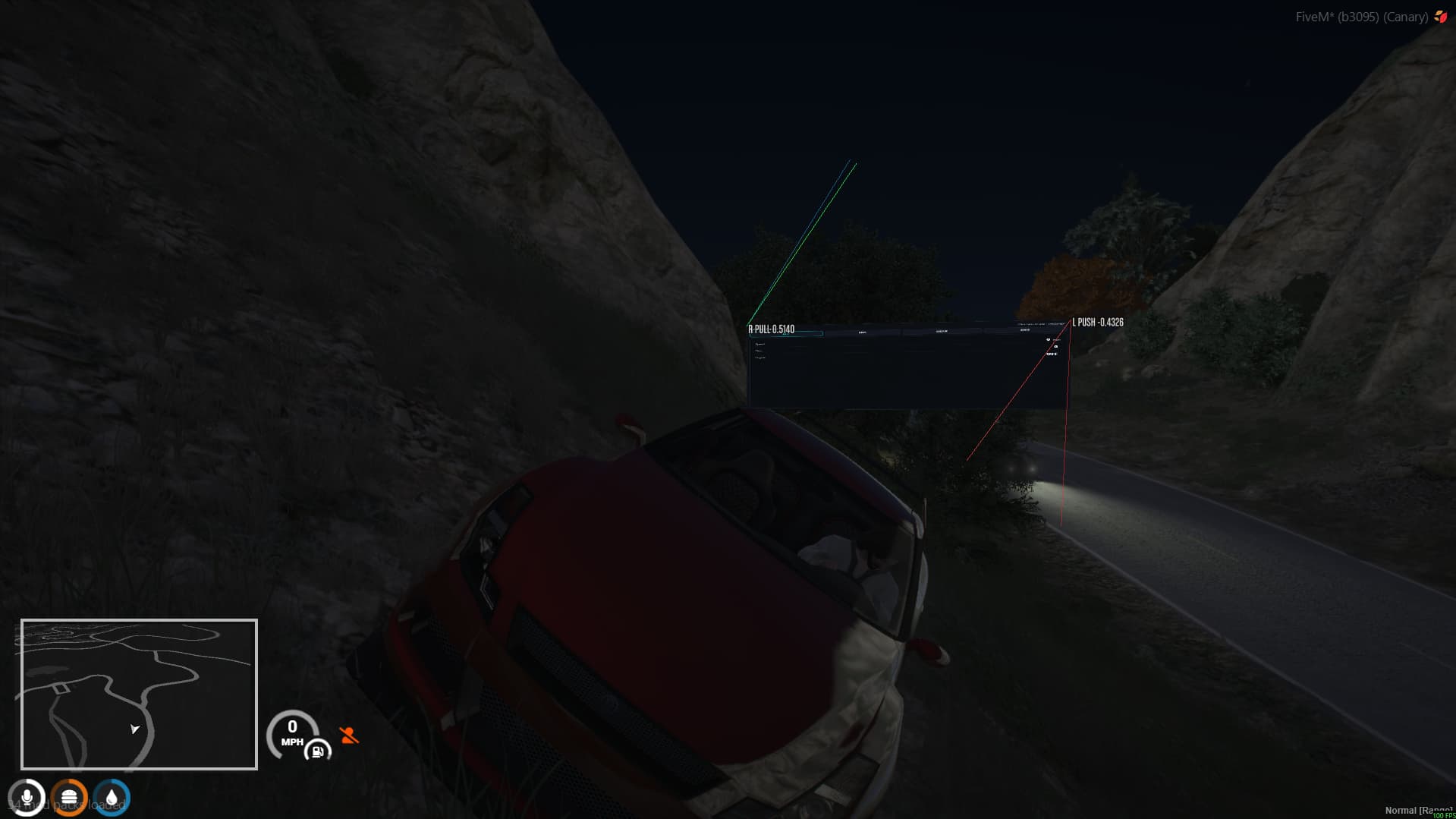
Almost acting like gravity or magnets where it pulls / pushes where it needs to in order to match the car.
-- panel's REST orientation in VEHICLE SPACE (never changes)
-- this is what you tuned
local PANEL_REST_NORMAL = vector3(nx, ny, nz)

-- every update (frame or throttled loop)
local function updatePanelNormal(panelId, vehicle)
    -- get the vehicle’s live axes (already include roll/pitch/yaw)
    local right, forward, up, _ = GetEntityMatrix(vehicle)

    -- rebuild the panel normal from the vehicle’s current orientation
    local dynamicNormal =
        right   * PANEL_REST_NORMAL.x +
        forward * PANEL_REST_NORMAL.y +
        up      * PANEL_REST_NORMAL.z

    -- normalize (important)
    dynamicNormal = dynamicNormal / #(dynamicNormal)

    -- apply to the panel
    exports['cr-3dnui']:SetPanelNormal(panelId, dynamicNormal)
end
In theory this should work-- or something similar.
TL:DR
i did the annoying part and made a debug tool to make it easy to get the locations/offsets/normals/rots… i also solved the prop > bone + panel > bone nightmare solving the jittery panels issue on moving cars and i came up with a plan to tackle panels to follow cars rotations.
The library is updated to 2.5 (only the car demo has changed)
edit: currently debugging and fixing the panel ROT to allgin with car
How ROT (Roll / Pitch / Yaw) Is Actually Solved
3D-NUI panels are not entities.
That means:
ROT requires two vectors:
localNormal → facinglocalUp → roll referenceThe library must support an explicit up vector:
panelUp
Internally, the panel basis is built from:
normal
panelUp
right = cross(panelUp, normal)
up    = cross(normal, right)
Without panelUp, true roll is impossible.
This was the library-side limitation that had to be fixed.
ROT comes from rebuilding the panel orientation from a live transform.
That source is the prop attached to the bone.
You do not attach the panel to the prop.
Instead:
prop → bone           (real rotation)
panel → vehicle       (stable)
Then you bake the prop’s orientation into vehicle-local space.
From demo (simplified):
-- prop local → world
local worldNormal = pr * propNormal.x + pf * propNormal.y + pu * propNormal.z
local worldUp     = pr * propUp.x     + pf * propUp.y     + pu * propUp.z

-- world → vehicle local
local localNormal = normalize(worldNormal • vehicleAxes)
local localUp     = normalize(worldUp     • vehicleAxes)
This gives you:
That’s ROT.
In the demo, Originally was:
localNormal = vNeg(bakedNormal)
localUp     = vNeg(bakedUp)
That mirrors the basis.
Result:
localNormal = vNeg(bakedNormal)
localUp     = bakedUp
That’s it.
After this:
TL:DR
ROT is solved by:
- Library supports
panelUp- ROT is baked from a real entity (prop → bone)
- Panel attaches to vehicle using baked normal + up
- Only the normal is negated — never the up
(If any one of those is missing, ROT breaks)
WORK IN PROGESS
New panel creation method
(MUCH EASIER)
Instead of calculating all the fancy math to place a panel on a prop…
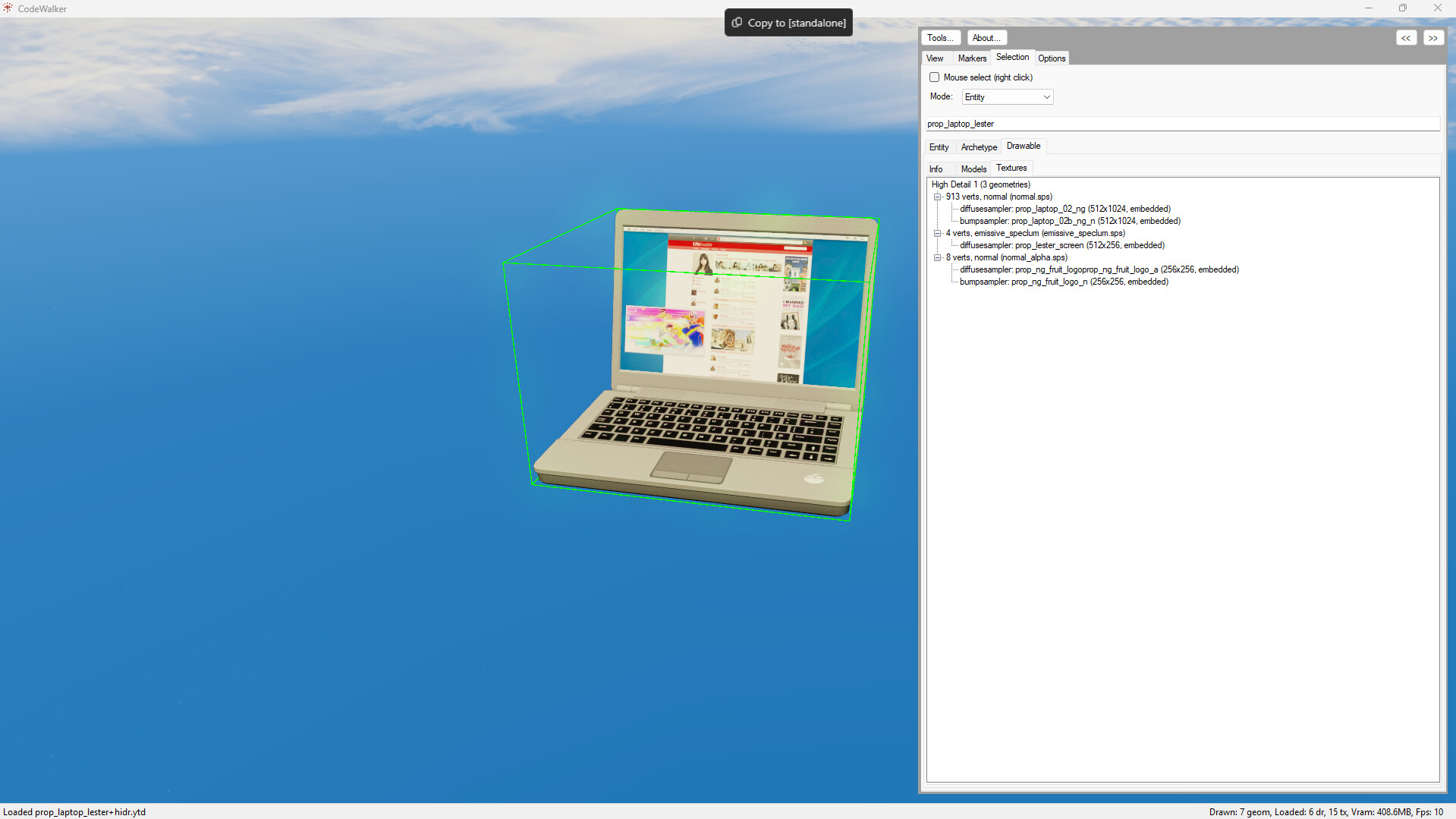
This replaces the texture inside the prop with our 3d-NUI
Simply open code walker and search the model and look up the textures in that model
over ride the texture!
still working on focus mode and a few things but should be pushed tonight
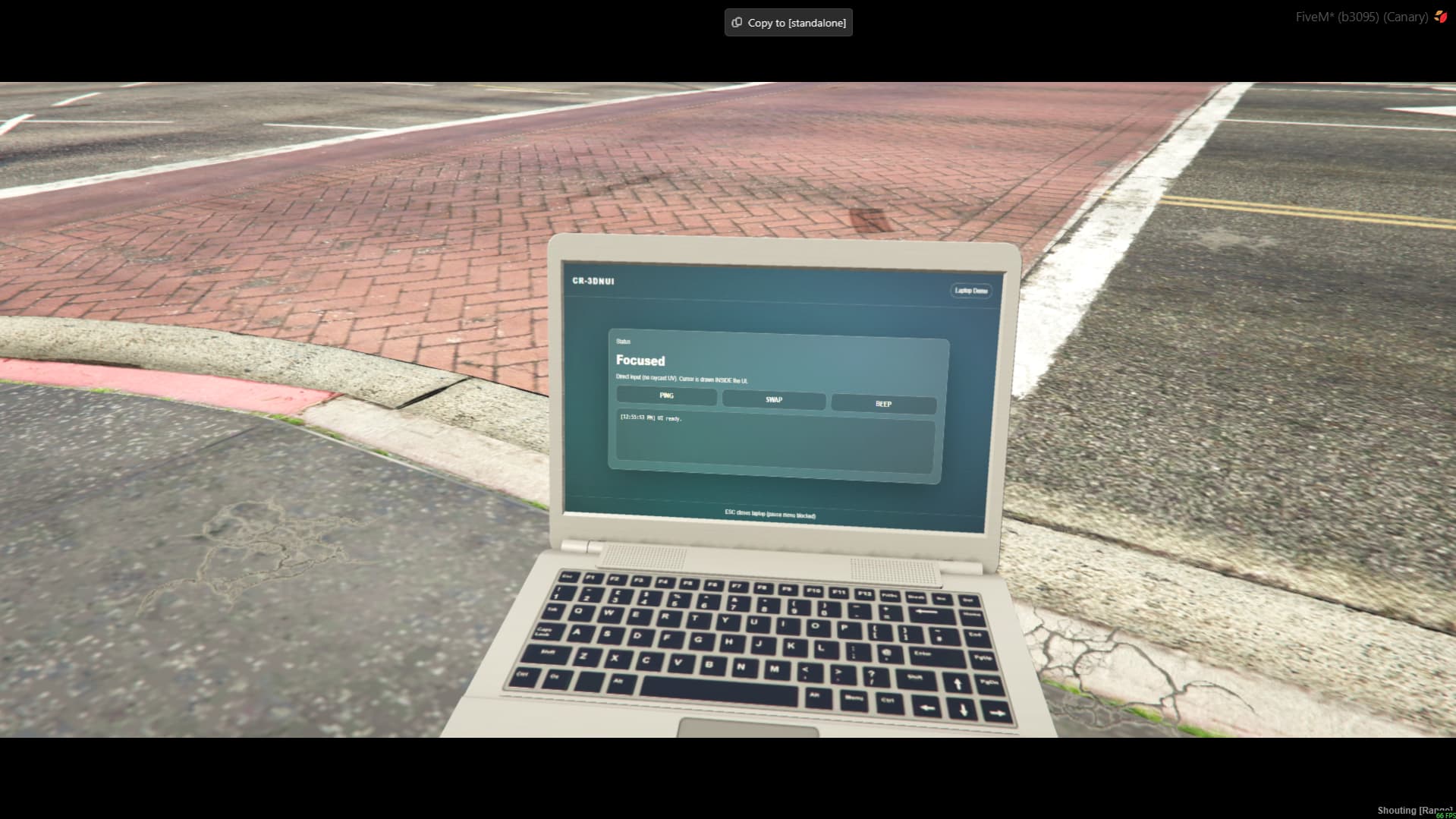
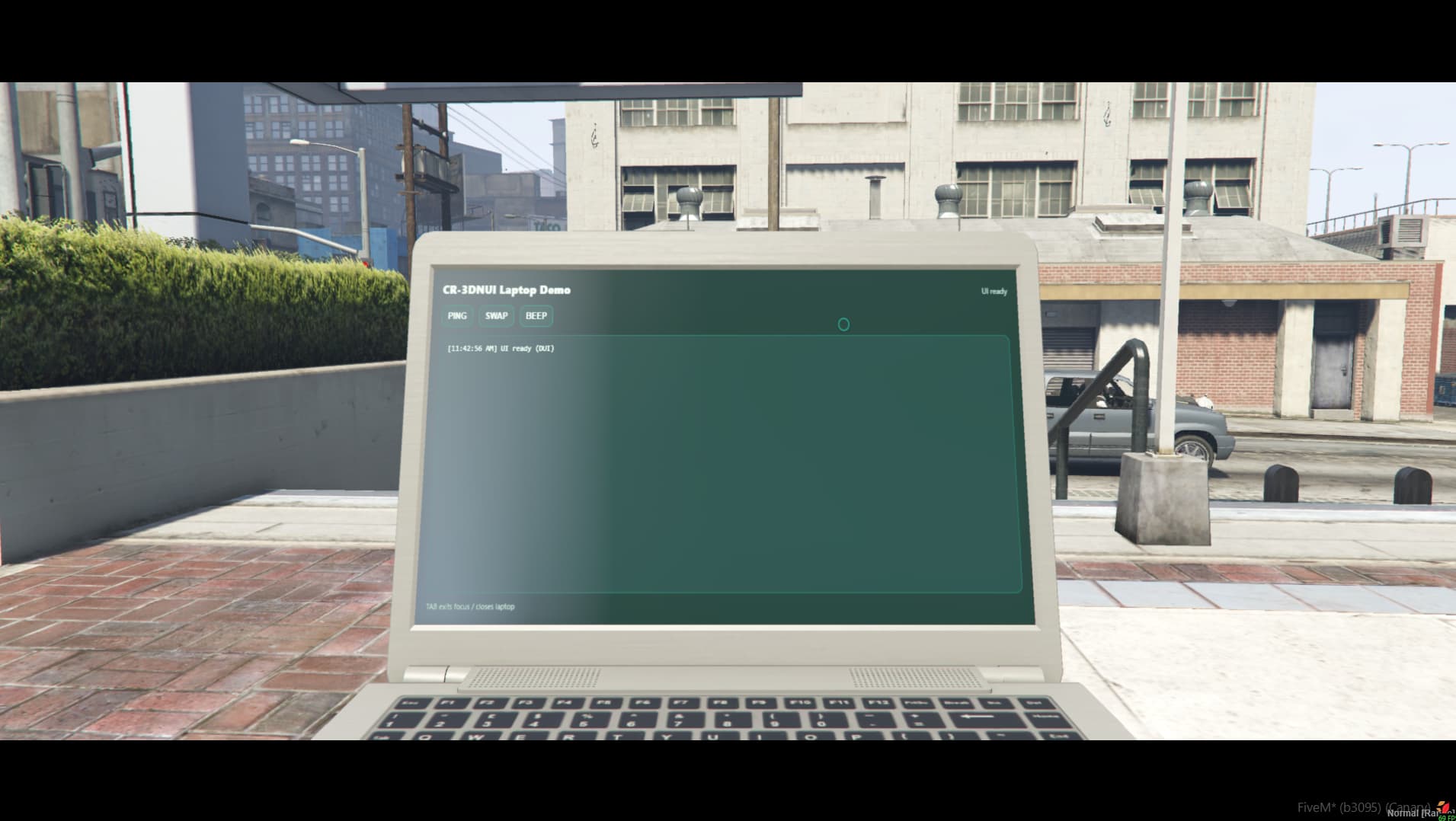
Laptop with 3dnui injected via texture override
Animated 3dnui injected via texture override into Yankton plate
(that means WORKING registration tags for cars and animated plates)
Texture Replace v2.6
– NEW panel creation method
override the props texture with a 3d-NUI…
What this means:
All you do is open the prop in codewalker to find the texture name needed to target override
prop_lester_screenis the texture name we target on prop model namedprop_laptop_lester
-- create the DUI
local dui = CreateDui(
  "nui://cr-3dnui_laptopdemo/html/index.html",
  1024,
  512
)

-- get DUI handle
local duiHandle = GetDuiHandle(dui)

-- create runtime texture dictionary
local txd = CreateRuntimeTxd("cr_laptop_txd")

-- create runtime texture from DUI
local txn = CreateRuntimeTextureFromDuiHandle(
  txd,
  "cr_laptop_screen",
  duiHandle
)

-- replace the laptop screen texture
AddReplaceTexture(
  "prop_laptop_lester",   -- model / txd
  "prop_lester_screen",   -- texture name on the model
  "cr_laptop_txd",        -- runtime txd
  "cr_laptop_screen"      -- runtime texture
)
Limitations in texture replace:
ReplaceTexture is client-side, so each player can see their own thing.
But the actual replacement is global per texture slot (orig TXD/TXN) on that client.
That means if you have two open laptops using the same screen slot, they will mirror — changing one changes both.Workaround (fake per-laptop independence):
only allow one “screen-capable” laptop open per client at a time
(swap others to the closed model so the replaced texture isn’t visible)
when switching laptops we reload the UI with a per-laptop id (ex:
index.html?lap=3)
and the NUI saves/restores state per id (theme, logs, page, etc).so each laptop appears independent:
- open Laptop A → swap colors → close
- open Laptop B → default colors → beep → close
- reopen Laptop A → colors are still swapped (state restored)
even though under the hood it’s still one ReplaceTexture/DUI at a time.
Not interacting = no open laptop = no live screen visible.
saved state per laptop gives the illusison each laptop has its own screen
Screen Glare
random but can be annoying in cars or outside in broad daylight
Because of the txd replace the panel now lives within the model and inherits glare from the prop since the panel is inside of the prop.
For the Snake Game.
How would you handle the DUI so that when it gets placed, it displays for all players in the area, and is synced showing someone playing it?
how to make the Snake demo update in real time for nearby players
by syncing authoritative game state
Only ONE player sends input.
The SERVER owns the simulation.
ALL clients render the same state.
-- server-owned authoritative state
local function NewSnakeState()
  return {
    tick  = 0,
    dir   = "RIGHT",
    snake = {
      { x = 5, y = 5 },
      { x = 4, y = 5 },
      { x = 3, y = 5 },
    },
    food  = { x = 8, y = 3 },
    alive = true,
  }
end
-- called from NUI when the focused player presses a direction key
TriggerServerEvent("snake:setDir", panelId, "LEFT")
Only the focused player ever sends input.
local Games = {} -- Games[panelId] = state

RegisterNetEvent("snake:create", function(panelId)
  if Games[panelId] then return end
  Games[panelId] = NewSnakeState()
end)

RegisterNetEvent("snake:setDir", function(panelId, dir)
  local g = Games[panelId]
  if not g or not g.alive then return end
  g.dir = dir
end)
CreateThread(function()
  while true do
    Wait(150)

    for panelId, g in pairs(Games) do
      if g.alive then
        stepSnake(g)        -- move head, handle food/collision
        g.tick = g.tick + 1

        -- broadcast authoritative state to everyone
        TriggerClientEvent("snake:update", -1, panelId, g)
      end
    end
  end
end)
RegisterNetEvent("snake:update", function(panelId, state)
  SendNUIMessage({
    type = "snake:update",
    panelId = panelId,
    state = state
  })
end)
Focused player and observers all receive the same update.
window.addEventListener("message", (e) => {
  const msg = e.data;
  if (msg.type !== "snake:update") return;

  const s = msg.state;
  clearCanvas();
  drawFood(s.food);
  drawSnake(s.snake);

  if (!s.alive) drawGameOver();
});
One player drives. Everyone else watches. The UI just renders the truth.
This is interesting, I’d assume you would have client own it, and just have the server pass the info to everyone as the client does something.
yep! this best way for networking stuff like this imho. doing it as well
WORK IN PROGRESS
update 2.7: External Websites
In a nutshell using a UV grid we overlay above the panel that can forward mouse inputs into the DUI because external sites cant be embedded into an iframe.
This allows interaction with any website while in fivem
Currently i need to tune the UV grid to better match the cursor clicks but have been preoccupied with other projects… update SOON™
OMFG! you are THE GUY its amazing!
Thank you for this!!
LOOKING GOOD!
Love to see the txd replace in action!
its sooooo easy to add panels to props using it 
I can’t type in apps or use the scroll wheel. Do you have any suggestions?
So for keyboard it’s pretty much the same as mouse
Lua
local panelFocused = false

local function SetPanelFocus(state)
    panelFocused = state
    SetNuiFocus(state, state)              -- mouse + keyboard
    SetNuiFocusKeepInput(false)            -- usually false while typing
end

RegisterCommand("panel", function()
    SetPanelFocus(true)
    SendNUIMessage({ type = "panelFocus", focused = true })
end)

RegisterNUICallback("exit", function(_, cb)
    SetPanelFocus(false)
    cb({})
end)

CreateThread(function()
    while true do
        if panelFocused then
            DisableAllControlActions(0)

            -- allow ESC to exit (optional)
            EnableControlAction(0, 322, true) -- ESC
            if IsControlJustPressed(0, 322) then
                SetPanelFocus(false)
                SendNUIMessage({ type = "panelFocus", focused = false })
            end

            Wait(0)
        else
            Wait(250)
        end
    end
end)
NUI JS
window.addEventListener("message", (e) => {
  if (e.data?.type === "panelFocus") {
    if (e.data.focused) {
      // focus an input so typing works immediately
      document.querySelector("#chatInput")?.focus();
    }
  }
});

function exit() {
  fetch(`https://${GetParentResourceName()}/exit`, {
    method: "POST",
    headers: { "Content-Type": "application/json" },
    body: JSON.stringify({})
  });
}
You can’t send keyboard input “to the prop / render target”. The prop is display-only. Put the player in an interaction state, call SetNuiFocus(true,true) and (optionally) disable game controls. Then typing goes to your NUI page normally; any extra keybinds you want can be captured in Lua and forwarded to NUI via SendNUIMessage.
Scroll Wheel………….
If NUI focus is on
SetNuiFocus(true, true) → the Chromium NUI will receive wheel events normally.
In your UI, make sure you’re not blocking it with CSS:
Lua
- while panelFocused
if IsControlJustPressed(0, 241) then -- INPUT_SELECT_NEXT_WEAPON (mouse wheel up)
  SendNUIMessage({ type = "wheel", dir = 1 })
end

if IsControlJustPressed(0, 242) then -- INPUT_SELECT_PREV_WEAPON (mouse wheel down)
  SendNUIMessage({ type = "wheel", dir = -1 })
end
Js:
window.addEventListener("message", (e) => {
  if (e.data?.type === "wheel") {
    // example: scroll a list
    const el = document.querySelector("#list");
    el?.scrollBy(0, e.data.dir * 80);
  }
});
VERY nice!!
You got server sync and more importantly you solved the pain point of the txd replace a dui…
Multiple clients with one txd slot and multiple states
Having the 3 individual laptops with unique dui rendering on each simultaneously on the same client is the coolest part about your video!
That means you solved the biggest pain point with it