Showcase
Download
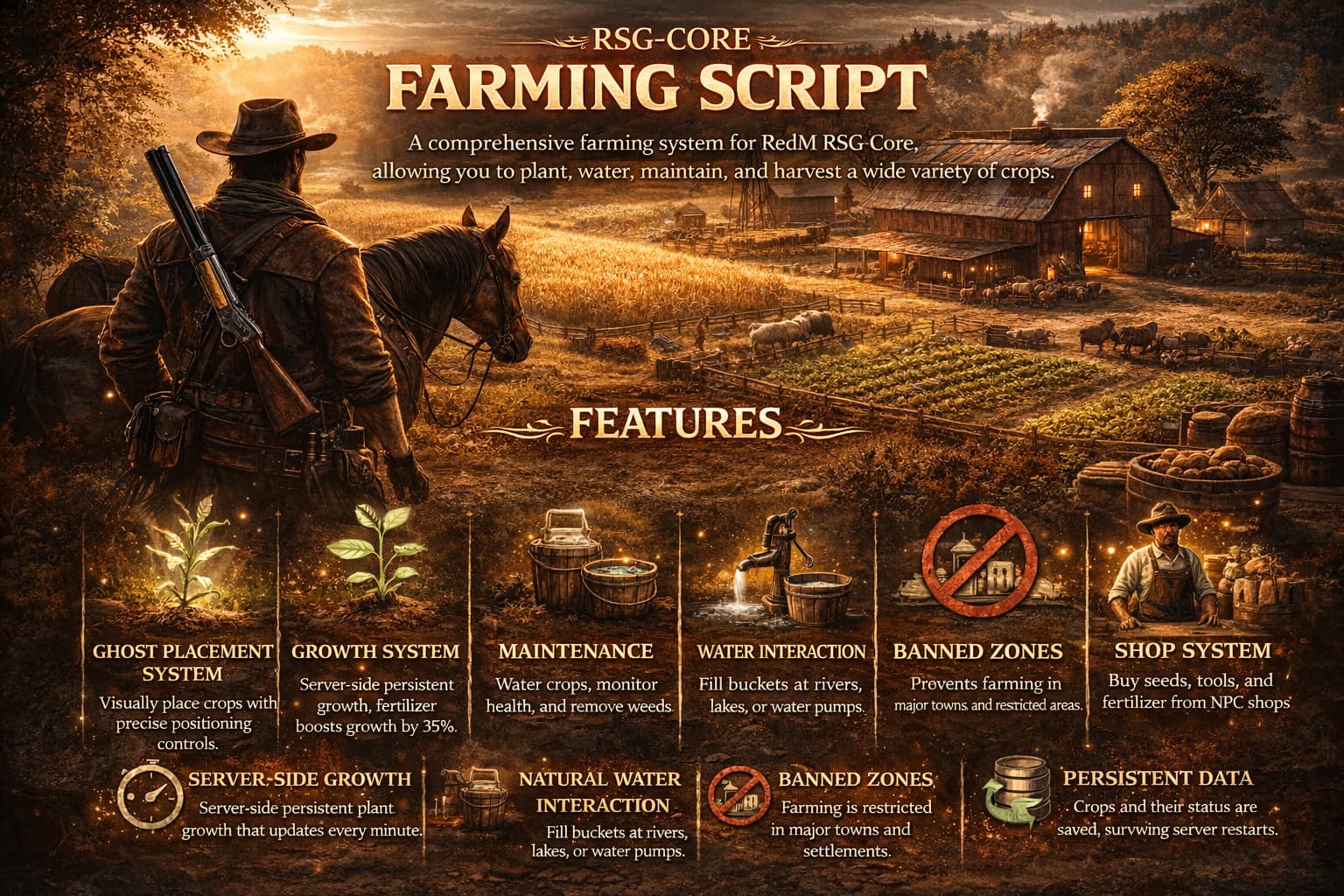
A comprehensive farming system for RedM RSG-Core, allowing you to plant, water, maintain, and harvest a wide variety of crops
Features
-
Ghost Placement System: visual placement of crops with fine-tuned positioning controls.
-
Growth System:
-
Server-side persistent growth (ticks every minute).
-
Fertilizer boosts growth speed by 35%.
-
Visual stages of plant growth.
-
Maintenance:
-
Manage Water levels.
-
Remove Weeds to ensure healthy crops.
-
Monitor Plant Health.
-
Water Interaction:
-
Interact with natural water sources (Rivers, Lakes) and Water Pumps.
-
Fill Buckets, Drink, or Wash yourself.
-
Banned Zones: Prevents farming in major towns and restricted areas.
-
Shop System: NPC shops with blips to purchase seeds, tools, and fertilizer.
-
Persistence: Crops and their status are saved in the database across restarts.
Dependencies
-
rsg-core -
rsg-inventory -
rsg-target -
ox_lib -
oxmysql
Installation
first rename the folder to rsg-farming
1. Download & Place
-
Download the resource and place it in your
resourcesfolder. -
Rename the folder to
rsg-farming.
2. Database Import
- Import the
farming.sqlfile into your database to create the necessary tables.
3. Add Items
-
Copy the contents of the
items.luafile included in this resource. -
Paste them into your shared items file (e.g.,
rsg-core/shared/items.lua). -
Ensure you have the corresponding images for these items in your inventory images folder.
4. Server Config
-
Add
ensure rsg-farmingto yourserver.cfgfile. -
Order Matters: Ensure it is started after
rsg-core,rsg-inventory, andox_lib.
Configuration
Edit config.lua to customize the server mechanics.
Changing Growth Time & Watering
You can adjust how long each plant takes to grow in Config.Seeds.
-
totaltime: Time in minutes for full growth.
-
Watering Logic: The system automatically calculates water decay based on
totaltime. -
A full bucket of water will last exactly 1/3rd of the growth cycle.
-
This forces players to tend to their crops ~3 times before harvest.
Example Config Entry:
["Corn"] = {

seedname = "corn_seed",

prop = "p_corn01x",

totaltime = 15, -- 15 Minutes to grow. Needs watering every 5 mins.

rewardcount = 2, -- Base reward amount

stages = { ... } -- Multi-stage visual models

},
Other settings:
-
Banned Zones: Configure areas where planting is forbidden.
-
Shop Locations: Add or move NPC shops.
Usage
1. Buying Supplies
-
Look for the Green Blip (“Farming Supplies”) on the map.
-
Use Alt (Third-Eye) on the NPC to open the shop.
-
Buy Seeds, Bucket, Fertilizer, and other tools.
2. Planting Crops
-
Use a Seed from your inventory to start placement mode.
-
A ghost object will appear.
-
Controls:
-
W/A/S/D: Move the plant position. -
Q/E: Rotate the plant. -
ENTER: Confirm placement. -
BACKSPACE: Cancel placement.
 Restricted Zones
Farming is strictly prohibited within the limits of major towns and settlements. You cannot plant crops in:
-
Valentine & Valentine Station
-
Saint Denis
-
Rhodes
-
Blackwater
-
Armadillo
-
Annesburg
-
Strawberry
-
Tumbleweed
3. Water & Maintenance
- Getting Water:
-
Equip/Hold a Bucket.
-
Go to a River, Lake, or Water Pump.
-
Press
[ALT]when prompted to open the water menu. -
Select Fill Bucket to get a
fullbucket.
- You can also Drink or Wash yourself here.
Supported Water Sources
You can fill your bucket at the following locations:
-
Sea of Coronado
-
San Luis River
-
Lake Don Julio
-
Flat Iron Lake
-
Upper Montana River
-
Owanjila
-
HawkEye Creek
-
Little Creek River
-
Dakota River
-
Beartooth Beck
-
Lake Isabella
-
Cattail Pond
-
Deadboot Creek
-
Spider Gorge
-
O’Creagh’s Run
-
Moonstone Pond
-
Roanoke Valley
-
Elysian Pool
-
Lannahechee River
 Available Crops
There are 37 different types of crops you can cultivate:
| Type | Crop Name | Type | Crop Name |
| :— | :— | :— | :— |
|  | Alaskan Ginseng |
  | English Mace |
| | American Ginseng |  | Hop |
|  | Apple |
  | Lemon |
|  | Banana | | Lettuce |
|  | Barley | | Milk Weed |
|  | Black Currant | | Oleander Sage |
|  | Blood Flower | | Oregano |
|  | Broccoli |
  | Parasol Mushroom |
|  | Choc Daisy |
  | Peach |
|  | Cherry |
  | Pepper |
|  | Coffee |
  | Potato |
|  | Corn | | Prairie Poppy |
| | Creekplum |  | Pumpkin |
| | Creeking Thyme | | Red Raspberry |
|  | Crows Garlic | | Red Sage |
|  | Sugar (Sugarcane) |
  | Tea |
|  | Tobacco | | Wheat |
|  | Wild Carrot | | Wild Mint |
|  | Wintergreen Berry | | Yarrow |
- Tending Crops:
-
Go to your planted crop.
-
Use Alt (Third-Eye) and select Inspect Crop.
-
A menu will open showing:
- Water %, Health %, Weed %, Growth %.
- Perform actions:
-
Water: Requires
fullbucket. -
Fertilize: Requires
fertilizer(Speeds up growth). -
Remove Weeds: Keeps the plant healthy.
4. Harvesting
-
Monitor the Growth %.
-
Once it reaches 100%, the Harvest option will become available in the menu.
-
Harvest to receive your crops!
This script is currently in BETA .
If you encounter any bugs or issues, please open an issue on GitHub.
You can also contact me directly on Discord: whysorude0088
 Enjoying the script?
You can support my work by sponsoring me on GitHub.
Stay tuned for more free scripts and updates.
| Code is accessible | Yes |
| Subscription-based | No |
| Requirements & dependencies | rsg-core |
| Support | No |