 EVOLVE Reports
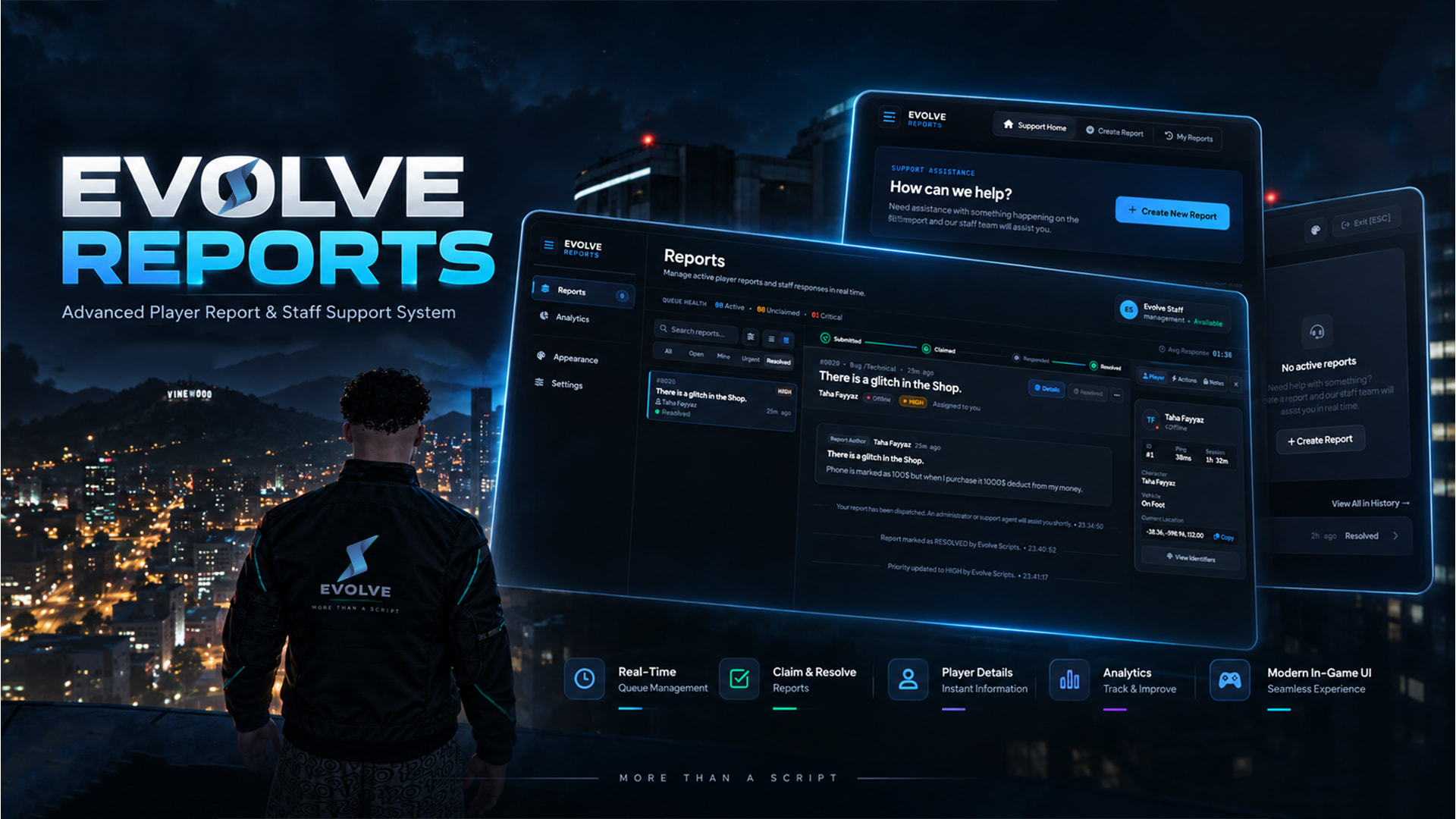
A complete report and staff moderation system built to make player support easier to manage without relying on multiple commands or separate admin menus.
EVOLVE Reports gives players a dedicated reporting interface while staff get their own dashboard with live ticket communication, moderation actions, report history, analytics, ratings, Discord logging, and more.
The resource supports ESX, QBCore, Qbox, and Standalone setups.
This resource is completely FREE and distributed through FiveM Asset Escrow via Tebex.
 Screenshots
Player Report Interface

Staff Dashboard

Analytics
Themes

Additional Screenshots

 Main Features
-
 Dedicated player report interface
 -
 Full staff moderation dashboard
 -
 Real-time player ↔ staff ticket chat
 -
 Report claiming, unclaiming and transferring
 -
 Integrated spectate mode
 -
 Teleport To / Bring
 -
 Return Staff / Return Player
 -
 Freeze / Unfreeze
 -
 Heal & Armor
 -
 Kick with custom reason
 -
 Private staff notes
 -
Configurable quick responses
-
 1–5 star player feedback
 -
 Staff analytics
 -
 Staff leaderboard
 -
 Discord webhook logging
 -
 Streamer Mode
 -
 Performance Mode
 -
 9 UI themes
 -
 Multi-language support
 -
 Configurable permissions and settings
 -
 ESX / QBCore / Qbox / Standalone support
Player Reports
Players can open the report interface with:
/report
Reports can include configurable categories and priorities, while useful information such as the player’s server ID, coordinates, ping and vehicle information can be attached automatically.
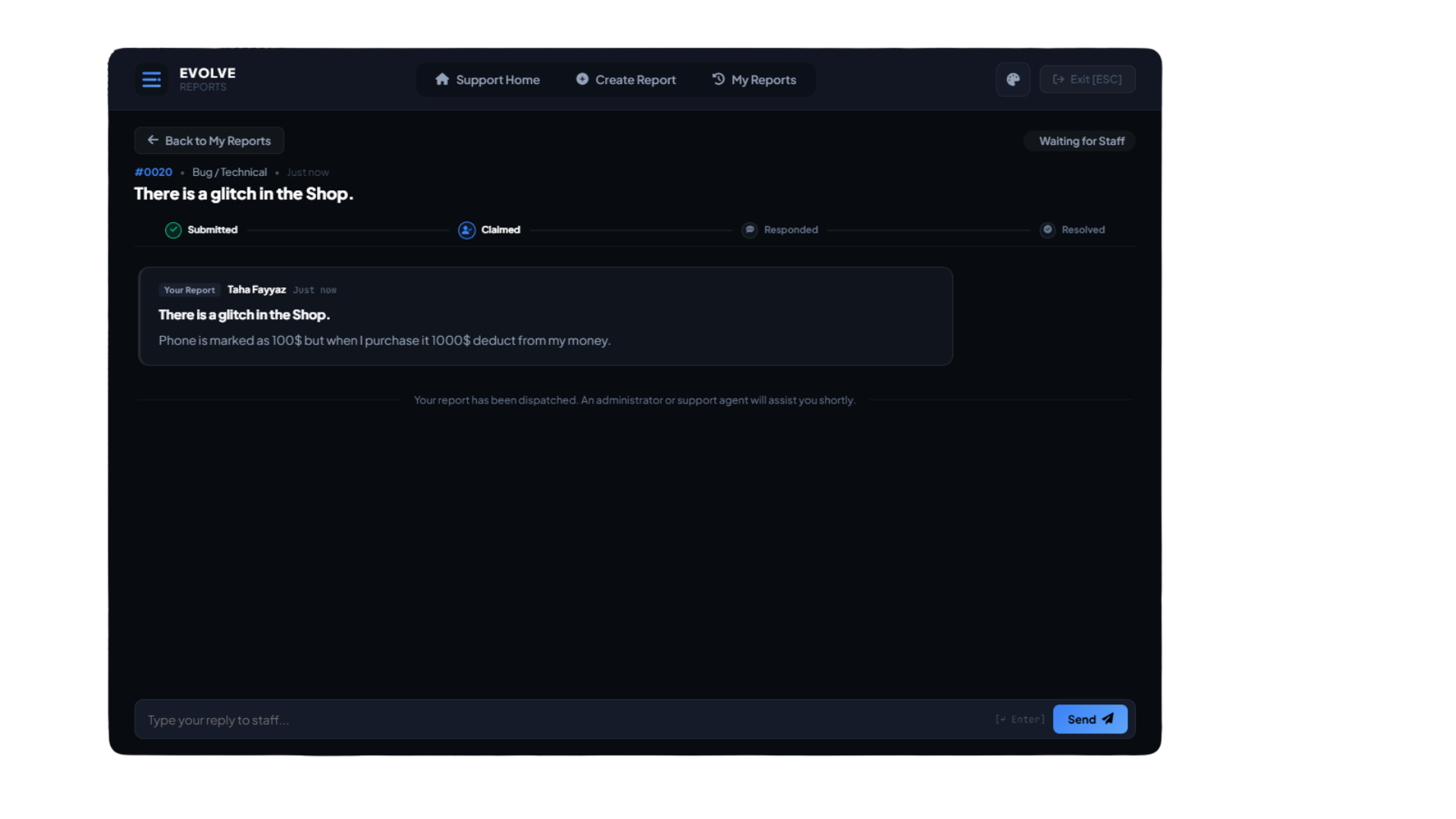
Players can communicate with staff directly through the ticket and follow its progress:
Submitted → Claimed → Responded → Resolved
Once a report has been completed, the player can leave a 1–5 star rating and feedback for the support they received.
Staff Dashboard
Staff can open the report dashboard with:
/reports
Default configurable keybind:
F7
From the dashboard, authorized staff can:
-
View and filter reports
-
Claim / unclaim reports
-
Transfer reports
-
Communicate with players in real time
-
Add staff-only notes
-
Use quick responses
-
View player/report information
-
Perform moderation actions
-
Resolve reports
-
Review previous tickets
The claim system also prevents multiple staff members from unintentionally handling the same report.
Integrated Staff Actions
Common moderation actions are available directly from an active report:
Spectate
Spectate the player while investigating a report.
Teleport To
Teleport directly to the reporting player.
Bring
Bring the player to your location.
Return Self / Player
Return staff or the player to their stored original location.
Freeze / Unfreeze
Temporarily freeze a player during an investigation.
Heal & Armor
Restore the player’s health and armor.
Kick
Remove a player with a custom reason.
Live Ticket Chat
Reports aren’t just one-time notifications.
Players and staff can continue communicating inside the same report with:
-
Real-time messages
-
Message history
-
Audio notifications
-
Staff-only internal notes
-
Report status updates
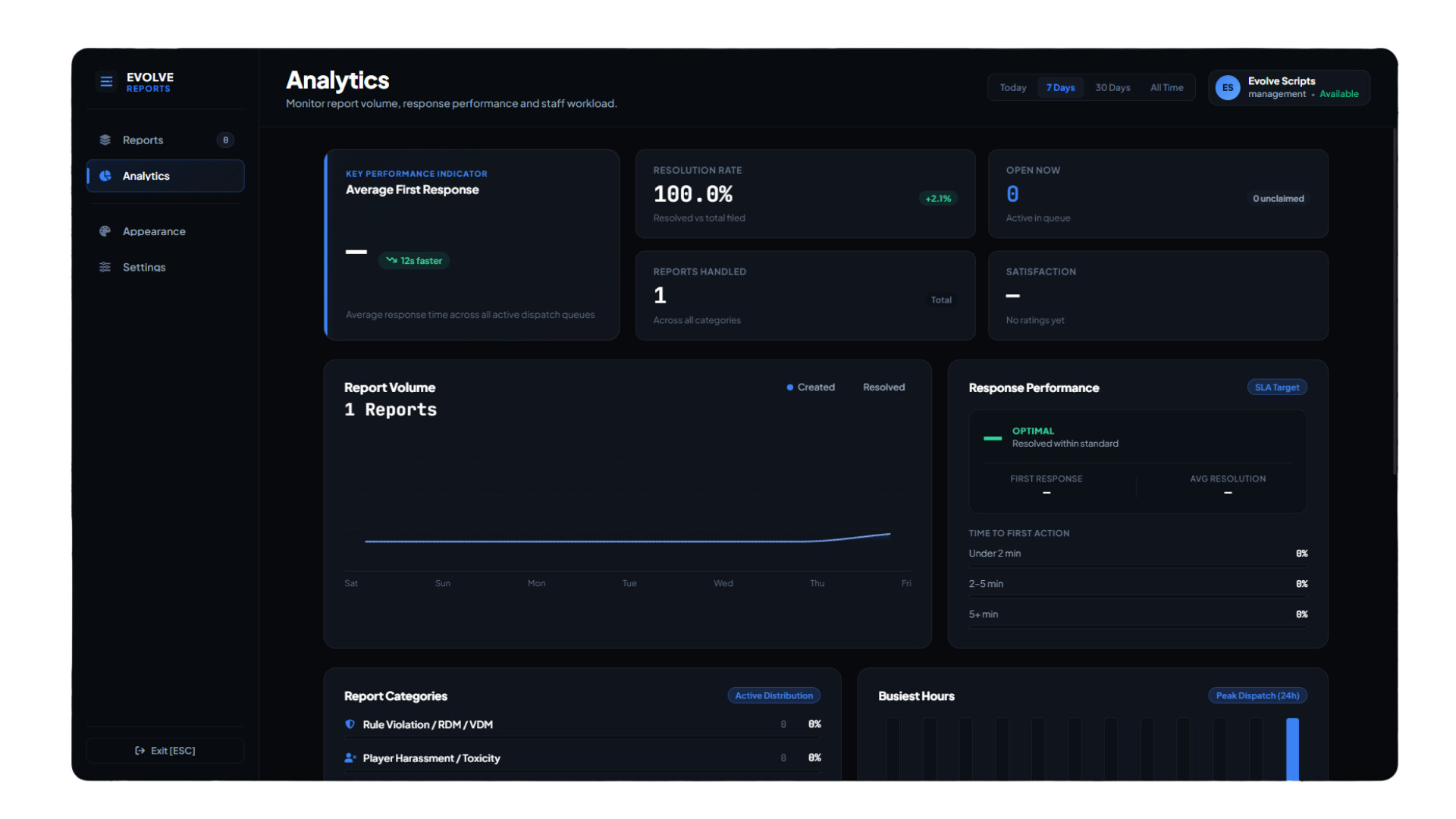
Analytics & Staff Activity
The dashboard includes reporting and staff statistics such as:
-
Open reports
-
Claimed reports
-
Resolved reports
-
Average response time
-
Average resolution time
-
Reports handled by staff
-
Player ratings
-
Recent feedback
-
Staff leaderboard
9 UI Themes
EVOLVE Reports includes nine switchable themes:
 Imperial Emerald
 Nordic Sapphire
 Crimson Ruby
 Liquid Gold
 Royal Amethyst
 Surgical Silver
 Venom Pink
 Oceanic Teal
 Solar Orange
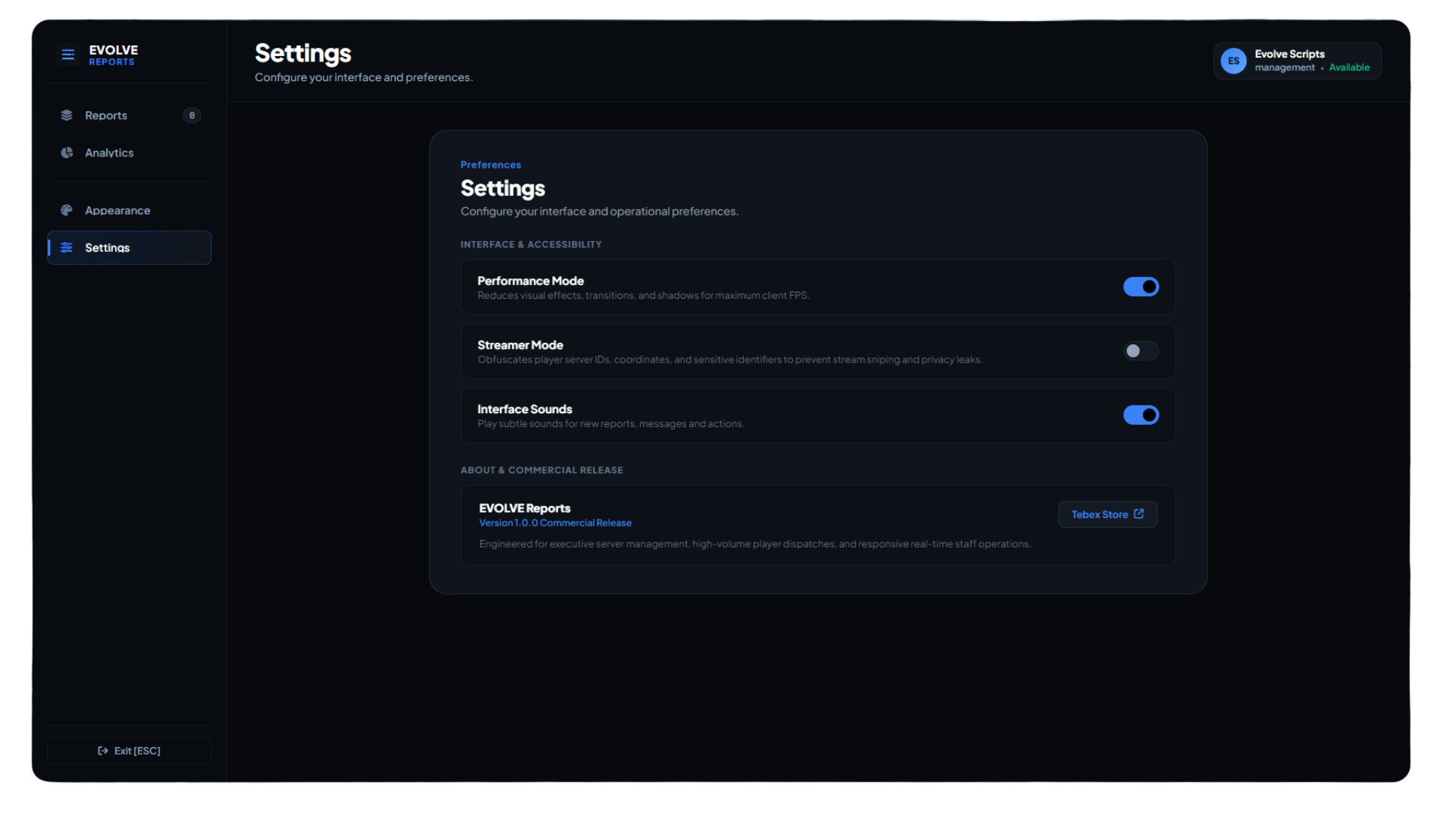
Streamer Mode
Streamer Mode can hide sensitive information while streaming or recording, including configurable information such as player IDs, coordinates and certain notifications.
Performance Mode
A dedicated performance option can reduce expensive UI effects such as blur, glow and heavy shadows for players who prefer a lighter interface.
Discord Logging
Configurable webhook logging is available for events including:
-
Report creation
-
Claim / unclaim
-
Report transfer
-
Priority changes
-
Ticket communication
-
Staff notes
-
Staff actions
-
Ticket resolution
-
Player ratings and feedback
-
Security / unauthorized-access events
Languages
Included translations:
 English
 German
 French
 Spanish
Additional translations can be added through the locale files.
Framework Support
Supported setups:
ESX
QBCore
Qbox
Standalone
Configuration
The resource includes configuration for things such as:
-
Branding
-
Report categories
-
Priorities
-
Commands
-
Keybinds
-
Staff permissions
-
ACE permissions
-
Framework groups
-
Report cooldowns
-
Quick responses
-
Discord webhooks
-
Languages
-
UI options
-
Themes
-
Streamer Mode
-
Performance settings
 Performance
The resource is designed around an event-driven approach rather than unnecessary permanent client loops.
Idle Resmon: 0.00 ms
Performance can vary depending on server configuration, hardware and the current interface state.
 Installation
-
Claim the free package through Tebex.
-
Download the resource through your Cfx.re account / granted assets.
-
Place the resource inside your server’s
resourcesdirectory. -
Import the included SQL file if required.
-
Configure
config.lua. -
Add the resource to
server.cfg. -
Restart the server.
Example:
ensure evolve-report-system
 Download — FREE
 Tebex / Asset Escrow
[Download EVOLVE Reports for FREE]
https://evolve.tebex.io/package/7683623
The package must be claimed directly through Tebex because the protected files are distributed using the official FiveM Asset Escrow system.
Support
Need help installing or configuring EVOLVE Reports?
Discord
Discord is provided for support only. Joining the Discord server is not required to download or use the resource.
 Resource Information
| Code is accessible | Partially — configurable/open files are accessible; core logic uses Asset Escrow |
| Subscription-based | No |
| Support | Yes — Discord |
Thanks for checking out EVOLVE Reports.
Feedback, bug reports and suggestions are welcome.