 MNC Gruppe 6 Collection Job




 Overview
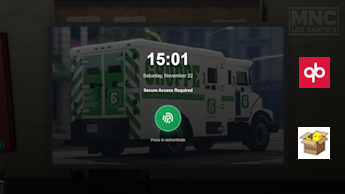
lockscreen
Routes Sheet
A fully immersive Gruppe 6 security job system for QBCore-based FiveM servers.
This script provides a realistic two-phase collection route with loan agreements and cash pickups, featuring a custom tablet UI with fingerprint lock screen, GPS waypoint system, uniform management, and skill-based minigames.
Fully optimized for ox_lib, qb-target, and includes persistent route tracking with completion states.
 Key Features
-
 Immersive Tablet Interface
- Futuristic lock screen with fingerprint authentication.
- Real-time clock display on lock screen.
- Smooth slide-in animations and responsive design.
- Employee name display and route tracking.
- GPS waypoint integration with one-click navigation.
-
 Two-Phase Collection System
- Phase 1: Loan Route - Collect loan agreements from banks.
- Phase 2: Cash Route - Pick up cash cases from ATM locations.
- Must return to depot between phases to collect wages.
- Separate payment for each phase ($1,250 loan + $2,500 cash).
-
 Advanced Route Management
- Randomized routes from configurable location pools.
- Sequential stop completion (must visit in order).
- Visual completion tracking with status indicators.
- Persistent route state across tablet opens/closes.
- Automatic GPS waypoint updates.
-
 Uniform System
- Gender-specific Gruppe 6 uniforms.
- Automatic clothing save/restore.
- Optional uniform requirement before work.
- In-game outfit copying tool (
/copyoutfit).
-
 Skill-Based Minigames
- Configurable ox_lib skill checks.
- Adjustable difficulty (easy/medium/hard).
- Random sequence length (3-6 steps).
- Optional toggle in config.
-
 Cooldown System
- 30-minute schedule pickup cooldown.
- 60-minute full job completion cooldown.
- Persistent across disconnects.
- Real-time countdown notifications.
-
 Vehicle Integration
- Recommended Gruppe 6 Speedo for cash phase.
- Configurable vehicle requirements.
- Optional enforcement for cash collections.
-
 Visual Blips & Markers
- Color-coded blips for different phases.
- Depot blip always visible on map.
- Active route waypoint highlighting.
- Debug polygon zones for testing.
Requirements
Dependency             Version   Required
---------------------- --------- ----------
QBCore Framework       Latest    ✅ Yes
qb-target              Latest    ✅ Yes
qb-menu                Latest    ✅ Yes (or ox_lib context)
ox_lib                 Latest    ✅ Yes
oxmysql                Latest    ✅ Yes
PolyZone               Latest    ✅ Yes
qb-clothing            Latest    ✅ Yes (for uniforms)
 Installation
 Download & Extract
# Clone from GitHub
git clone https://github.com/YourUsername/mnc-gruppe6.git

# OR download ZIP from Releases
Place into your resources folder:
[server-data]/resources/[custom]/mnc-gruppe6/
 Database Setup
The script uses QBCore’s built-in player data and cooldown tracking. No additional database tables required.
 Add to Server Config
# server.cfg
ensure oxmysql
ensure ox_lib
ensure qb-target
ensure mnc-gruppe6
 Add Items
Update qb-core/shared/items.lua:
['g6_route_gps'] = {
    ['name'] = 'g6_route_gps',
    ['label'] = 'Gruppe 6 Route GPS',
    ['weight'] = 300,
    ['type'] = 'item',
    ['image'] = 'g6_route_gps.png',
    ['unique'] = false,
    ['useable'] = true,
    ['shouldClose'] = true,
    ['description'] = 'Digital route sheet with GPS navigation for Gruppe 6 employees'
},
 Configure Job
Ensure your qb-core/shared/jobs.lua includes:
['gruppe6'] = {
    label = 'Gruppe 6',
    defaultDuty = true,
    offDutyPay = false,
    grades = {
        ['0'] = { name = 'Recruit', payment = 50 },
        ['1'] = { name = 'Driver', payment = 75 },
        ['2'] = { name = 'Security Officer', payment = 100 },
        ['3'] = { name = 'Supervisor', payment = 125 },
        ['4'] = { name = 'Manager', payment = 150 },
    },
},
 Add Images
Place these images in your qb-inventory/html/images/ folder:
g6_route_gps.png- GPS device icon
 Configuration
Basic Settings
Config.Debug = false                    -- Enable debug logs and zone visuals
Config.JobName = "gruppe6"              -- Job name required to access
Config.RequireOnDuty = true             -- Must be clocked in
Config.RequireUniformBeforeWork = true  -- Must wear uniform before taking schedule

-- Integration Options
Config.Notify = "ox"                    -- "qb" or "ox"
Config.Menu = "ox"                      -- "qb" or "ox"
Config.Progress = "bar"                 -- "bar", "circle", or "qb"
Config.ClothingExport = "qb-clothing"   -- Clothing resource name
 Location Setup
-- Depot/Schedule Pickup Location
Config.Depot = vector3(11.99, -666.1, 33.9)
Config.SchedulePickup = {
    coords = vector3(11.99, -666.1, 33.9),
    heading = 89.0
}

-- Route Counts
Config.LoanRouteCount = 2    -- Number of loan stops (max 15)
Config.CashRouteCount = 2    -- Number of cash stops (max 20)
 Location Pools
Config.Pool = {
    -- Banks (used for loan phase)
    banks = {
        { coords = vector3(149.45, -1042.13, 29.37), name = "Pillbox Medical" },
        { coords = vector3(-1212.83, -330.12, 37.78), name = "Depot Street" },
        -- Add more locations...
    },

    -- ATMs (used exclusively for cash phase)
    cash = {
        { coords = vector3(-821.2, -1081.6, 11.13), name = "ATM - Mirror Park" },
        { coords = vector3(-386.2, 6045.4, 31.5), name = "ATM - Paleto Bay" },
        -- Add more locations...
    }
}
 Payment Configuration
Config.LoanPayout = 1250    -- Payment after loan phase
Config.CashPayout = 2500    -- Payment after cash phase
Cooldowns & Timers
Config.Cooldowns = {
    Schedule = 1800,    -- 30 minutes between schedule pickups
    FullJob = 3600      -- 60 minutes after completing full job
}

Config.Timers = {
    CollectLoan = 5000,    -- 5 seconds to collect loan documents
    CollectCash = 6000,    -- 6 seconds to pick up cash case
    LoadCase = 4000        -- 4 seconds to load case into vehicle
}
Minigame Settings
Config.Minigame = {
    Enabled = true,         -- Set to false to skip minigame
    MinLength = 3,          -- Minimum sequence length
    MaxLength = 6,          -- Maximum sequence length
    Difficulty = "easy"     -- Options: "easy", "medium", "hard"
}
Vehicle Requirements
Config.RequireVehicleForCash = false  -- Enforce vehicle check
Config.CashRequiredVehicles = {
    "speedo4",  -- Gruppe 6 Speedo
    "stockade"  -- Brinks armored truck
}
Blip Configuration
Config.Blips = {
    Depot = {
        enabled = true,
        sprite = 431,
        color = 2,
        scale = 1.0,
        text = "Gruppe 6 Depot"
    },
    Loan = {
        sprite = 280,
        color = 46,
        scale = 0.7,
        text = "Loan Pickup"
    },
    Cash = {
        sprite = 108,
        color = 5,
        scale = 0.7,
        text = "Cash Pickup"
    }
}
How to Play
Starting a Route
- Go to Gruppe 6 Depot (Legion Square area)
- Interact with the schedule pickup (qb-target)
- Put on Gruppe 6 uniform (required if enabled)
- Take Schedule from menu
- Receive GPS tablet automatically
- Follow GPS waypoints to each location
Phase 1: Loan Collections
- Visit each loan stop in sequential order
- Complete minigame (if enabled)
- Collect loan agreements (5-second progress)
- Return to depot after all stops completed
- Withdraw loan wages ($1,250)
- GPS tablet remains for Phase 2
Phase 2: Cash Collections
- Start cash phase from depot menu
- Optional: Use Gruppe 6 Speedo (recommended)
- Visit each cash stop in sequential order
- Complete minigame (if enabled)
- Pick up and load cash cases (10 seconds total)
- Return to depot after all stops completed
- Withdraw final wages ($2,500)
- GPS tablet is removed automatically
Using the GPS Tablet
- Use the GPS item from inventory anytime
- Unlock tablet with fingerprint button
- View all route stops with completion status
- Click waypoint buttons to set GPS markers
- Track progress in real-time
- Close with X button or ESC key
Controls
| Key | Action |
|---|---|
E |
Interact with target zones |
ESC |
Close GPS tablet |
| Mouse | Click waypoint buttons, unlock screen |
 Commands
| Command | Description | Usage |
|---|---|---|
/copyoutfit male |
Copy male uniform to console | In-game with male character |
/copyoutfit female |
Copy female uniform to console | In-game with female character |
Uniform Customization
Editing Uniforms
Modify uniforms.lua to customize Gruppe 6 outfits:
Uniforms.Gruppe6 = {
    male = {
        outfit = {
            ["tshirt"] = { item = 15, texture = 0 },
            ["torso2"] = { item = 26, texture = 1 },
            ["pants"]  = { item = 24, texture = 0 },
            ["shoes"]  = { item = 52, texture = 0 },
            ["arms"]   = { item = 48, texture = 0 },
            ["vest"]   = { item = 6, texture = 0 },
            ["hat"]    = { item = -1, texture = 0 }  -- -1 = no hat
        }
    },
    female = { /* ... */ }
}
Using /copyoutfit Command
- Dress your character in desired outfit
- Run
/copyoutfit maleor/copyoutfit female - Copy the output from F8 console
- Paste into
uniforms.lua - Restart resource
UI Customization
Tablet Colors
Edit style.css CSS variables:
:root {
    --accent: #19a85a;        /* Gruppe 6 green */
    --accent-dark: #148f49;   /* Darker green */
    --complete: #19a85a;      /* Completed stops */
    --pending: #f59e0b;       /* Pending stops */
}
Lock Screen Background
Replace html/lockscreen.png with your custom image (recommended: 880x520px).
 Troubleshooting
GPS Tablet Not Opening
- Check if player has active route (
activeRoute) - Ensure item name matches:
g6_route_gps - Verify ox_lib is loaded before script
Waypoint Buttons Not Working
- Confirm route data is being sent correctly
- Check browser console (F12) for JavaScript errors
- Ensure stop indices match (0-based in NUI, 1-based in Lua)
Uniform Not Applying
- Verify clothing export name in config
- Check drawable/texture IDs in
uniforms.lua - Use
/copyoutfitto get correct IDs for your server
Minigame Always Failing
- Lower difficulty in config:
Difficulty = "easy" - Reduce sequence length:
MaxLength = 3 - Test with
Enabled = falseto bypass
Stops Not Completing
- Enable debug mode:
Config.Debug = true - Check distance from target zone (must be within 20m)
- Verify stop index matches current route position
- Check F8 console for debug logs
Cooldown Not Working
- Confirm oxmysql is running
- Check server console for database errors
- Verify citizenid is valid
 Performance
- Resmon Usage: ~0.01ms idle, ~0.03ms active
- Database Queries: Minimal (cooldown checks only)
- Network Events: Optimized (state updates only when needed)
- Memory: ~5MB (including UI assets)
 Planned Features
- Team routes (multiple players, shared progress)
- Difficulty tiers (easy/medium/hard routes)
- Random events (robberies, vehicle breakdowns)
- Ranking system with perks
- Custom vehicle spawning
- Integration with phone apps (e.g., qb-phone)
 Changelog
Version 2.2.0 (Current)
- Added GPS tablet item with persistent route tracking
- Implemented fingerprint lock screen
- Fixed completion state persistence
- Added waypoint button functionality
- Improved NUI-Lua communication
- Enhanced debug logging
Version 2.1.0
- Two-phase payment system (loan + cash)
- Separated location pools (banks + ATMs)
- Tablet removed only after final payment
- Fixed cooldown tracking
 Credits
- Author: Stan Leigh
- Framework: QBCore
- UI Libraries: ox_lib, qb-menu, qb-target
 Support & Community


Need Help?
- Open an issue on GitHub
- Join our Discord server
- Check the troubleshooting section above
 License
This project is licensed under the MIT License.
 Show Your Support
If you like this script, please give it a on GitHub!
Enjoy your Gruppe 6 collection routes! 
|-----------------------------|--------------------|
| Code is accessible | Yes |
| Subscription-based | No |
| MLO | No |
| Requirements & dependencies | Requirements |
QBCore Framework Latest  Yes
Yes
qb-target Latest Yes
qb-menu Latest Yes (or ox_lib context)
ox_lib Latest Yes
oxmysql Latest Yes
PolyZone Latest Yes
qb-clothing Latest Yes (for uniforms)
| Support | Yes/No |