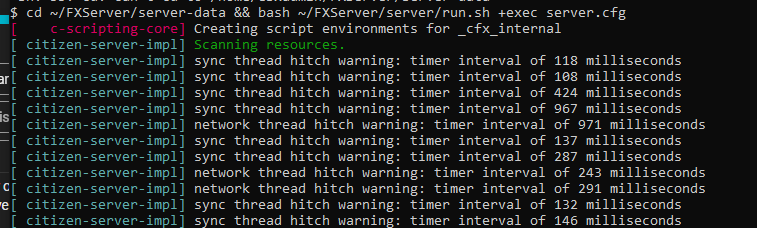
i have just installed my FiveM Server on Ubuntu 22.04 an when i tried to start the server it got stuck on ‘Scanning resources’. Its a fresh server, only things i have installed: MySQL, Apache2, php, phpmyadmin.
If your FiveM server is stuck on “Scanning resources,” there could be a few possible causes. Here are some steps you can take to troubleshoot the issue:
Check your server logs: Look in the server console or logs to see if there are any errors or warnings that might indicate the cause of the issue.
Check your firewall settings: Make sure that your firewall is not blocking any necessary ports or connections for FiveM.
Check your server configuration: Make sure that you have configured your FiveM server properly, including the server.cfg file and any other necessary configuration files.
Check your resource files: If a resource is causing the issue, it could be corrupt or missing. Check your resource files and make sure they are properly installed and configured.
Try a fresh installation: If all else fails, try a fresh installation of FiveM and see if the issue persists.
In terms of the specific software you mentioned installing (MySQL, Apache2, php, phpmyadmin), they should not have any direct impact on the FiveM server’s ability to scan resources. However, it’s always possible that one of these programs could be interfering with FiveM in some way, so you may want to investigate further if none of the above steps resolve the issue.
It’s also worth noting that FiveM is not officially supported on Ubuntu 22.04, as it is a very new release. You may want to consider using a different Linux distribution that is officially supported by FiveM, such as Ubuntu 20.04 or Debian 10.
Good that you performed the above steps, but unfortunately I don’t have another solution either. Good luck further! I hope someone else has another solution.
opened all Ports but its still stuck on scanning resources.
doesnt seem like its an port/internet based problem but that it cant find the resources locally
I was 1 by 1 following this guide: Setting up a Vanilla FXServer - Cfx.re Docs
→ Also i downgraded to Ubuntu 20.04 and it still didnt work, even though nothing else was installed. Gonna try with Debian now.
→ Firewall is disabled too

 )
)