Environment questions
GTA V version: 1.0.3337.0
Up to date: Yes
Legit or Pirate copy: Legal copy through steam
Purchased where - Steam/Rockstar Launcher/Epic: Steam
Windows version: Windows 11 24H2
Did you try to delete content_index.xml and try again? I am running a server, I am not sure if that is required for the server host to do.
Important parts
What is the issue you’re having?
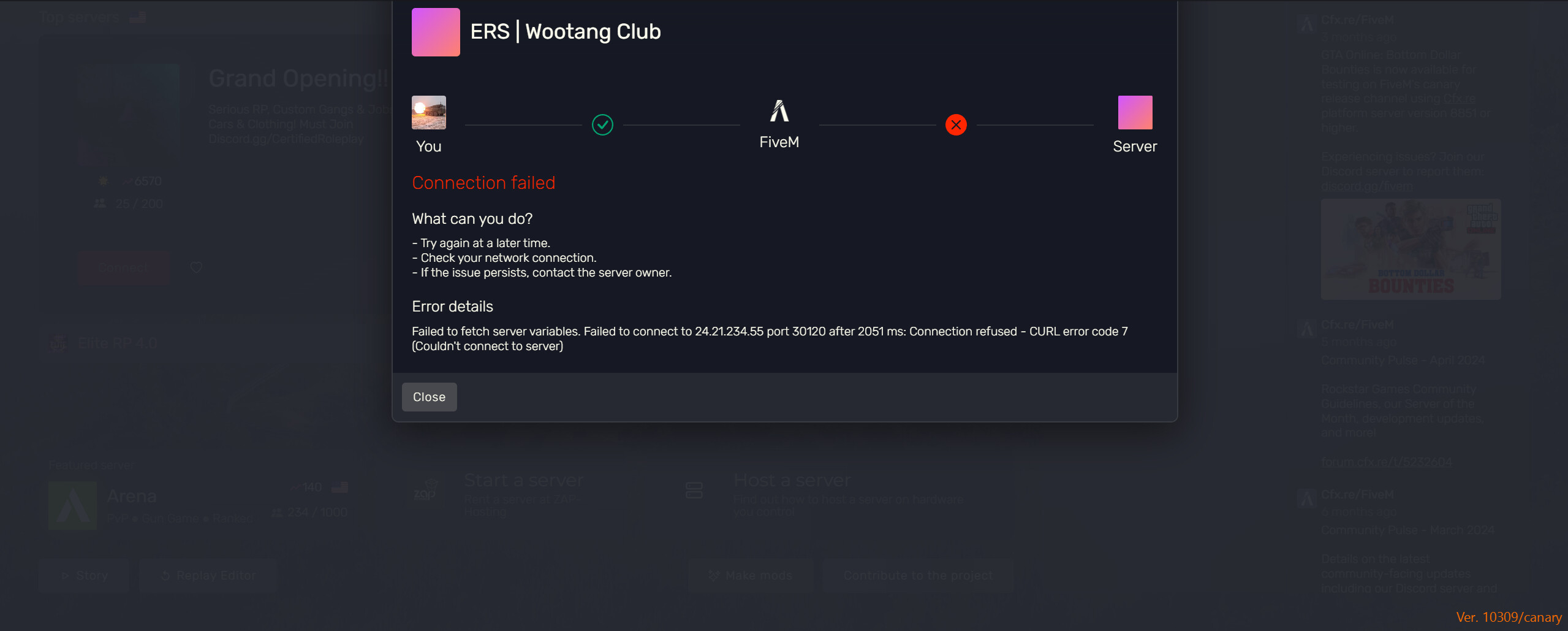
Unable to have friends connect to server. I have done port forwarding (followed what highway trooper did), contacted my ISP to see if its blocked, walked my friends through how to enable fivem through firewall, and I have contacted my server host support to really no avail.
What are you trying to do?
Have my server appear as online and stop feeding errors of connection to my friends who are trying to join.
What have you tried already to fix the issue?
Contacted ISP
Port Forwarded (redid it like 5 times)
Contacted server host support
Allowed app through firewall
Error screenshot (if any):
What did you do to get this issue?
I installed ERS into a qbcore server, however I don’t believe thats an exact issue. (unless it is)
What server did you get this issue on? Be specific and name some, ‘all of them’ by itself isn’t useful!
I only am getting these issues on my own server.
The links to them are
- cfx.re/join/v9j845
-
- connect 10.0.0.219
Additional comments
Any help would be greatly appreciated, if there is any need for me to screenshare just let me know.
