What is the issue you’re having?
Hello,
I have a very unusual authentication issue with FiveM.
My GTA V is purchased directly from Rockstar Games.
The Rockstar Games Launcher works perfectly, and I can launch GTA V and play Story Mode without any issues.
However, whenever I launch FiveM, it never reaches the FiveM main menu.
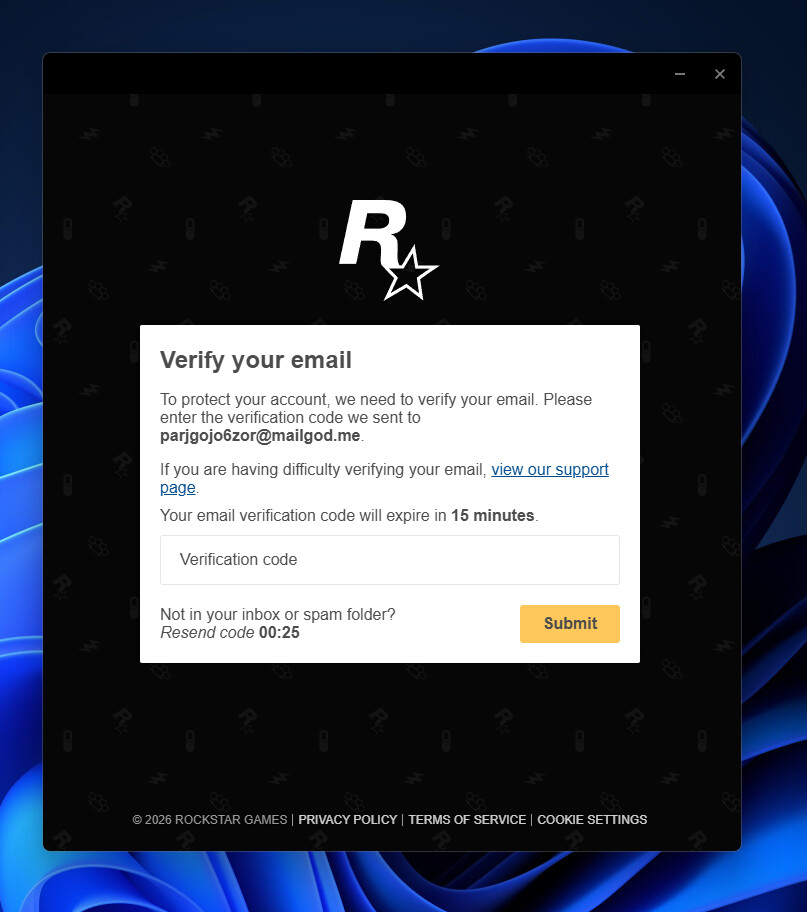
Instead, it immediately opens a Rockstar verification window asking me to verify an email address that does not belong to me:
I have absolutely no idea whose email this is.
My actual Rockstar account is completely different and works normally in the Rockstar Launcher.
I have already tried all of the following:
- Fresh installation of FiveM from the official website.
- Brand new Windows installation on a new PC.
- Cleared every FiveM cache.
- Deleted all FiveM Application Data.
- Deleted CitizenFX folders.
- Reinstalled Rockstar Games Launcher.
- Verified GTA V.
- Logged out and back into Rockstar Launcher.
- Confirmed GTA V launches and works normally.
- Confirmed my Cfx.re account is correct.
- Confirmed my Rockstar account is correct.
- Checked Rockstar linked accounts.
- Disabled ESET Security temporarily.
- Ran FiveM Diagnostics (CfxDiag) with no reported issues.
Despite all of this, FiveM always opens Rockstar verification for the unknown email:
It never reaches the FiveM main menu.
Could you please check whether my Cfx.re account or Rockstar authentication is linked to an incorrect Rockstar account on your side?
I can provide screenshots and diagnostic logs if needed.
Thank you.
What have you tried already to fix the issue?
- Fresh installation of FiveM from the official website.
- Fresh installation of Rockstar Games Launcher.
- Fresh Windows installation on a brand new PC.
- Cleared all FiveM cache and application data.
- Deleted CitizenFX folders.
- Verified GTA V files.
- Logged out and back into Rockstar Games Launcher.
- GTA V launches and plays normally.
- Cfx.re account is correct.
- Rockstar account is correct.
- Checked Rockstar linked accounts.
- Disabled ESET Security temporarily.
- Ran FiveM Diagnostics (CfxDiag) with no issues.- Fresh installation of FiveM from the official website.
- Fresh installation of Rockstar Games Launcher.
- Fresh Windows installation on a brand new PC.
- Cleared all FiveM cache and application data.
- Deleted CitizenFX folders.
- Verified GTA V files.
- Logged out and back into Rockstar Games Launcher.
- GTA V launches and plays normally.
- Cfx.re account is correct.
- Rockstar account is correct.
- Checked Rockstar linked accounts.
- Disabled ESET Security temporarily.
- Ran FiveM Diagnostics (CfxDiag) with no issues.
What server did you get this issue on?
None. The issue happens immediately when launching FiveM before reaching the main menu.
Error screenshot(s)
Windows version
Windows 11
System specifications
ryzen 9
ram 32gb
Windows 11 64-bit
Antivirus software
ESET Security
CitizenFX crash zip file (‘Save information’ on a crash)
CfxCrashDump_2026_08_01_15_45_42.zip (75.4 KB)
Additional comments
FiveM never reaches the main menu.
Immediately after launching FiveM, a Rockstar verification window opens asking me to verify an email address that does not belong to me:
My Rockstar Games Launcher is logged into my own Rockstar account and GTA V works perfectly.
This only happens when launching FiveM.
Could you please check if my Cfx.re account or Rockstar authentication is incorrectly linked to another Rockstar account on your side?
