Environment questions
GTA V version: latest
Up to date: yes
Legit or Pirate copy: legit
Purchased where - Steam/Rockstar Launcher/Epic: R* Launcher
Windows version: Windows 10 20H2
Did you try to delete caches.xml (not cache/!) and try again? yes, doesn’t fix anything
System specifications: i7-3770, 16GB RAM DDR3-1600, 128GB SPCC SSD/1TB WDB HDD, ITX ASUS P8H61-I R2.0, Gigabyte AMD RX 460 4GB
CitizenFX crash zip file (‘Save information’ on a crash): 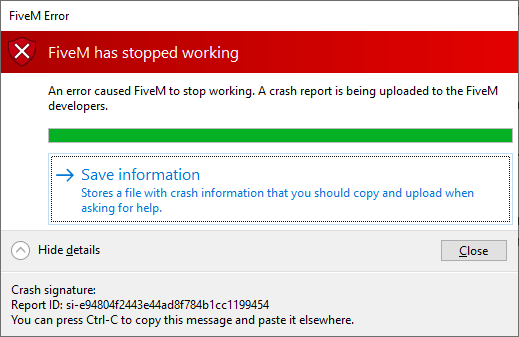
logs/CitizenFX_log files: CitizenFX_log_2021-03-14T050151.log - Notepad (gyazo.com)
.dmp files/report IDs: Not sure where that is
If you can’t start the game at all I am able to start FiveM
GTA V folder screenshot:
GTA V/update/x64/dlcpacks screenshot:
Filepath to FiveM folder:
FiveM client folder screenshot:
Which antivirus/firewall software are you using?
Did you try to disable/uninstall your Anti-virus?
Important parts
What is the issue you’re having?
FiveM crashing upon start
What are you trying to do?
It won’t let me do anything but I’m trying to get on a server
What have you tried already to fix the issue?
delete cache which hardly ever fixes anything, I’ve uninstalled and reinstalled fivem, restarted my PC
Error screenshot (if any):
oh that’s where the .zip file should be shown
What did you do to get this issue?
Run FiveM
What server did you get this issue on?
I wasn’t able to join any server
Additional comments
There are multiple different error codes and error boxes to this issue/bug.
Here’s a different one: [Window Title]
FiveM Error
[Main Instruction]
FiveM has stopped working
[Content]
An error caused FiveM to stop working. A crash report is being uploaded to the FiveM developers.
Stack trace:
0x54a64390
0x1
GTA5.exe!sub_141DEC9B3 (0xfdd29c)
GTA5.exe!rage::fwMapTypesStore::_maintainRefCounts (0x16e)
0x1893064feac5
0x1
0xffddad2ba1a3
[^] Hide details [Save information] [Close]
[Expanded Information]
Crash signature:
Report ID: si-e50215ba66e64849bda8f284b7a52ebe
So far there have only been 2 errors that I’ve come across.
