IF YOU DO NOT FILL THIS OUT, YOUR TOPIC WILL BE UNLISTED AND CLOSED
To receive support, please fill out the following template, and remove this top text.
Environment questions
**GTA V version:**i think its the latest to
Up to date:
Legit or Pirate copy: Legit
**Purchased where - Steam/Rockstar Launcher/Epic:**Steam
**Windows version:**latest windows 11
**Did you try to delete content_index.xml and try again?**yes
**System specifications:**nothing
CitizenFX crash zip file (‘Save information’ on a crash):
CfxCrashDump_2023_04_14_15_31_12.zip (1.2 MB)
logs/CitizenFX_log files:
**.dmp files/report IDs:**report id:si-c9a4e34e27c54d01b3f0ed827499542
If you can’t start the game at all i can start the game but at the loading screen i get this crash
GTA V folder screenshot:
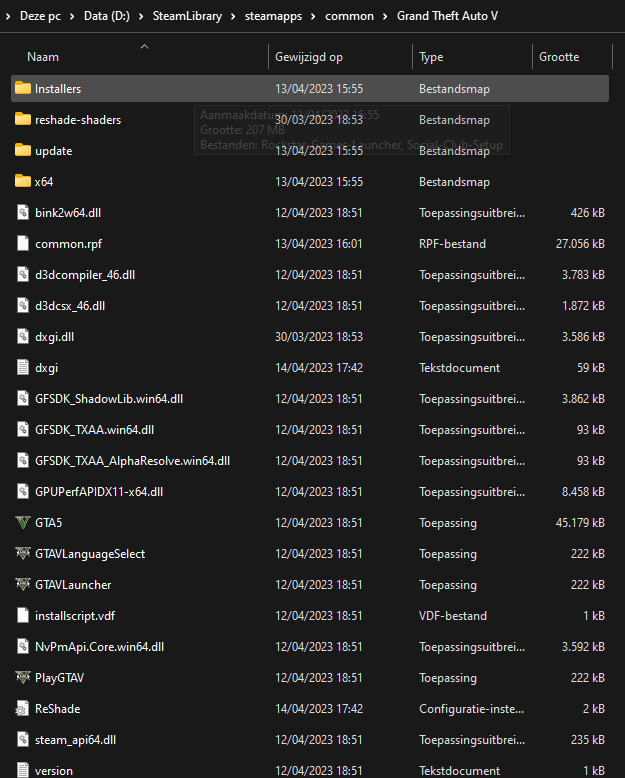
GTA V/update/x64/dlcpacks screenshot:
Filepath to FiveM folder:\AppData\Local\FiveM
FiveM client folder screenshot:\AppData\Local\FiveM\FiveM.app
**Which antivirus/firewall software are you using?**i think im using the windows antivirus
**Did you try to disable/uninstall your Anti-virus?**no i havent
Important parts
**What is the issue you’re having?**if i try to join a server it gives me a error
**What are you trying to do?**im trying to play a server with my friends
What have you tried already to fix the issue? uninstalling fivem and GTAV cleared all %temp% temp watching tutorials
Error screenshot (if any):
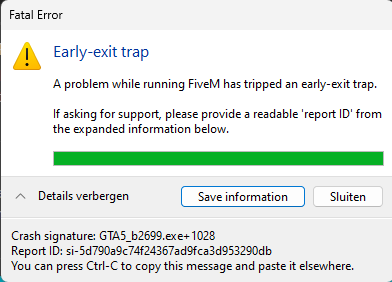
**What did you do to get this issue?**i did nothing the other day it ran perfectly fine and now it wont start
**What server did you get this issue on? Be specific and name some, ‘all of them’ by itself isn’t useful!**i cant join any server i believe
