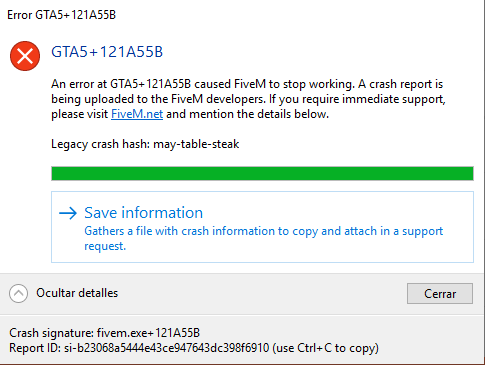
**GTA V version?**Latest (@ 22/07/2019)
**Up to date?**Yes
**Legit or Pirate copy?**Legit
**Steam/CD/Social Club?**Social Club
**Windows version?**Windows 10 (1809)
**Did you try to delete caches.xml and try again?**Yes Error screenshot (if any) System specificationsRyzen 5 2600x
ASUS Prime x470 Pro
16GB ram (G.Skill F4-3200C16-8GVKB)
GTX 1070Ti (Gigabyte Windforce)
Toshiba TR200 What did you do to get this issue? The game just crashes randomly, without a reason. What server did you get this issue on? Ciudad del Pecado RP CitizenFX.log fileCitizenFX.log.1 (163.8 KB) .dmp files/report IDsa73d22ff-879f-4bb5-b029-94ea75bd355f.dmp (6.2 MB) CfxCrashDump_2019_07_21_18_22_01.zip (1.0 MB) CfxCrashDump_2019_07_22_11_18_11.zip (1.0 MB)
I tried deleting the cache (including the entire cache folder and caches.xml)
I tried changing the RAM clock (from 2733MHz to 2666MHz and such)
I tried disabling the anti-virus, and none of these options worked.
Edit 22/07/2019 @17:40
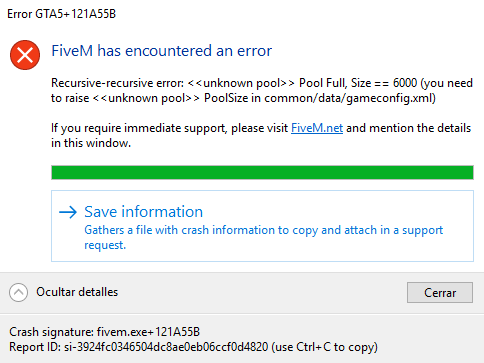
So, it crashed for the 15th time or something, and it had the same error code but showed a different message, here’s a pic.
Also the CitizenFX.log shows a different message, and I don’t know if the .dmp file will show anything different, here’s the file. CfxCrashDump_2019_07_22_15_39_43.zip (1.0 MB)
Hello, this is a friendly reminder because this is your first time creating a topic (or it has been a while since your last topic) in this category.
Please note that most of the support is provided by the FiveM community on a voluntary basis. We ask you to be patient; there is no guarantee we have a solution to your problem(s). To avoid unnecessary/duplicate topics, please browse the forums before creating a topic.
To improve your chances of your issue(s) being solved, please provide as much information as possible about the issue(s) you are having. Also —whenever possible— please use the template given to you when creating a topic.
Try this, maby this could work.
I have had a similar probelm, every time i tried to join a Onesync server i kept getting a similar error.
I Fixed it by Deleting CitizenFx folder in Saved Games,
go to “C:\Users\USERNAME\Saved Games” in here delete the CitizenFX folder and then just Start FiveM.
I didn’t fixed it like that. My computer powered off because power outage, so I decided to change RAM latency, from CL16 to CL17, and that fixed it for me. Also I marked another message as the solution as I think that would be a more reasonable/doable way to fix it. Anyways, thank you very much!