To receive support, please fill out the following template, and remove this top text.
Up to date? Yes
Legit or Pirate copy? | Legit
Steam/CD/Social Club? | Social Club
Windows version? | Windows 10
Did you try to delete caches.xml and try again? | Yes
System specifications | RX470 Graphics Card, FX-6300 CPU, 8 GB DDR3
What did you do to get this issue? | Installed FiveM and placed into a folder. Ran it.
If an issue with starting:
GTA V folder screenshot

GTA V/update/x64/dlcpacks screenshot Couldn’t find.
Filepath to FiveM folder Desktop > FiveM
FiveM client folder screenshot
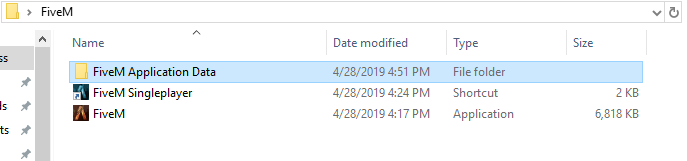
Did you try to disable/uninstall your Anti-virus? Yes
When I install FiveM, it doesn’t prompt me to locate GTAV like the tutorials online show. I’ve tried placing the FiveM folder in the GTAV folder as well as the other way around. When I run FiveM it allows me to log into Social Club but closes after I enter my information. Any help is appreciated! 

