FiveM Crashing on ANY server. Windows 11. Top End PC

Environment questions

GTA V version: 1.58
Up to date: Yes
Legit or Pirate copy: Legit
Purchased where - Steam/Rockstar Launcher/Epic: Steam
Windows version: 11
Did you try to delete content_index.xml and try again? Yes
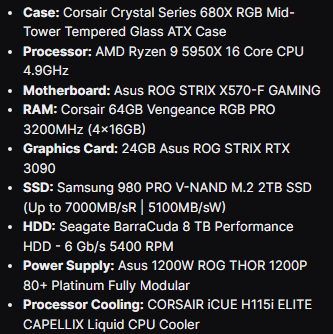
System specifications:
image
CitizenFX crash zip file (‘Save information’ on a crash): WeTransfer - Send Large Files & Share Photos Online - Up to 2GB Free
logs/CitizenFX_log files: WeTransfer - Send Large Files & Share Photos Online - Up to 2GB Free
.dmp files/report IDs: WeTransfer - Send Large Files & Share Photos Online - Up to 2GB Free

Important parts

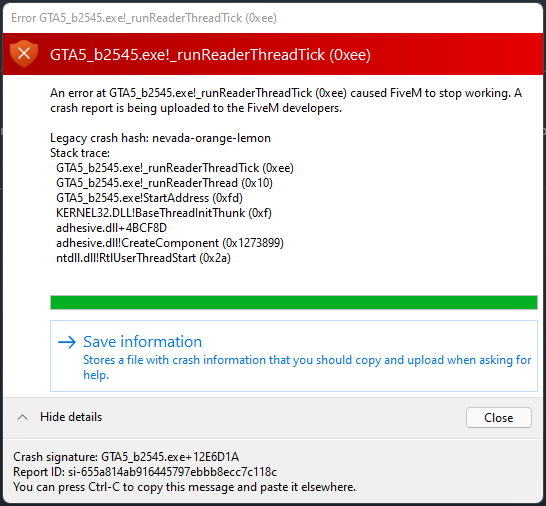
What is the issue you’re having? FiveM crashes when joining ANY server, regardless of the amount of mods they have.

What are you trying to do? Just play a server

What have you tried already to fix the issue? Reinstalled GTA, Reinstalled FiveM, Cleared Cache etc.

Error screenshot (if any):

What did you do to get this issue? Loaded a server

What server did you get this issue on? Be specific and name some, ‘all of them’ by itself isn’t useful! cfx.re/join/2gl6zn


Additional comments

Any help would be appriciated

Hello, this is a friendly reminder because this is your first time creating a topic (or it has been a while since your last topic) in this category.

Please note that most of the support is provided by the Cfx.re community on a voluntary basis. We ask you to be patient; there is no guarantee we have a solution to your problem(s). To avoid unnecessary/duplicate topics, please browse the forums before creating a topic.

To improve your chances of your issue(s) being solved, please provide as much information as possible about the issue(s) you are having. Also —whenever possible— please use the template given to you when creating a topic.

Thanks for keeping these forums tidy!
:mascot:

Doubtful, or if so, done wrongly. This is a disk read error that usually occurs when a file is corrupted, missing, truncated, or otherwise unreadable (e.g. a disk disconnecting).
How you you wrongley press “Install” on Steam? :thinking: Literally one button…

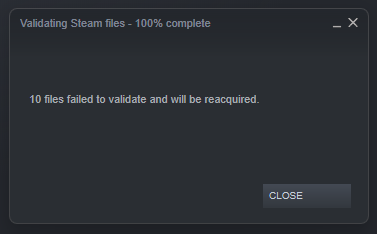
I’ve gone ahead and verified the game integrity again and here are the results
image

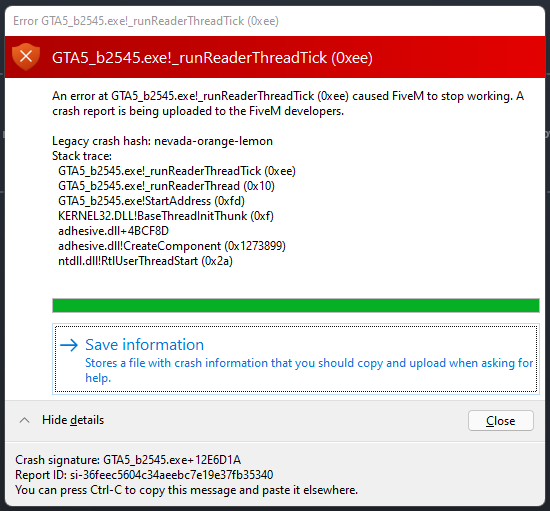
and this is what I saw when I opened FiveM after the above…

If this happens so quickly after you reinstalled the game, I’d be worried about the disk the game is placed on, or Steam’s download logic. :confused:

Literally the only game I have issues with, no problems on the Disk after defrag. Shame

Does GTA5 itself work? including online?

Not an issue, played for 7 hours yesterday not a single hiccup.

This topic was automatically closed 30 days after the last reply. New replies are no longer allowed.