Environment questions
**GTA V version:1.0.2845.0
**Up to date: Yes
**Legit or Pirate copy: Legit
**Purchased where - Steam/Rockstar Launcher/Epic: Steam
**Windows version: Windows 11
**Did you try to delete content_index.xml and try again?: Yes
**System specifications:
Device name DESKTOP-HQ8UT4R
Processor Intel(R) Core™ i7-2600 CPU @ 3.40GHz 3.40 GHz
Installed RAM 32.0 GB
System type 64-bit operating system, x64-based processor
Pen and touch No pen or touch input is available for this display
CitizenFX crash zip file (‘Save information’ on a crash):
CfxCrashDump_2023_04_20_17_01_29.zip (1.7 MB)
logs/CitizenFX_log files:CitizenFX_log_2023-04-20T165502.log (1.2 MB)
**.dmp files/report IDs:si-e489d17ce9ab4ef1be0a494d7cf11951
Important parts
**What is the issue you’re having? The game will crash depending on where I drive to.
**What are you trying to do? Drive around and rp but the game crashes depending on the location
**What have you tried already to fix the issue? Remove MLO Mods, Nothing else yet.
Error screenshot (if any):
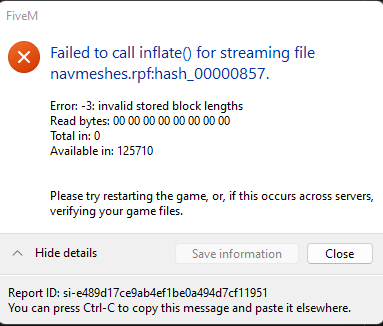
**What did you do to get this issue? I honestly have no idea, it’s a fresh install of GTA 5 but something messed up whenever I got back to developing
**What server did you get this issue on? It was my own personal server
Additional comments
I tried on a fresh esx server, no mods besides vMenu and ESX Resources, nothing
