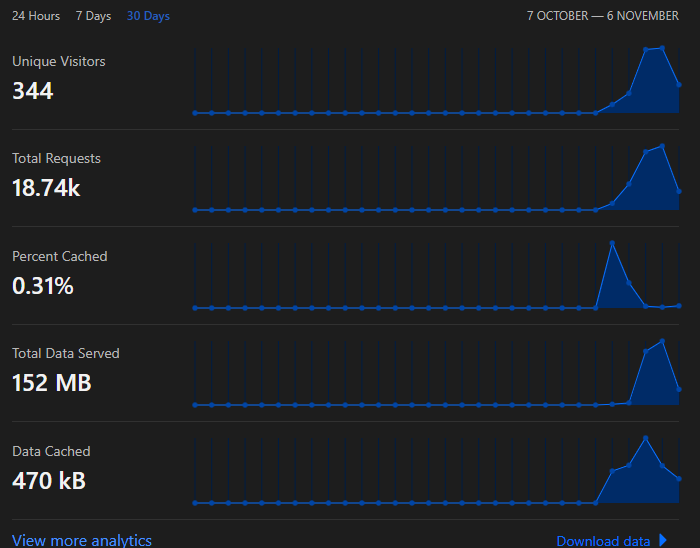
Hello I’ve managed to Build a CDN Fileserver and Reverse Proxy Setup using NGINX and Cloudflare but i don’t know how to make my Cloudflare Analytics Display all Data that been cached and the percentage of being cached at my CDN/Cache File Server.
Hi, please can you share your nginx setup?
hello, can you share the configuration on your nginx? because I made it but it failed, and an error always appears on F8 when I launch FiveM, I’ve tried to get around this using port 80 but it’s very strange to me because many players actually download it for a very long time, not faster.
Hello, I have encountered the same issue, here is my nginx “website” config:
upstream backend {
    server 123.567.89:30120;
}

proxy_cache_path /srv/cachewlon levels=1:2 keys_zone=assetswlon:48m max_size=20g inactive=2h;

server {
	listen 81;
    server_name sss.sss.cz;
    location /files/ {
        proxy_pass http://backend$request_uri;
        add_header X-Cache-Status $upstream_cache_status;
        add_header Cache-Control "public, max-age=3600, must-revalidate";
        proxy_cache_lock on;
        proxy_cache assetswlon;
        proxy_cache_valid 1y;
        proxy_cache_key $request_uri$is_args$args;
        proxy_cache_revalidate on;
        proxy_cache_min_uses 1;
        proxy_read_timeout 60s;
        proxy_connect_timeout 60s;
        limit_rate 10m;
    }

    listen 443 ssl; # managed by Certbot
    ssl_certificate /etc/letsencrypt/live/sss.sss.cz/fullchain.pem; # managed by Certbot
    ssl_certificate_key /etc/letsencrypt/live/sss.sss.cz/privkey.pem; # managed by Certbot
    include /etc/letsencrypt/options-ssl-nginx.conf; # managed by Certbot
    ssl_dhparam /etc/letsencrypt/ssl-dhparams.pem; # managed by Certbot

}