What is the issue you’re having?
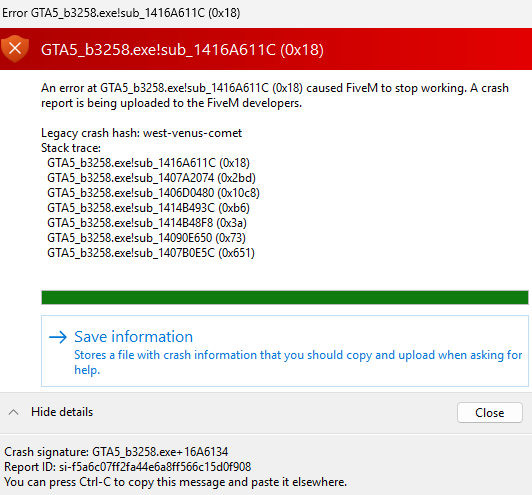
When loading into servers, I’m getting a crash every single time right before the character selection screen should pop up. I’ve tried this on two servers, and it’s the same on both. The crash randomly started happening one day after no changes to the PC or anything else was made. Have been playing FiveM for years with very few crash issues.
I will note that I have one of the faulty intel chips. My issues have really only ever been with Riot games due to issues with vanguard anticheat BSOD. My computer is fine otherwise. Figured I’d note that I can play RedM servers without issue.
What have you tried already to fix the issue?
I’ve done all basic troubleshooting. I’ve deleted and reinstalled both GTA and FiveM. I’ve cleared all caches multiple times. I’ve tried all versions of FiveM. No mods or plugins are installed anymore. I’ve downloaded a critical bios update. I’ve installed the latest GPU update. I’ve both underclocked and overclocked my Intel xtreme tuning app. I’ve tried various other settings, resolutions, monitors etc.
What server did you get this issue on?
Chase Roleplay and ONX
Error screenshot(s)
Windows version
Windows 11
System specifications
Alienware Aurora R15
GPU NVIDIA GeForce RTX 4080
Processor 13th Gen Intel(R) Core™ i9-13900KF (3.00 GHz)
Installed RAM 32.0 GB (31.7 GB usable)
System type 64-bit operating system, x64-based processor
Antivirus software
None, just run basic Windows virus scan
CitizenFX crash zip file (‘Save information’ on a crash)
CfxCrashDump_2026_01_14_22_51_23.zip (1.98 MB)