What is the issue you’re having?
When I usually play 5M, its always smooth with zero issues. Well randomly after 2/11/26, my 5M has started to have a issue where it gets stuck Awaiting Scripts when loading into any server (including the FiveM Test Server). All week anytime i try to play any server on FiveM, it will load all the way in until you get to the Awaiting Scripts point, then it freezes for a second and gets stuck there until eventually it gives me a EARLY TRAP EXIT or the SCRIPT DEADLOOP error.
What have you tried already to fix the issue?
I’ve Tried a Reinstall of the FiveM client, Validation of the GTA V Install (via steam), Restarting PC, Updated all of my Windows components, Updated GPU drivers.
What server did you get this issue on?
Any Server.
Windows version
Windows 11
System specifications
i7 12700k, RTX 4070, 64GB DDR4, 3TB HDD.
Antivirus software
Microsoft Defender
CitizenFX crash zip file (‘Save information’ on a crash)
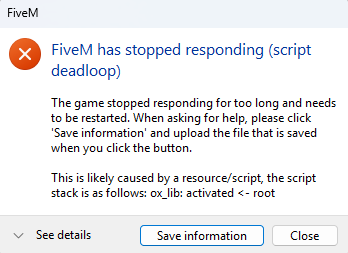
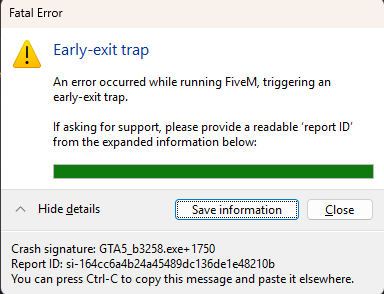
Log files
CitizenFX_log_2026-02-15T183446.log (71.6 KB)
CitizenFX_log_2026-02-15T181805.log (73.4 KB)
CitizenFX_log_2026-02-15T181852.log (7.45 MB)
Additional comments
My client has been having issues for a week now. Hopefully the logs and screenshots can help solve the issue. At first i thought it could’ve just been my computer, but I have narrowed it down to the FiveM Client. GTA V is perfectly intact and I do not use any Graphics Packs or other Mods/Scripts besides whats provided in FiveM severs.
