IF YOU DO NOT FILL THIS OUT, YOUR TOPIC WILL BE UNLISTED AND CLOSED
To receive support, please fill out the following template, and remove this top text.
Environment questions
GTA V version: Newest Up to date: yes Legit or Pirate copy: Legit Purchased where - Steam/Rockstar Launcher/Epic: Steam Windows version: 10 Did you try to delete content_index.xml and try again? yes System specifications: gtx 1650, ryzen 5800x, 32 gb CitizenFX crash zip file (‘Save information’ on a crash): logs/CitizenFX_log files: .dmp files/report IDs:
If you can’t start the game at all
GTA V folder screenshot: GTA V/update/x64/dlcpacks screenshot: Filepath to FiveM folder: FiveM client folder screenshot: Which antivirus/firewall software are you using? Did you try to disable/uninstall your Anti-virus?
Important parts
What is the issue you’re having?
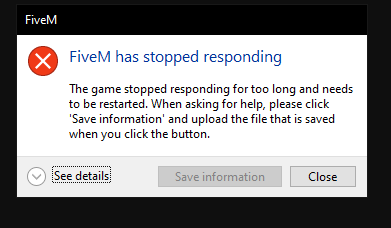
Every time i join a server i finish loading server assets I get stuck on the connecting screen and for the Arena Server specifically it freezes after 3 cycles of the intro video. I finish downloading everything but it doesn’t put me in the server and the only way for me to leave is to close using task manger
What are you trying to do?
Join Servers
What have you tried already to fix the issue?
Allow FiveM through Fire wall
Verify integrity of game files
Uninstall FiveM
Clear Cache
Disable firewall
Error screenshot (if any):
What did you do to get this issue?
What server did you get this issue on? Be specific and name some, ‘all of them’ by itself isn’t useful!
Arena
Hello, this is a friendly reminder because this is your first time creating a topic (or it has been a while since your last topic) in this category.
Please note that most of the support is provided by the Cfx.re community on a voluntary basis. We ask you to be patient; there is no guarantee we have a solution to your problem(s). To avoid unnecessary/duplicate topics, please browse the forums before creating a topic.
To improve your chances of your issue(s) being solved, please provide as much information as possible about the issue(s) you are having. Also —whenever possible— please use the template given to you when creating a topic.
it said game finished loading then rage mode switched to 1 then it actually crashed this time instead of me having to task manger end it. Here’s the files if that helps.
Also just to add on when i checked the F8 console it said it loaded up successfully but i did see something about invalid’ vertices and random numbers and something about export when i scrolled up.
That’s fine, if it gets stuck on “game loaded successfully” that means you have something messing with the game process - usually it’s some kind of “optimizer” or “game booster” software, make sure to fully exclude FiveM and its game processes from any software like that
Interesting the thing is that i don’t have any software like that. I only got the NVIDIA App and that’s it. IO also got MSI after burner for Overclocking but other than that there nothing else ill try uninstalling and reinstalling again. I just looked int the crash dump and it said to post this log.
I just tried it and it still had the same problem I uninstalled The NVIDIA app then tried it as-well as reinstalling my drivers. Also yesterday i forgot to tell you , I deleted FiveM then restarted and re downloaded
-it didn’t work then I deleted my drivers & it started working but when i went to sleep and turned off my PC and came back today the problem is back. Should i try uninstalling gta? I tried uninstalling fiveM again. I have no idea what going on, been at this for 5 hours
Hello. Check gta if need updates etc. Disable temporarily the gpu overclock. Install DDU and delete nvidia drivers, next install the last nvidia drivers without GeForce experience. And last clear the cache of fivem,run fivem check what build you have in ficem and make sure you not have the last canary version. Let me know if works.
Just tried it and it didn’t work unfortunately uninstalled the drivers with DDU disabled the overclock and re downloaded FiveM. The game/server says that Ive finished loading server assets etc and that im connecting but after a few mins it freezes and goes black screen and crashes on me. I’m on the 10849 version of FiveM and I did previously delete and re-download GTA before doing your recommendations. So everything’s up to date
Ok. Lets delete the fivem with Revo Uninstaller. Download the revo , opening and right click in fivem, unselected the option for backup, select advance for search and select all fikes etc and delete them. If ask again to do the same select all and delete them. Install again the fivem and let me know. If not working this method delete gtav with revo and do the same steps.
Okay so i tried uninstalling five M using Rev Uninstaller (on advanced mode) then i restarted the downloaded five M and got the same problem. I also tried the second way and uninstalled five M and Gta on advanced mode in Rev uninstaller and re downloaded them both and still got the same problem. Also i tested GTA online and it works fine. Does Rockstar launcher affect FiveM?
Yes is for game authentication, updates. Without Rockstar launcher i think you cant play. Check this to be sure with launcher bcoz maybe have a update. If you have Bitdefender turn it off. Really i dont know any other method for fix. Last you can check on YouTube the Panjno’s video about nvidia cache delete and make this changes and maybe work for you. Let me know if works good luck
Thanks for the help i figured out the issue my CPU affinity was not set to all process and some were deselected. Once i put the CPU affinity to all process in Task Manger or in my case System explorer everything was working great . Really appreciate the help from both of you guys have A great day. Thanks for the help once again.

 I uninstalled The NVIDIA app then tried it as-well as reinstalling my drivers. Also yesterday i forgot to tell you , I deleted FiveM then restarted and re downloaded