To receive support, please fill out the following template, and remove this top text.
GTA V version? Latest
Up to date? Yes
Legit or Pirate copy? Legit
**Steam/CD/Social Club?**https://steamcommunity.com/profiles/76561198323645390/
Windows version? Windows 10 V - 1903
Did you try to delete caches.xml and try again? Yes
Error screenshot (if any) 
https://gyazo.com/1806e040f76316a3876e57bfa2f3a20c
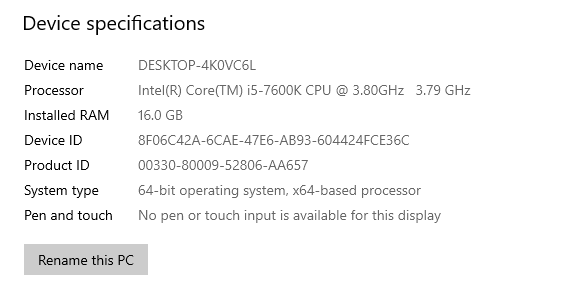
System specificationshttps://i.gyazo.com/26c7f51f51c12472f9337d0107fafe82.png
**What did you do to get this issue?**When opening the game
**What server did you get this issue on?**None
CitizenFX.log fileCitizenFX.log (5.2 KB)
.dmp files/report IDs
If an issue with starting:
GTA V folder screenshothttps://gyazo.com/64ed23b61a4cdeaa8f7d33753534c826
GTA V/update/x64/dlcpacks screenshothttps://gyazo.com/687e39831765b230354255b39eeb50d8
Filepath to FiveM folderhttps://gyazo.com/203ae5074cce9daf229439ba3f77c6ca
FiveM client folder screenshothttps://gyazo.com/203ae5074cce9daf229439ba3f77c6ca
Did you try to disable/uninstall your Anti-virus? Yes
Also add what you already tried so far.