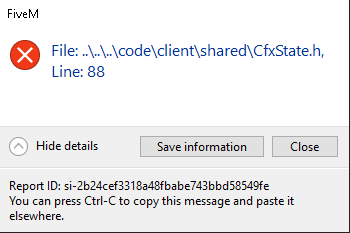
File: ....\code\client\shared\CfxSate.h, Line:88

What is the issue you’re having?

It loads me into the server and automatically crashes sometimes without no crash error and sometimes with an error or my screen goes black and then it crashes me without an error

What have you tried already to fix the issue?

EVERYTHINGGG

What server did you get this issue on?

OUTTHEMUD RP

Error screenshot(s)

Windows version

Windows 10

System specifications

GeForce RTX 3050 Ti Laptop GPU | Windows 10 64-bit

Antivirus software

Windows or malware

2 Likes

Hello, this is a friendly reminder because this is your first time creating a topic (or it has been a while since your last topic) in this category.

Please note that most of the support is provided by the Cfx.re community on a voluntary basis. We ask you to be patient; there is no guarantee we have a solution to your problem(s). To avoid unnecessary/duplicate topics, please browse the forums before creating a topic.

To improve your chances of your issue(s) being solved, please provide as much information as possible about the issue(s) you are having. Also —whenever possible— please use the template given to you when creating a topic.

Thanks for keeping these forums tidy!
:mascot:

That’s pretty weird, do a deep malware scan and make sure to be using a clean FiveM installation

1 Like

i have the same problem do u fix it?

1 Like

Did you find how to fix it, because the same thing happens to me?

1 Like

Did u resolve the problem? If u did, how?

1 Like

Dif you guys find a solution? I still can’t Play.

1 Like

and me

1 Like

Did you fix the same problem for me? Did you fix it? And if you fixed it, please let me know how.

1 Like

same bs happens to me but its different servers now

2 Likes

so did you find a fix? i dont understand why this is happening i can play for like 10-15 minutes then my frames drop down to like 60-80 to 16-2 and then the game crashes with that error i dont know why that happens you found a fix?

2 Likes

What does this mean and what is a malware scan??

  • Scan for malware using a third-party antivirus tool, Malwarebytes is a good choice that’s frequently recommended but by far not the only option
  • “Clean” as in fully unmodified

What if you delete everything and download it back… and you get the same results.
Should you then, just factory reset??

did ya resolve? i got the same problem i need help pls

been having the same issue, still cant fix it, anyone have a fix?

1 Like

Having the same issues. I either get this error or the Removed GPU error or something like that. Any fixes?

how do i fix this??

same problem here didn’t find a solution yet even tho i did that malware scan

On some personal experience, this appears when FiveM hits some kind of severe performance bottleneck and crashes due to insufficient resources to run; I don’t know precisely what caps out or why, but that’s the only time I see that message. To anyone having this issue make sure to close all unnecessary background apps and ensure adequate cooling/temps of your system.