IF YOU DO NOT FILL THIS OUT, YOUR TOPIC WILL BE UNLISTED AND CLOSED
To receive support, please fill out the following template, and remove this top text.
Environment questions
GTA V version: 1.0.0.66 Up to date: Yes Legit or Pirate copy: Legit Purchased where - Steam/Rockstar Launcher/Epic: Steam Windows version: windows 10 Did you try to delete content_index.xml and try again? No, I don’t know what that is. System specifications: RAM: 16gb
CPU:Inter Core i5-10400f 2.90Ghz, 6 cores 12 threads
GPU: NVIDIA GeForce GTX 1050ti CitizenFX crash zip file (‘Save information’ on a crash): logs/CitizenFX_log files: .dmp files/report IDs:
If you can’t start the game at all
GTA V folder screenshot: GTA V/update/x64/dlcpacks screenshot: Filepath to FiveM folder: FiveM client folder screenshot: Which antivirus/firewall software are you using? Did you try to disable/uninstall your Anti-virus?
Important parts
What is the issue you’re having?
When I drive my car I keep on falling through the map, sometimes the city is invisible and it renders a lot and when it renders its like a blurry texture and my game stutters all the time even though my fps is 100+, ping 70, packet loss 4. What are you trying to do?
I have done all the things I know What have you tried already to fix the issue?
I have tried set priority to realtime and high, updated GPU, close other apps, set my settings to normal and I also tried to max extended texture budget nothing works. Error screenshot (if any):
What did you do to get this issue?
nothing What server did you get this issue on? Be specific and name some, ‘all of them’ by itself isn’t useful!
Other servers like Serious roleplay
Hello, this is a friendly reminder because this is your first time creating a topic (or it has been a while since your last topic) in this category.
Please note that most of the support is provided by the Cfx.re community on a voluntary basis. We ask you to be patient; there is no guarantee we have a solution to your problem(s). To avoid unnecessary/duplicate topics, please browse the forums before creating a topic.
To improve your chances of your issue(s) being solved, please provide as much information as possible about the issue(s) you are having. Also —whenever possible— please use the template given to you when creating a topic.
The amount that it says in the settings screen is irrelevant, it’s not live data - open your Task Manager and see how much VRAM is actually being used in-game.
install GTAV onto an SSD if you haven’t already and lower your Population & Texture Quality settings a little bit and reinstall(Verify File Integrity) GTAV after the new update…
this bug usually happens the most while riding around in a vehicle with another player.
this means that your client or another players client isn’t talking to the server fast enough.
Internet Up/Down Speeds and Graphics are the cause of this sort of issue. If you are on WiFi, you will certainly get this sort of behavior.
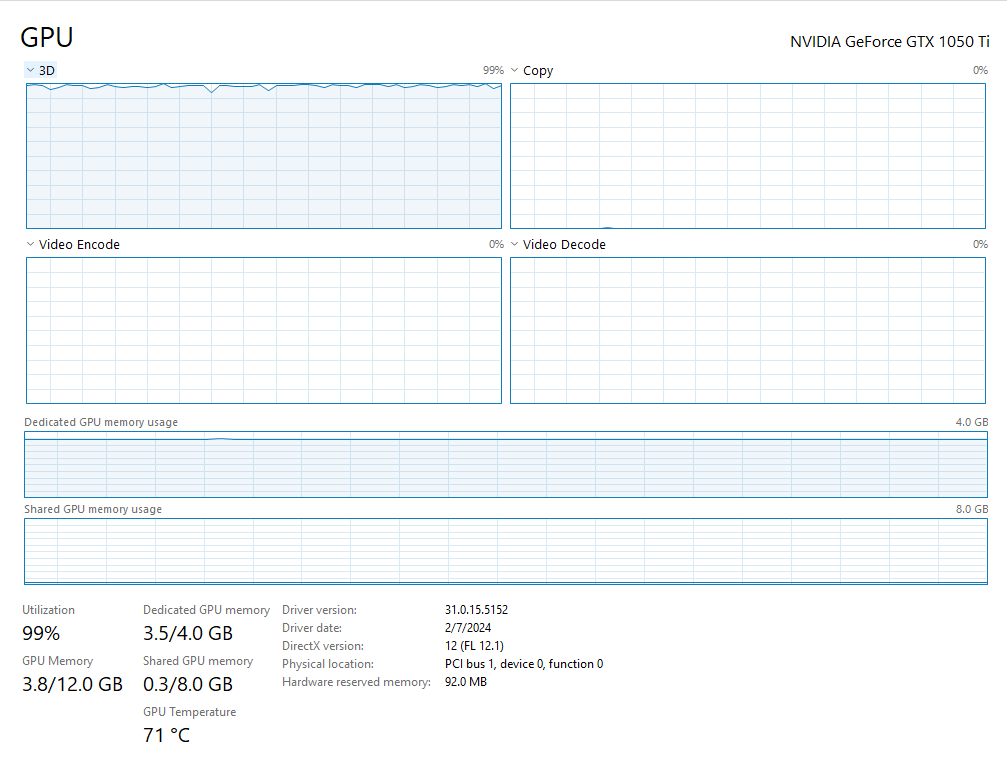
It looks like your GPU is peaking out. 3.5 of the 4GB’s used. It is running pretty hot too.
Yep, your GPU is maxing itself out as you can see on that screen, make sure to do what @xTylerMcLean suggested to lighten the load - GPU being unable to keep up can cause that on servers with a good deal of custom assets; make sure that your connection is stable and monitor your packet loss and other relevant metrics in the NetGraph (enabled in your F8 console’s top button row).
I’ve tried everything bought a new ethernet cable and set all my settings to normal prioritized from task manager, set my gpu to best performance to fivem and gta5 still nothing works