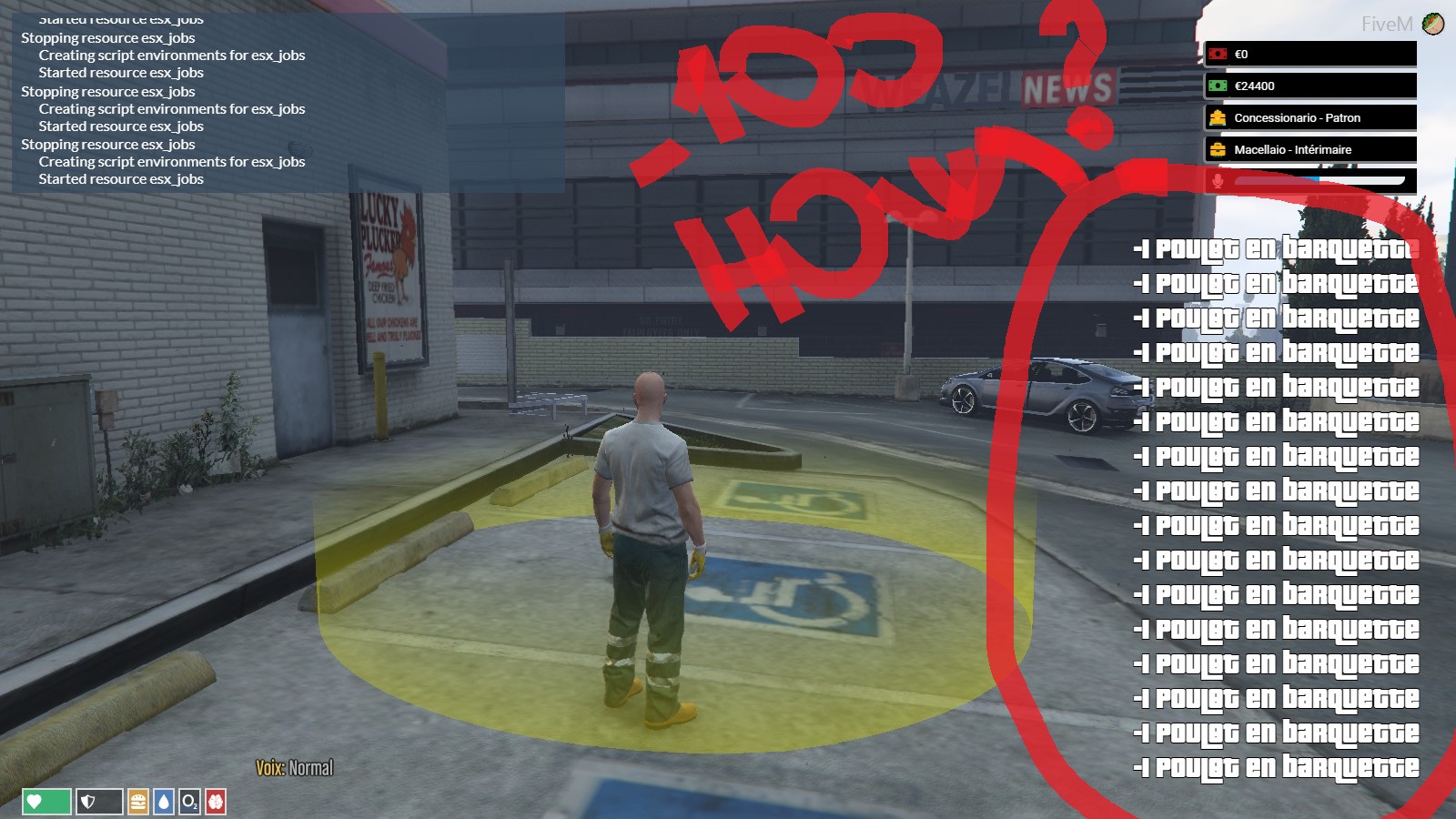
hello,
first, sorry for my bad english,
i’ve one request for this plugin… i want HIDE this Notification…
People can help me?
hello,
first, sorry for my bad english,
i’ve one request for this plugin… i want HIDE this Notification…
People can help me?
Hi! Do you made a custom job ? If yes, please remove it, there should be a error, otherwise try to download “esx_joblisting”, I think this will fix the error 
Good luck!
i think you don’t understand… i want HIDE notification of Delivery in esx_jobs
Find es_extended/client/main.lua, open this file and search esx:removeInventoryItem, replace
ESX.UI.ShowInventoryItemNotification(false, item, count)
to
--ESX.UI.ShowInventoryItemNotification(false, item, count)
Thanks you so much, but i want HIDE only - not + too… can help me?
You would need to add a check to see if “count” is a positive or negative value, and only show the notification is positive.
yes but only for Delivery of ESX_JOBS
The easiest way would probably be to write your own custom event, and not include ESX.UI.ShowInventoryItemNotification in the code. ex: (in client/main.lua)
RegisterNetEvent('esx_jobs:removeInventoryItem')
AddEventHandler('esx_jobs:removeInventoryItem', function(item, count)
	for k,v in ipairs(ESX.PlayerData.inventory) do
		if v.name == item.name then
			ESX.PlayerData.inventory[k] = item
			break
		end
	end

	if ESX.UI.Menu.IsOpen('default', 'es_extended', 'inventory') then
		ESX.ShowInventory()
	end
end)
and then in your server/main.lua replace any reference of xPlayer.removeInventoryItem with:
TriggerClientEvent('esx_jobs:removeInventoryItem', source, item, count)
i want to replace default notifications with mythic_notify ? can u explain me please ?
any solution?
Not sure if you’re still interested, but the way to remove the (-1 Item) and (+1 Item) are seperate, so you can change the colours, types etc for example if you wanted (+1 Item) to be green and (-1 item) to be red you can!
So I implemented skeexsNotify just because it’s my preference, but mythic_notify is exaclty the same if not better in terms of customisability - here goes.
RegisterNetEvent('esx:addInventoryItem')
AddEventHandler('esx:addInventoryItem', function(item, count, showNotification)
	for k,v in ipairs(ESX.PlayerData.inventory) do
		if v.name == item then
			--ESX.UI.ShowInventoryItemNotification(true, v.label, count - v.count)
			exports["skeexsNotify"]:TriggerNotification({
				['type'] = "success",
				['message'] = 'Added '..(count - v.count)..'x of '..v.label..' '
			})
			ESX.PlayerData.inventory[k].count = count
			break
		end
	end

	if showNotification then
		ESX.UI.ShowInventoryItemNotification(true, item, count)
	end

	if ESX.UI.Menu.IsOpen('default', 'es_extended', 'inventory') then
		ESX.ShowInventory()
	end
end)
That then makes This
VVV

Which i think looks way cooler, either that or you can just fully tab out the ESX.UI.ShowInventoryItemNotification(true, v.label, count - v.count) and get nothing!  Hope this helped.