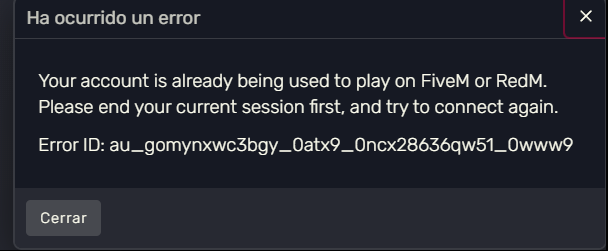
We are two brothers with separate licenses purchased legally, the problem is that when we want to play both of us mix up our accounts, he has his own accounts in everything and I have mine, but the fivem launcher recognizes mine and exchanges accounts preventing us from playing and showing an error
Hello, this is a friendly reminder because this is your first time creating a topic (or it has been a while since your last topic) in this category.
Please note that most of the support is provided by the Cfx.re community on a voluntary basis. We ask you to be patient; there is no guarantee we have a solution to your problem(s). To avoid unnecessary/duplicate topics, please browse the forums before creating a topic.
To improve your chances of your issue(s) being solved, please provide as much information as possible about the issue(s) you are having. Also —whenever possible— please use the template given to you when creating a topic.
If you and your brother are playing on 1 PC, then this issue will always happen to you unfortunately.
I would honestly suggest playing on 1 account together. If you play RolePlay servers, then some servers with 2 different playable characters can come in handy (You can play on 1 RP server and when you connect to it, it will allow you to pick what character you want to play).
The solution for this problem is clearing out your DigitalEntitlements folder which will make you logout out of everything and you will have to login into everything again.
You and your brother both need to do this.
Make sure neither FiveM, nor Rockstar Games Launcher is running.
Press Win + R, enter %localappdata%\DigitalEntitlements\ and click OK,
Back up all the files in there, leave them in a separate directory.,
Delete all the files inside of DigitalEntitlements.,
Run Grand Theft Auto V once through the relevant launcher you used to install the game with.,
Your FiveM client should now use your new identifiers, provided you actually have separate licenses.,
You might also have to delete %appdata%\CitizenFX\ros_id.dat which is your Rockstar Social Club identifier.
We play on different computers, the problem is that one person can play with their own account, but when the other person connects, the accounts get mixed up and neither of us can play.