What is the issue you’re having?
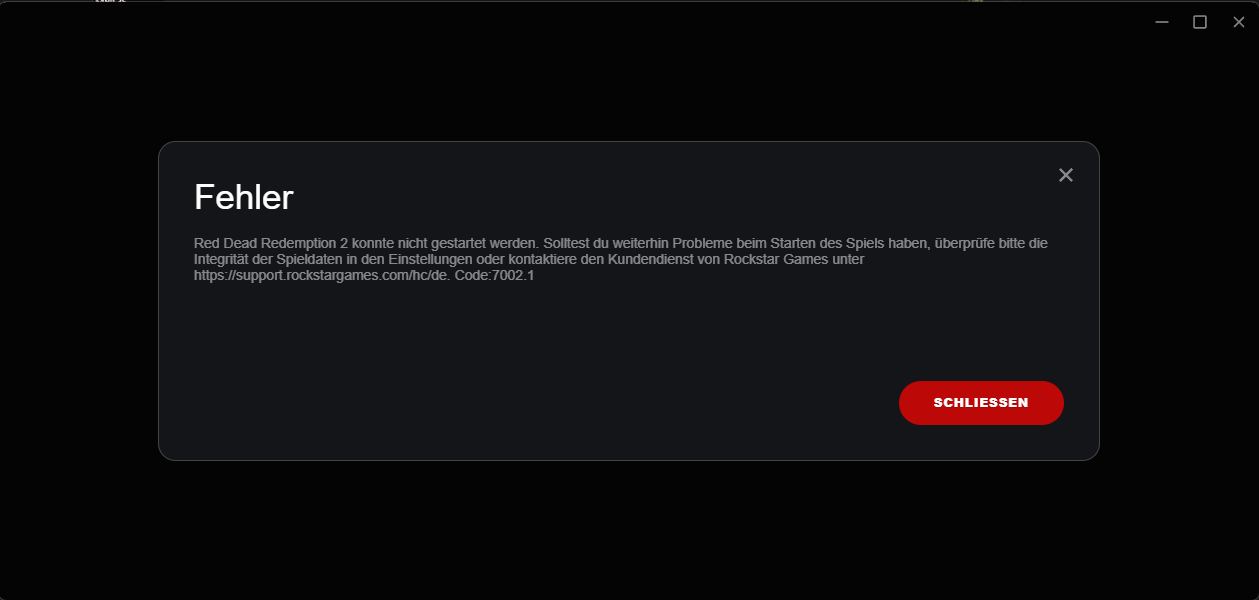
Error Code 7002.1 only appears when launching RedM.
Just the Game Red Dead Redemption 2 with Steam + Rockstar Launcher works perfectly fine. FiveM also works without any problems.
RedM always closes the Rockstar Launcher automatically and restarts it → error 7002.1 appears immediately.
The only way to start RedM once is to restart the entire PC. After a crash or normal exit, the error comes back instantly unless I restart the PC again.
What have you tried already to fix the issue?
- Verified RDR2 game files multiple times on Steam
- Completely reinstalled Rockstar Games Launcher (fresh download from official website)
- Cleared all Rockstar cache folders (%localappdata%\Rockstar Games, Documents\Rockstar Games, Social Club)
- Cleared all of the RedM Data (Application Data etc.)
- Reset all audio devices to default + disabled enhancements
- Changed DNS to 8.8.8.8 / 8.8.4.4
- Opened required UDP ports (6672, 61455–61458)
- Removed all non-default resources
- Added Windows Security exclusions for RDR2, Rockstar Launcher and RedM folder
- Completly Reinstalled RDR2 and reinstalled freshly
Nothing helped.
What server did you get this issue on?
Not on any server, I can’t even launch RedM.
Error screenshot(s)
Windows version
Windows 11 Pro 10.0.26200
System specifications
CPU: Intel i9-14900K
RAM: 48 GB DDR5
GPU: NVIDIA GeForce RTX 4070 Super
Antivirus software
Microsoft Defender (real-time protection enabled)
Additional comments
This makes RedM completely unplayable for me because I have to restart my PC every single time I want to join.
