What is the issue you’re having?
I am experiencing an authentication issue when trying to open FiveM while Steam is logged in.
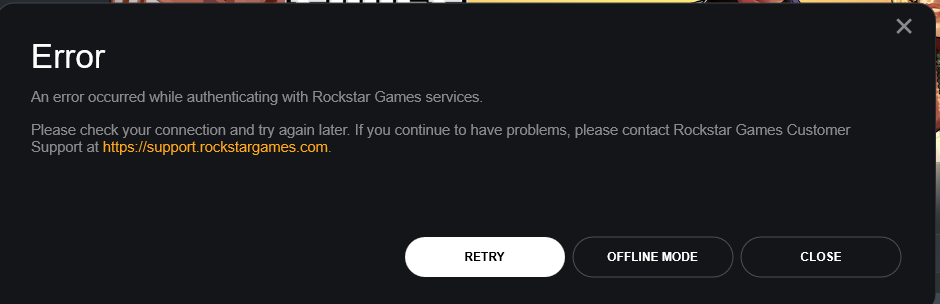
When I launch FiveM, I receive the following error message from Rockstar Games services:
“An error occurred while authenticating with Rockstar Games services.”
Clicking the “Retry” button does not resolve the issue, and the error persists.
I have discovered that if I completely log out of Steam, FiveM opens normally without any authentication error. However, as soon as I log back into Steam and try to open FiveM again, the same Rockstar authentication error appears.
This issue occurs consistently every time Steam is logged in. My Rockstar Games Launcher is logged in and functioning normally, and my internet connection is stable. Other players are able to use FiveM without any problems.
This appears to be a conflict between Steam and FiveM authentication with Rockstar Games services.
I would appreciate any assistance in resolving this issue so that I can use FiveM while Steam is logged in.
What have you tried already to fix the issue?
I have tried the following steps:
- Restarted my PC
- Restarted my internet router
- Logged out and logged back into Rockstar Games Launcher
- Cleared FiveM cache folder
- Flushed DNS using ipconfig /flushdns
- Disabled VPN (not using VPN)
- Checked date and time settings
- Reinstalled FiveM
The only workaround is logging out of Steam, after which FiveM works normally.
The issue still happens every time.
What server did you get this issue on?
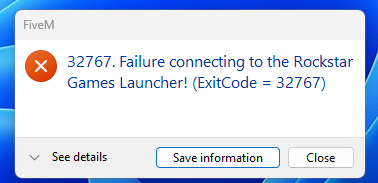
This happens before joining any server. I cannot open FiveM at all.
Error screenshot(s)
Windows version
window 11 pro
System specifications
CPU: r5-5500
GPU: rtx 5050
RAM: 32GB
Storage: SSD
OS: Windows 11 Pro 64-bit
Steam: Installed and logged in
Rockstar Games Launcher: Installed and logged in
FiveM: Latest version
Internet: Home internet connection
Antivirus software
Windows Defender (default Windows antivirus)
CitizenFX crash zip file (‘Save information’ on a crash)
CfxCrashDump_2026_02_27_13_48_45.zip (63.7 KB)
