Early-exit trap

What is the issue you’re having?

Hello,
Sometimes the game crashes with the title “Early-exit trap” — this happens either before entering the game, during the script loading screen, or unexpectedly while playing.
I’ve attached the crash dumps as attachments for review.

What have you tried already to fix the issue?

To try and fix the issue, I’ve done the following steps:

Uninstalled and reinstalled FiveM completely

Verified my GTA V game files through the launcher

Removed all GTA V mods (if any were installed)

Deleted all FiveM mods

Wiped all FiveM data and reinstalled from scratch

Edited the CitizenFX.ini file as part of troubleshooting

Checked, uninstalled, and reinstalled all my drivers (including GPU, chipset, etc.)

Changed the Windows power plan settings

Checked my internet connection (but the issue doesn’t seem to be related to connectivity)

Despite trying all these steps, the issue still persists and hasn’t been resolved.

What server did you get this issue on?

I tried on multiple servers, but the issue happened on all of them: XEN RP Racon RP

Windows version

Windows 11 23H2

System specifications

Processor (CPU): Intel Core i7-14700K
Graphics Card (GPU): NVIDIA GeForce RTX 3060 Ti
RAM: 32 GB DDR5
Storage: 1 TB M2 SSD
Operating System: Windows 11 Pro

Antivirus software

Even though I disabled Malwarebytes, the issue still persists. ChatGPT’ye sor

CitizenFX crash zip file (‘Save information’ on a crash)

CfxCrashDump_2025_08_07_18_47_43.zip (2.11 MB)
CfxCrashDump_2025_08_07_19_15_14.zip (1.92 MB)

Log files

CitizenFX_log_2025-08-07T191028.log (54.1 KB)
CitizenFX_log_2025-08-07T192112.log (63.7 KB)
CitizenFX_log_2025-08-07T190436.log (46.6 KB)
CitizenFX_log_2025-08-07T191115.log (764 KB)

Additional comments

pls help

1 Like

Hello, this is a friendly reminder because this is your first time creating a topic (or it has been a while since your last topic) in this category.

Please note that most of the support is provided by the Cfx.re community on a voluntary basis. We ask you to be patient; there is no guarantee we have a solution to your problem(s). To avoid unnecessary/duplicate topics, please browse the forums before creating a topic.

To improve your chances of your issue(s) being solved, please provide as much information as possible about the issue(s) you are having. Also —whenever possible— please use the template given to you when creating a topic.

Thanks for keeping these forums tidy!
:mascot:

Dealing with the same exact issue I’ve heard every solution in the book not one has worked and no one has a straight answer to a solution. I’ve made a support request they’ve told me to come here. I have looked everywhere on here to look for an answer and nothing.

1 Like

Have you both tried the following:

Hey! Let’s try to get to the bottom of your early exit or crashing issue on FiveM. Please answer the following to help us figure out what’s going on:

  1. System Info
    BIOS Version and Date
    Press Windows key → type System Information → press Enter
    Look for these fields:
    BaseBoard Manufacturer
    BaseBoard Product
    BaseBoard Version
    BIOS Version/Date
    Those three lines together give you the motherboard brand and model.

Helpful guide:
https://support.lenovo.com/gb/en/solutions/ht070218-how-to-check-your-bios-version-on-windows-7-8-and-10

  1. CPU and GPU Models
    We need your processor and graphics card info.

How to check:
Open Task Manager with Ctrl + Shift + Esc
Go to the Performance tab
Under CPU and GPU, you’ll see the exact model names

  1. Are your GPU drivers fully updated?
    Let us know if you’ve recently checked and updated your graphics drivers.

If not, here are the official download pages:
NVIDIA: Download The Latest Official NVIDIA Drivers
AMD: https://www.amd.com/en/support
Intel: https://www.intel.com/content/www/us/en/download-center/home.html

Optional method:
Right-click the Start button → Device Manager → Expand “Display adapters” → Right-click your GPU → Update driver
Have you updated your BIOS before?
Let us know if you’re using the original BIOS version or if you’ve flashed it before.

Why this matters: Some BIOS updates fix compatibility and crash issues with newer hardware or Windows versions.

BIOS update guides by brand:
ASUS: How to Update BIOS with ASUS Firmware Update/EZ Flash | Official Support | ASUS Global
MSI: https://www.msi.com/support/technical_details/MB_BIOS_Update
Gigabyte: How to update BIOS on a Gigabyte motherboard | CORSAIR
ASRock: ASRock > Support

For prebuilt systems like Dell, HP, or Lenovo, go to their official support site and search for your exact model.

  1. System Setup
    Did you build this PC yourself or is it a prebuilt system?
    If it’s prebuilt, include the full make and model (example: Dell XPS 8940, HP Pavilion Gaming Desktop TG01)

  2. What version of Windows are you on?
    Press the Windows key, type winver, and press Enter. A window will pop up with your version.

Example:
Windows 10 Version 22H2
or
Windows 11 Version 23H2

  1. Have you run a malware or virus scan recently?
    Let us know if you’ve done a full system scan with Malwarebytes or another antivirus. If not, it’s a good idea to do so just in case something is interfering with FiveM.

Download link:

After installing, run a full system scan, not just a quick one.

  1. Have you done a RAM check using Windows Memory Diagnostic?
    Sometimes bad RAM causes random crashes or early exits.

How to run it:
Press Windows key → type Windows Memory Diagnostic → click it
Choose Restart now and check for problems

More info:

Your PC will restart and run the memory test. Let us know if any errors showed up.

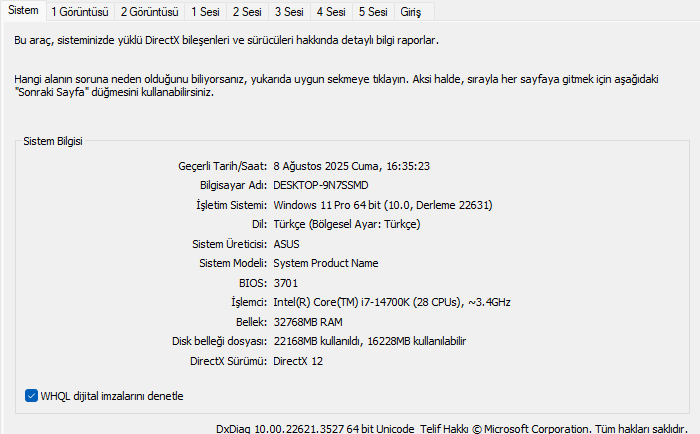
  1. Can you run use Windows Key + R, and type in the run box dxdiag, allow it to load, and then send the screenshot of the final result here.

  2. Can you disable any antiviruses and or firewall, and list which one you use if any.

  3. Generate a task list, send it here, to do this

Open Command Prompt as Administrator, run command, send the file here from downloads folder called tasklist.txt

tasklist > "%USERPROFILE%\Downloads\tasklist.txt"

Once you’ve gathered all that info, post it back so we can help troubleshoot more accurately. Let’s get it sorted.

The normal stuff I send to people in the support Discord, a lot of the time we find it’s either due to malicious software they have on their computer causing the problem, in which case sometimes is to the point of damage where the OS is not easily repaired, and is worth a factory reset, they then find it works after this.

Or due to an outdated BIOS or issues re; CPU usually when overclocking/underclocking, some weird issue with CPU threading which causes FiveM to trip out, which we then get them to underclock slightly and that resolves it, obviously this is the last case things of checking before everything else.

1 Like

Hi, thank you so much for your response — I really appreciate it. My Discord is @levitieanrossi, could you send me a request? Some of the information you asked for is sensitive, so I’d prefer to share it with you there.

System Info

  • BaseBoard Manufacturer: ASUSTeK COMPUTER INC.
  • BaseBoard Product: ROG STRIX Z690-E GAMING WIFI
  • BaseBoard Version: Rev 1.xx
  • BIOS Version/Date: American Megatrends Inc. 3701, 28.06.2024

CPU and GPU Info

  • Intel(R) Core™ i7-14700K
  • NVIDIA GeForce RTX 3060 Ti

GPU Drivers

  • All drivers are fully updated.

BIOS Version

  • I’m using the original BIOS and it is already updated.

System Type

  • Custom-built (self-assembled) PC.

Windows Version

  • Windows 11 Version 23H2

Malware Scan

  • I already use Malwarebytes and have scanned the system.

Windows Memory Diagnostic

  • (Not specified — let me know if you want to add this)

dxdiag

  • I’ve also attached a screenshot from dxdiag.

Antivirus

  • I tried turning off and on my antivirus, but it didn’t make any difference.

Task List

  • I’ve attached the tasklist.txt as well.

tasklist.txt (23.2 KB)

I do have Discord, and you could have sent it’s the same as my forum user

I’ll review through the information and get back to you soon

okey i waiting and sended friend request

Does anyone know?

I updated the BIOS and it worked!

Solution: BIOS UPDATE

Many thanks to @JamesUK for his help!

I have also encountered the exact same problem, and after asking people around me, I found that this problem has been occurring for several months. But the official has not provided any solution, I don’t understand why.

i did update the bios and nothing changed

1 Like

This issue is 90% hardware-related.

how do you go about this?

This topic was automatically closed 30 days after the last reply. New replies are no longer allowed.