We are pleased to share the third entry in our FiveM for GTAV Enhanced development update series, which includes early access release details.
Today, we are sharing progress on networking improvements, scripting runtimes, server-side performance, developer tools, and more.
Improving the Installation Process
FiveM for GTAV Enhanced introduces a new installer that gives you more control over how and where the client is set up.
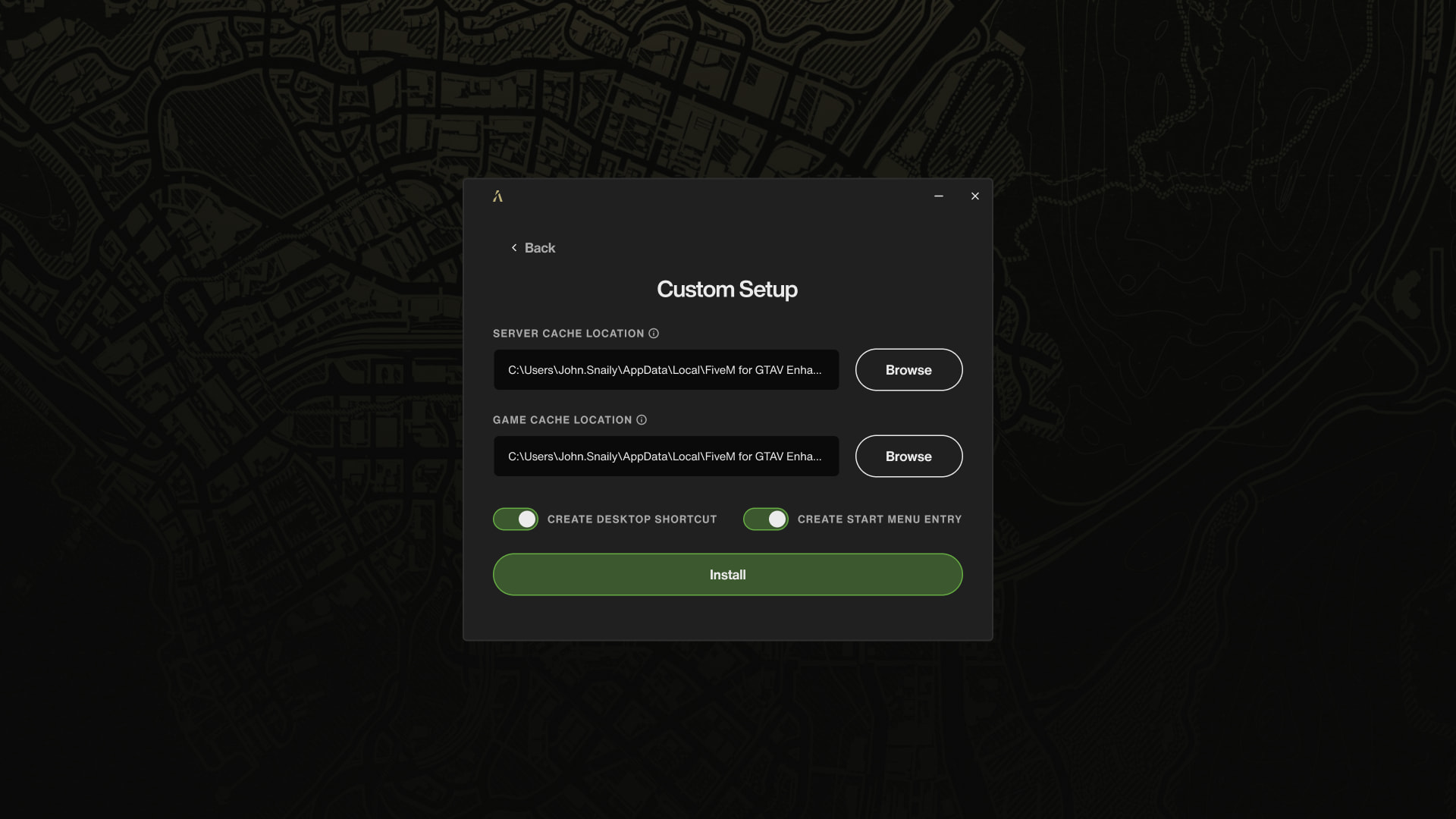
You can choose a separate folder or drive for cached server files and have the option to create Desktop and Start Menu shortcuts during setup.
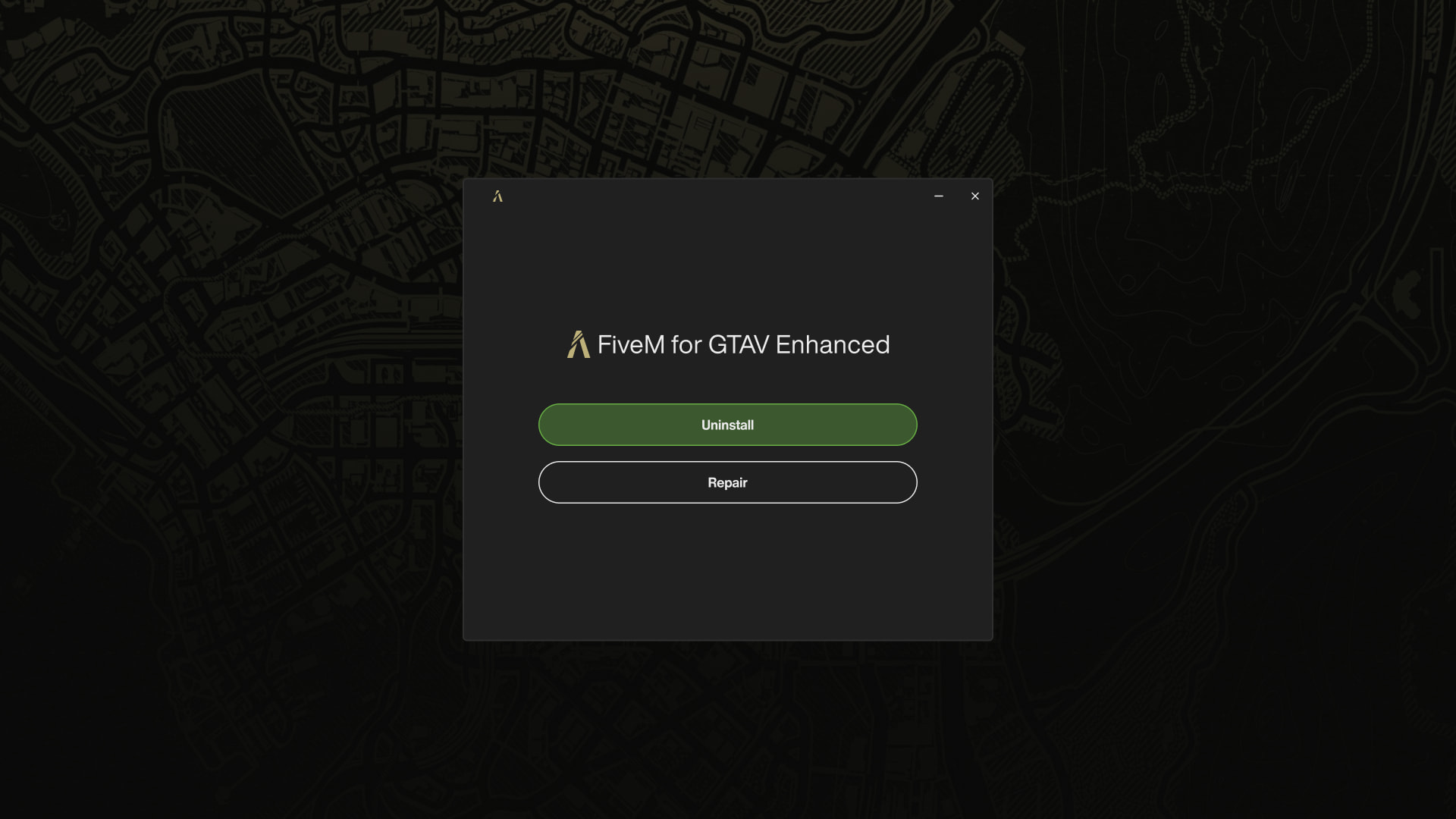
The installer also supports uninstalling and repairing your current installation. As with FiveM today, you can still remove it directly from Windows’ app management interface.
Continued Networking Improvements
In our first development update, we shared details about the first wave of networking performance improvements introduced in FiveM for GTAV Enhanced. Since then, we’ve continued to optimize and refine the synchronization between client and server.
As part of these optimizations, we removed our reliance on third-party libraries for synchronization frames. Sync data is now transmitted as raw UDP packets (with ENet still handling event-based communication), which gives us full control over the synchronization layer and opens the door to future I/O optimizations like Registered I/O (RIO) on Windows and io_uring on Linux.
This provides greater control over our networking stack and allowed us to significantly increase the network synchronization tick rate. Server operators can now configure it up to 120 updates per second, up from the previous 30 (or 40 with sv_useAccurateSends enabled) on FiveM for GTAV Legacy. The higher tick rate reduces the delay between a player’s action and other players seeing it, which matters most in PvP scenarios where precise timing and accurate hit detection are everything.
Note: The performance comparison graphs from our first development update were already captured with OneSync running at 120 ticks per second. The bandwidth and packet rate improvements shown there are what server operators can expect at full tick rate.
We’ve also improved reliability under poor network conditions. Better retry logic keeps synchronization stable under higher packet loss, and we’ve fixed issues with server-side entity creation that could previously result in invisible entities for connected players.
Entity culling (the process that determines which entities each player can see and how important they are) has also been improved. Previously, it ran on the sync thread and could only process around 16 players per tick. On a server with thousands of players at 30 Hz, it could take several seconds to cycle through everyone, causing entities to visibly pop in with a delay. Culling now runs across multiple cores inside the sync pipeline, so entities appear around players much faster even on highly populated servers.
Our internal tests showed strong results, with noticeable improvements in synchronization stability and bandwidth efficiency over Legacy. With these foundations in place, we’re now looking to push beyond the current 2,048-player cap on a single server. We’ll be scheduling public playtesting sessions in the coming weeks to test at higher player counts. Stay tuned for how to participate.
Scripting Runtimes Updates
In our second development update, we announced .NET 10 support for C# developers. FiveM for GTAV Enhanced also updates the JavaScript runtimes: NodeJS 26 on the server, V8 14.6.202 on the client.
State bags have also seen improvements. In FiveM for GTAV Legacy, all values were replicated regardless of intent, and change listeners could fire even when the entity didn’t exist on the receiving end. In FiveM for GTAV Enhanced, only values marked as replicated are sent over the network, change listeners only fire when the entity exists, sets are 10x faster on average, and networking overhead is lower with fewer hitches.
Cfx Server
FiveM for GTAV Enhanced ships with an updated server component under a new name: Cfx Server. It will be available as a separate download from the previous FXServer artifacts when early access launches, with txAdmin still embedded so the setup experience remains the same.
We’ve made improvements across all platforms: memory allocation per player and per entity has been optimized (reducing RAM usage by up to 50%), and CPU usage is lower in certain scenarios. Linux builds continue to use Alpine rootfs, so all requirements remain the same as with FiveM for GTAV Legacy. We also plan to offer an official Docker image, with more details to follow later.
Resource Cache Management
In FiveM for GTAV Legacy, every resource file you downloaded from any server stayed on your disk forever, even after the server stopped using it or you never went back. This could quietly eat up gigabytes of storage with no easy way to reclaim the space.
With FiveM for GTAV Enhanced, the client now automatically removes cached files that servers no longer serve. Beyond that, we’re planning further improvements: automatic cleanup of cache from servers you haven’t visited in a while, and a cache management view in the game client settings so you can see exactly how much space is being used and take action on it.
Revamping Developer Tools
The developer tools from FiveM for GTAV Legacy are being reimplemented for the Enhanced client, and we’re taking the opportunity to improve them along the way.
While not everything is in its final state yet (e.g., you can’t drag tool windows out into separate panels), the core functionality is in place and usable.
Developer Mode
Moving forward, client development tools will only be available on servers that explicitly enable developer mode. This keeps production servers clean and ensures dev tools aren’t exposed to players.
There are two ways to enable it:
- Set the convar
sv_devmodeto enable development tools for everyone on the server. Servers running in this mode are limited to eight player slots to prevent production use. - Inside
deferrals.handover, grant developer mode to individual players, letting your developers use the tools without affecting the rest of your player base.
Perfetto Integration
We’ve replaced the legacy profiler backend with Perfetto, giving you a modern tracing UI to inspect server and client performance. The commands remain the same:
profiler record <duration>
profiler save <filename>.json
Traces are saved to the profiler/ folder inside your FiveM for GTAV Enhanced installation directory. You can then open the resulting JSON file directly in Perfetto UI for detailed timeline analysis.
Expanded Prometheus Metrics
In FiveM for GTAV Legacy, the /perf endpoint only exposed three metrics: tick time histograms for the main, network, and sync threads. That was useful for spotting hitches but gave limited insight into what was happening inside your server.
In FiveM for GTAV Enhanced, the metrics endpoint now exposes over 80 individual metrics, including:
- UDP packet counts, packet pool usage per type, peer counts, and invalid packet tracking
- OneSync entity count, sync tree count, blip count, state bag counts, world grid, and routing bucket data
- Handshake counts and failures, challenge requests, rate limiting, and auth ticket state
- JavaScript and Lua memory usage
- HTTP endpoint request and rate-limit counts
- KVP database size, NetID usage, TCP connections, event loop queue depths, and RCON activity
- The same svMain, svNetwork, svSync thread tick time histograms as Legacy
All metrics are Prometheus-compatible and can be scraped into any monitoring stack that supports the exposition format.
Early Access Release Date
We’re excited to announce that FiveM for GTAV Enhanced will release in early access on July 21, 2026. As with any early access launch, we expect to continue identifying and resolving issues and look forward to working closely with the community to improve the platform.
Thank you for your continued support.





