 Description
CY-Itemscreator is a comprehensive ingame admin panel that allows you to create, edit, test, and manage items directly from within the game - no server restarts, no manual SQL, no hassle.
Built specifically for VORP Framework, this tool features a beautiful Western-themed UI that perfectly matches the RedM aesthetic. Whether you’re setting up a new server or managing an existing one, this panel will save you countless hours of work.
 Features
 Core Features
| Feature | Description |
|---------|-------------|
| Ingame Item Creation | Create new items with a full GUI - no SQL knowledge required |
| Direct Database Insert | Items are instantly written to your database |
| Live Preview | See exactly how your item will look before creating it |
| 8 Item Templates | Pre-configured templates for Food, Drinks, Weapons, Materials, Medicine, Clothing, Tools, and Collectibles |
| Instant Testing | Test items immediately by adding them to your inventory with one click |
| Item Manager | Browse, search, edit, and delete all existing items |
| Icon Upload | Drag & drop icons directly into the panel - automatically saved to your inventory folder |
| Permission System | Configurable admin groups and Steam ID whitelist |
 User Interface
-
Western-Themed Design - Matches the RedM/RDR2 aesthetic perfectly
-
Responsive Layout - Clean and intuitive interface
-
Tab Navigation - Easy switching between Create and Manage modes
-
Real-time Updates - Preview updates as you type
-
Search Functionality - Quickly find items in large databases
 Quality of Life
-
ESC to close panel
-
Form validation with helpful hints
-
Notification system for success/error feedback
-
Auto-reload attempt after creating items
-
Export functions for integration with other scripts
 Screenshots
Create Tab - Item Creation
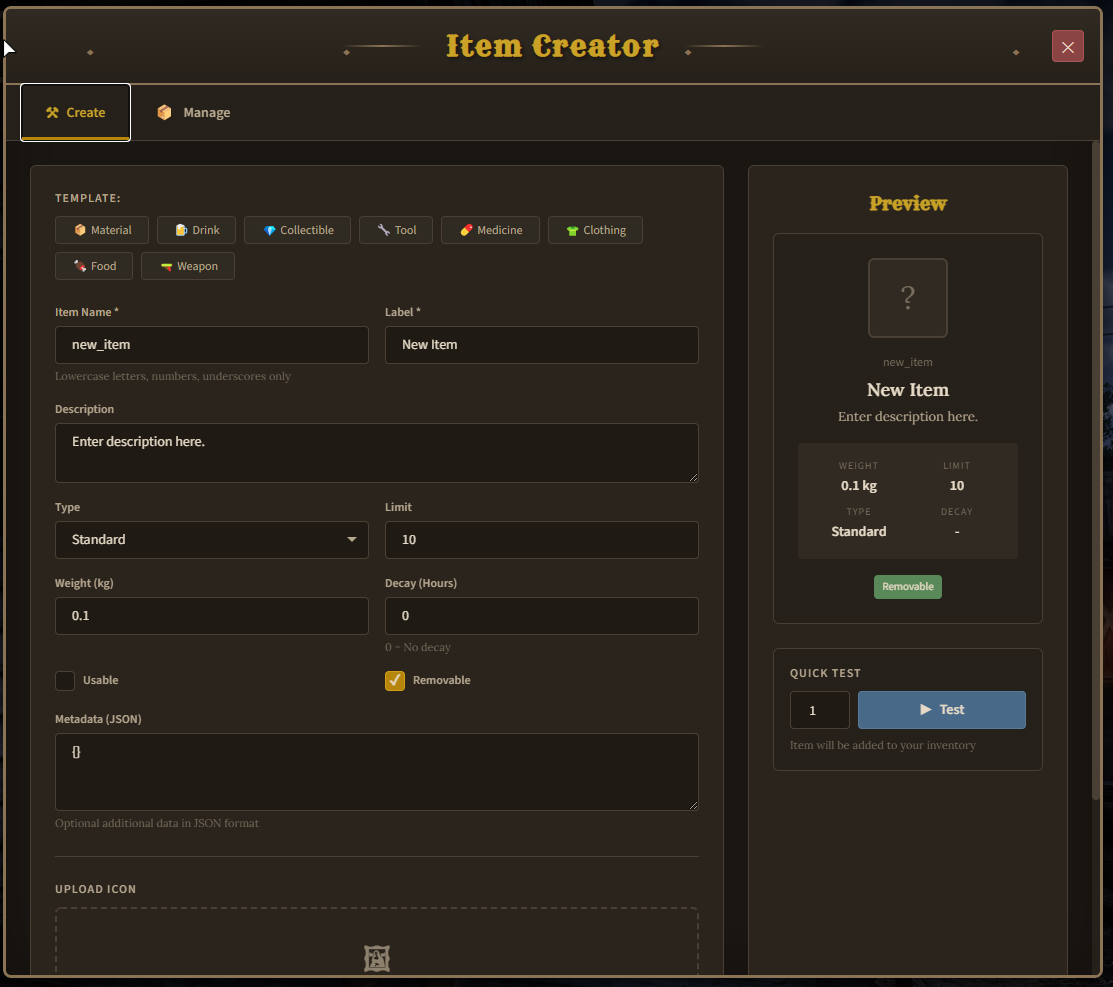
Full item creation form with live preview
Templates

8 pre-configured templates for quick item creation
Manage Tab - Item Management
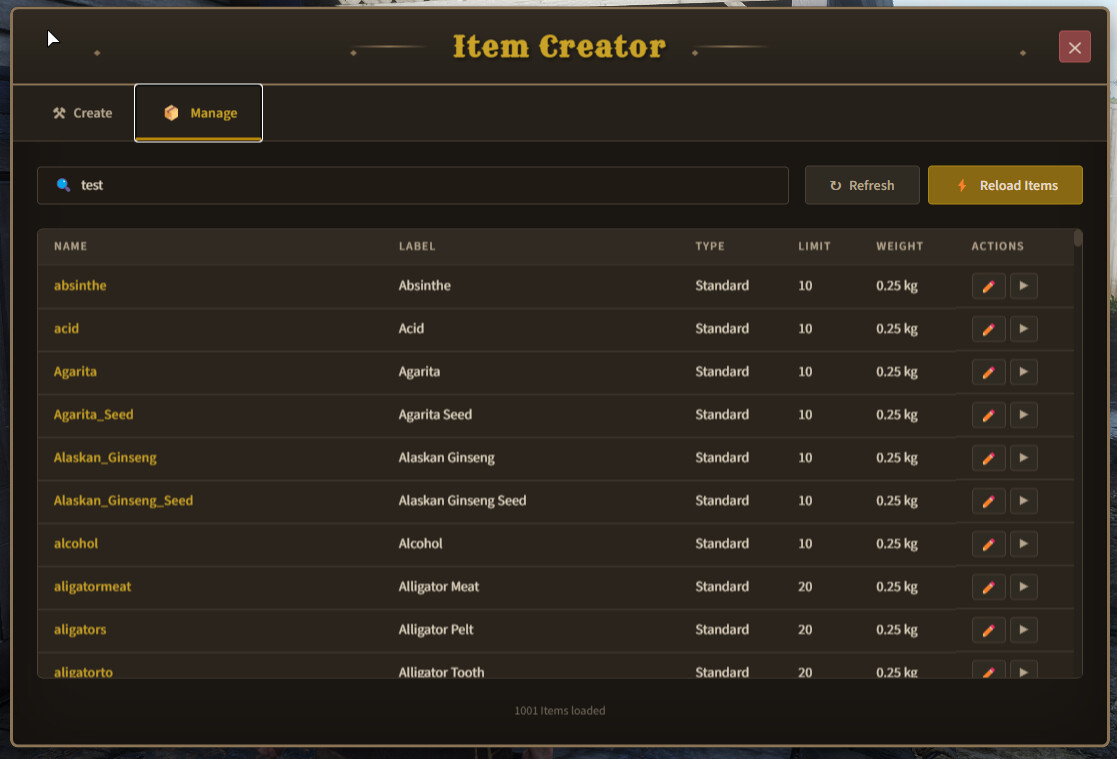
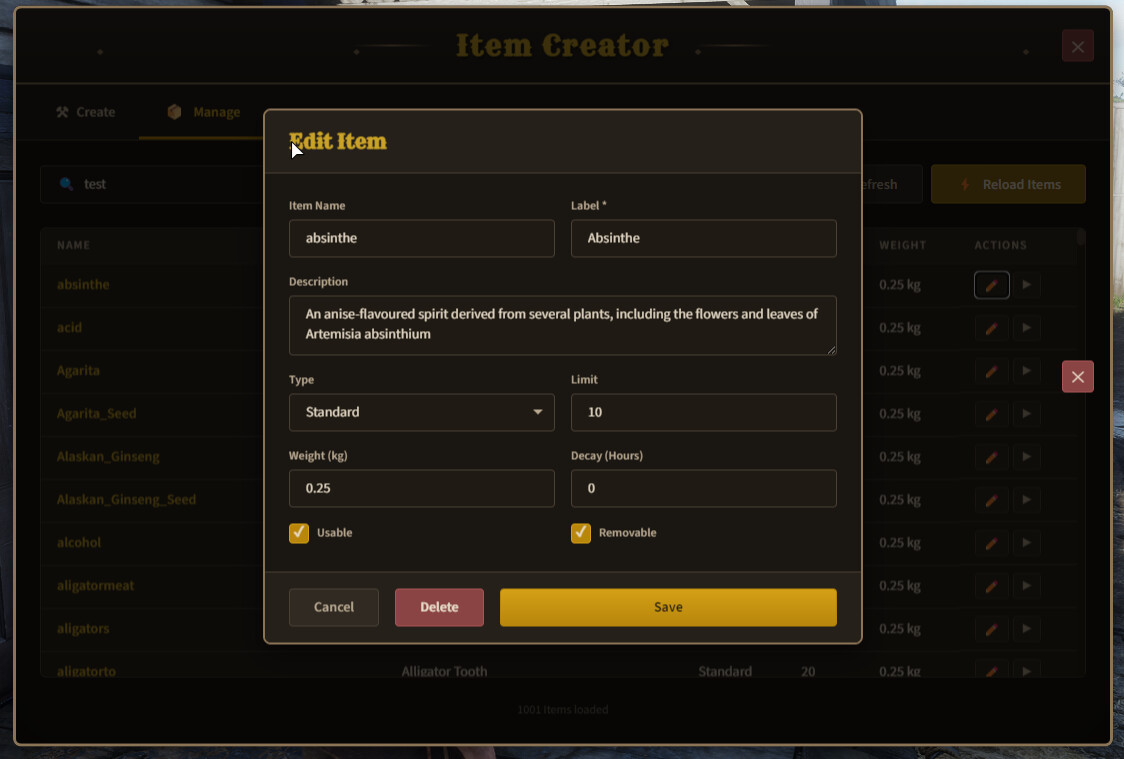
Browse, search, edit, and delete items
Live Preview
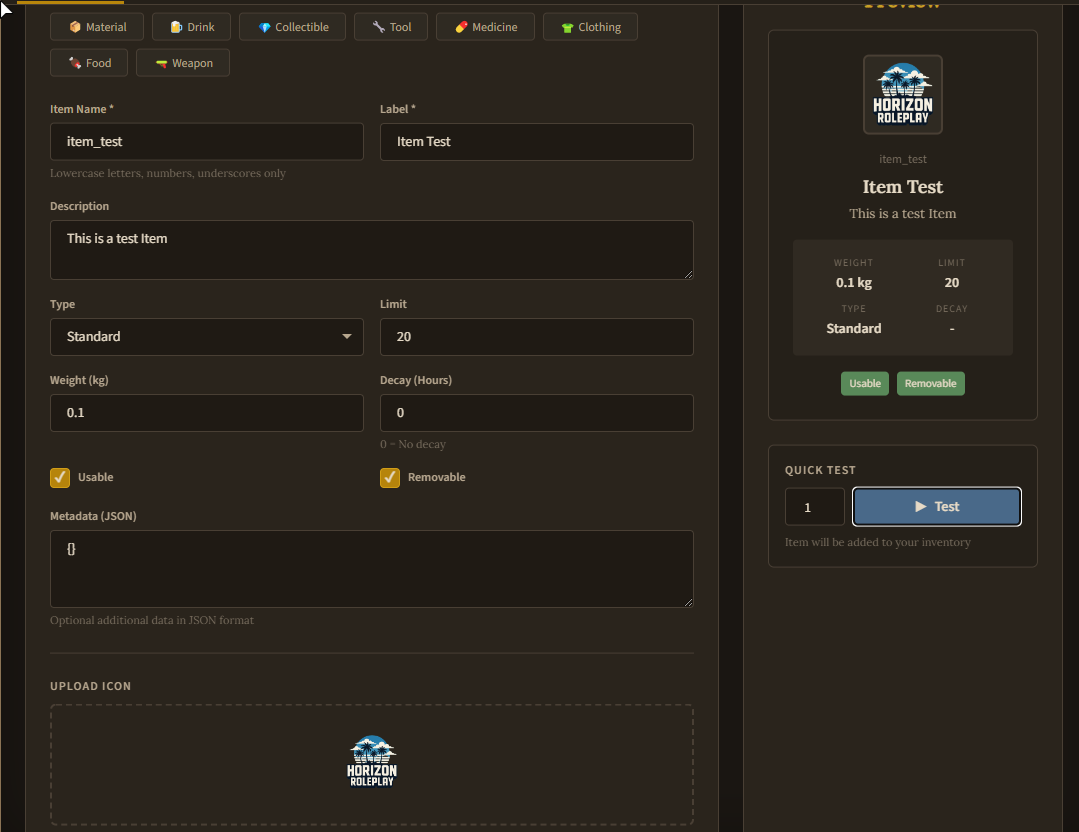
Real-time preview showing how your item will look

 Item Templates
The panel includes 8 pre-configured templates to speed up your workflow:
| Template | Default Values |
|----------|---------------|
|  Food | Weight: 0.1kg, Limit: 10, Degradation: 7 days, Hunger +10 |
|  Drink | Weight: 0.2kg, Limit: 10, Degradation: 7 days, Thirst +15 |
|  Weapon | Weight: 1.5kg, Limit: 1, Durability: 100 |
| Material | Weight: 0.05kg, Limit: 50, No degradation |
|  Medicine | Weight: 0.1kg, Limit: 5, Degradation: 30 days, Health +25 |
|  Clothing | Weight: 0.3kg, Limit: 3, Slot-based |
|  Tool | Weight: 0.5kg, Limit: 1, Durability: 100 |
|  Collectible | Weight: 0.01kg, Limit: 99, Rarity system |
All templates are fully customizable in the config.lua file.
 Configuration
-- config.lua

Config = {}

-- ACE Permission
-- Players with this permission can open the panel
-- In server.cfg: add_ace group.admin itemcreator.use allow
Config.AcePermission = 'itemcreator.use'

-- Command to open the panel
Config.OpenCommand = 'itemcreator'

-- Item templates for quick creation
Config.ItemTemplates = {
    ['food'] = {
        name = 'new_food_item',
        label = 'New Food',
        desc = 'A delicious food item.',
        limit = 10,
        can_remove = true,
        usable = true,
        type = 'item_standard',
        weight = 0.1,
        degradation = 168, -- 7 days in hours
        metadata = '{"hunger": 10, "thirst": 5}'
    },
    ['drink'] = {
        name = 'new_drink_item',
        label = 'New Drink',
        desc = 'A refreshing drink.',
        limit = 10,
        can_remove = true,
        usable = true,
        type = 'item_standard',
        weight = 0.2,
        degradation = 168,
        metadata = '{"hunger": 0, "thirst": 15}'
    },
    ['weapon'] = {
        name = 'new_weapon_item',
        label = 'New Weapon',
        desc = 'A dangerous weapon.',
        limit = 1,
        can_remove = true,
        usable = true,
        type = 'item_weapon',
        weight = 1.5,
        degradation = 0,
        metadata = '{"ammo": 0, "durability": 100}'
    },
    ['material'] = {
        name = 'new_material_item',
        label = 'New Material',
        desc = 'A useful material.',
        limit = 50,
        can_remove = true,
        usable = false,
        type = 'item_standard',
        weight = 0.05,
        degradation = 0,
        metadata = '{}'
    },
    ['medicine'] = {
        name = 'new_medicine_item',
        label = 'New Medicine',
        desc = 'A healing medicine.',
        limit = 5,
        can_remove = true,
        usable = true,
        type = 'item_standard',
        weight = 0.1,
        degradation = 720, -- 30 days
        metadata = '{"health": 25}'
    },
    ['clothing'] = {
        name = 'new_clothing_item',
        label = 'New Clothing',
        desc = 'A piece of clothing.',
        limit = 3,
        can_remove = true,
        usable = true,
        type = 'item_standard',
        weight = 0.3,
        degradation = 0,
        metadata = '{"slot": "torso"}'
    },
    ['tool'] = {
        name = 'new_tool_item',
        label = 'New Tool',
        desc = 'A useful tool.',
        limit = 1,
        can_remove = true,
        usable = true,
        type = 'item_standard',
        weight = 0.5,
        degradation = 500,
        metadata = '{"durability": 100}'
    },
    ['collectible'] = {
        name = 'new_collectible_item',
        label = 'New Collectible',
        desc = 'A rare collectible.',
        limit = 99,
        can_remove = true,
        usable = false,
        type = 'item_standard',
        weight = 0.01,
        degradation = 0,
        metadata = '{"rarity": "common"}'
    }
}

-- Item types for dropdown
Config.ItemTypes = {
    'item_standard',
    'item_weapon',
    'item_account',
    'item_ammo'
}

-- Default values for new items
Config.DefaultItem = {
    name = 'new_item',
    label = 'New Item',
    desc = 'Enter description here.',
    limit = 10,
    can_remove = true,
    usable = false,
    type = 'item_standard',
    weight = 0.1,
    degradation = 0,
    metadata = '{}'
}
 Installation
-
Download and extract the resource
-
Place
cy-itemscreatorin yourresourcesfolder -
Add to your
server.cfg:
ensure cy-itemscreator
-
Configure admin permissions in
config.lua -
Restart your server
-
Use
/itemcreatoringame to open the panel
Dependencies
| Dependency | Required |
|------------|----------|
| VORP Core |  Yes |
Yes |
| VORP Inventory | Yes |
| oxmysql | Yes |
 Exports
Integrate with your own scripts:
-- Check if panel is open

local isOpen = exports['cy-itemscreator']:IsOpen()

-- Open the panel (with permission check)

exports['cy-itemscreator']:Open()

-- Close the panel

exports['cy-itemscreator']:Close()
 Database
Uses the standard VORP items table structure:
CREATE TABLE IF NOT EXISTS `items` (

`item` varchar(50) NOT NULL,

`label` varchar(50) NOT NULL,

`desc` varchar(255) DEFAULT NULL,

`limit` int(11) DEFAULT 10,

`can_remove` tinyint(1) DEFAULT 1,

`usable` tinyint(1) DEFAULT 0,

`type` varchar(50) DEFAULT 'item_standard',

`weight` decimal(10,2) DEFAULT 0.10,

`degradation` int(11) DEFAULT 0,

PRIMARY KEY (`item`)

);
 Security
-
Permission-based access - Only authorized admins can use the panel
-
Input validation - All inputs are validated before database operations
-
SQL injection protection - Uses parameterized queries via oxmysql
-
Server-side verification - All operations are verified server-side
 Changelog
Version 1.0.0
-
Initial release
-
Full item creation system
-
8 item templates
-
Item management (edit/delete)
-
Live preview
-
Icon upload
-
Instant testing
-
Search functionality
 Support
If you encounter any issues or have questions:
- Discord: CY DevWorks
 Terms of Service
-
You may use this resource on your server(s)
-
You may modify the code for personal use
-
 You may NOT redistribute or resell this resource
 -
You may NOT claim this as your own work
-
You may NOT share the source code publicly
 Purchase
Price: €41.64

 Credits
-
Development: CY DevWorks
-
UI Design: Western-themed design inspired by RDR2
-
Framework: Built for VORP Framework
Thank you for your interest in CY-Itemscreator! This tool was built with love for the RedM community. If you have any suggestions or feature requests, feel free to reach out!
Required Information
Code is accessible: ☐ Yes  No (Escrow)
Subscription-based: ☐ Yes No
Lines of code (approximately): ~2,500
Requirements:
-
VORP Core
-
VORP Inventory
-
oxmysql
Support: CY DevWorks