What is the issue you’re having?
I am receiving Critical Error CFFFFFFF (0xcfffffff) when trying to launch the Rockstar Games Launcher. The launcher gets stuck on “Establishing connection to Rockstar Game Services,” becomes unresponsive, and displays the error. This prevents me from starting the launcher and playing.
What have you tried already to fix the issue?
I have already attempted the following troubleshooting steps:
Performed a clean reinstallation of the Rockstar Games Launcher, including manual deletion of all cache files (Social Club, Launcher).
Attempted to run the program as administrator.
Checked my Windows user profile: consists only of Latin characters.
Temporarily disabled Windows Firewall.
Flushed DNS and reset Winsock using Command Prompt.
Checked Rockstar Services Status (all were “Up”).
I have also checked for possible OneDrive conflicts.
What server did you get this issue on?
This issue prevents the Rockstar Games Launcher from starting, so I cannot connect to any FiveM server.
Error screenshot(s)
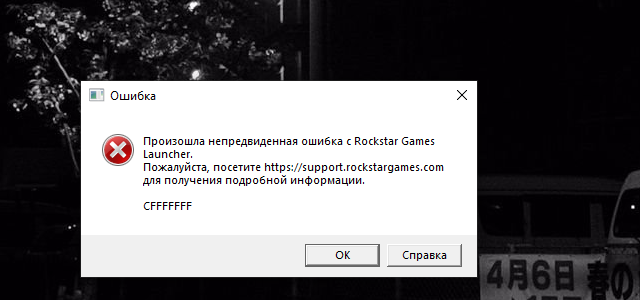
Windows version
Windows 10 Pro, Version 22H2
System specifications
CPU: Intel(R) Core™ i5-9400F CPU @ 2.90GHz
GPU: Radeon RX 580 Series (8 GB)
RAM: 16,0 GB
System Type: 64-bit operating system
Antivirus software
RAV Endpoint Protection
Log files
launcher.01.log (1.16 KB)
prelauncher.log (2.42 KB)
launcher.log (111 KB)
Additional comments
Hello everyone,
I am consistently experiencing a critical error when trying to launch the Rockstar Games Launcher (RGL). The application gets stuck on the “Establishing connection to Rockstar Games services” screen, then becomes “Not Responding” (as shown in the attached screenshot), and finally throws the critical error code: CFFFFFFF.
This prevents me from accessing any of my games.
Troubleshooting steps I have already taken (and results):
I performed a complete clean reinstall of the Rockstar Games Launcher, which included manually deleting all residual files and cache (Social Club, Launcher folders).
I have consistently tried launching the application as an administrator.
No profile conflicts: I have confirmed that my Windows user profile path contains only Latin characters (no Cyrillic or special symbols).
I temporarily tried disabling the Windows Firewall to ensure it’s not a network block.
The issue persists after all these steps. Has anyone encountered and successfully resolved this specific CFFFFFFF error after trying a clean reinstall?
Any advice or information that led to a fix would be highly appreciated! Thank you.
