Crashing when loading into server

What is the issue you’re having?

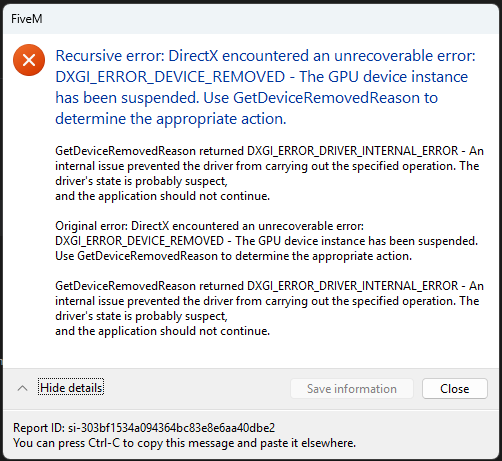
Every time I join a server, FiveM crashes. GTAV itself runs fine via Steam with no issues.

What have you tried already to fix the issue?

Driver updates, driver rollbacks, reinstalling FiveM and GTA, restarting PC, turning down settings in-game, changing to windowed mode

What server did you get this issue on?

ValleyRP

Error screenshot(s)

Windows version

Windows 11 Home

System specifications

Processor AMD Ryzen 5 5600G with Radeon Graphics 3.90 GHz
Installed RAM 8.00 GB (7.34 GB usable)
Device ID 8DB1C533-B52A-4C95-BC5F-F095714178A8
Product ID 00342-21174-75367-AAOEM
System type 64-bit operating system, x64-based processor
Graphics Card AMD Radeon RX 6400

Antivirus software

AVG Antivirus

CitizenFX crash zip file (‘Save information’ on a crash)

CfxCrashDump_2025_02_08_03_18_53.zip (1.65 MB)

Hello, this is a friendly reminder because this is your first time creating a topic (or it has been a while since your last topic) in this category.

Please note that most of the support is provided by the Cfx.re community on a voluntary basis. We ask you to be patient; there is no guarantee we have a solution to your problem(s). To avoid unnecessary/duplicate topics, please browse the forums before creating a topic.

To improve your chances of your issue(s) being solved, please provide as much information as possible about the issue(s) you are having. Also —whenever possible— please use the template given to you when creating a topic.

Thanks for keeping these forums tidy!
:mascot:

Huh. An RX6400 shouldn’t be having these kinds of issues, where are you downloading the drivers from? Also verify that AVG isn’t messing with anything

The drivers are all downloaded directly from AMD’s website. https://www.amd.com/en/support/downloads/drivers.html/graphics/radeon-rx/radeon-rx-6000-series/amd-radeon-rx-6400.html

I tried disabling my antivirus and got the same exact error just now.

Try using older versions, your crash is caused directly by the drivers. Can you recall when the crashes started, and whether you updates anything right before?

It started a few days ago. I think I may have updated my drivers before, but I’m not 100% sure. I’m going to give some older versions a shot and see if that helps, I’ll report back and see what happens!

Fixed! I installed the latest drivers and chose the “factory reset” option for a clean install, now everythings working fine.

1 Like

Nevermind. I’m back to getting the same error after about an hour of gameplay.

Any more insight on this? I got a few hours of normal gameplay and now I’m back to getting the same error message.

Gotta reinstall drivers again, then. If you get the same behavior (eventually, even if not immediate after reinstall like last time) then something is seriously wrong with your system, and at that point I would recommend a clean reinstall of your entire OS, with all files wiped.

This topic was automatically closed 30 days after the last reply. New replies are no longer allowed.