What is the issue you’re having?
When i open fivem it crashes when i’m on the starting page
What have you tried already to fix the issue?
Sure, here’s the list in English:
Crash Signature: legitimacy.dll+30212D
Troubleshooting steps already tried:
Cleared FiveM cache (%localappdata%\FiveM\FiveM.app\data\cache)
Updated GPU drivers (AMD)
Checked/disabled overlay software:
Disabled AMD Adrenalin In-Game Overlay
Disabled AMD “Game tracking and notifications” (Instant Replay related)
Completely uninstalled and reinstalled FiveM
Completely reinstalled GTA V (tested across 3 different launchers: Epic Games, Steam, and Rockstar Games Launcher)
Checked Windows system files: ran sfc /scannow (restarted as required, result: “no integrity violations found”)
Checked Windows Event Viewer (no relevant error found at the time of the crash, aside from an unrelated SysMain/Superfetch entry)
Checked FiveM client logs (crash reproducibly occurs right after INIT_CORE init functions completes, always at the same memory address)
System Info:
GPU: AMD (Adrenalin driver up to date)
GTA V Version: 1.0.3258.0
OS: Windows (add exact build if possible, via winver)
Additional notes:
Crash happens on every launch, fully reproducible, independent of which launcher is used
No third-party antivirus (Windows Defender only)
No mods/ASI files found in the GTA installation folder
What server did you get this issue on?
no server just on the fivem menu
Error screenshot(s)
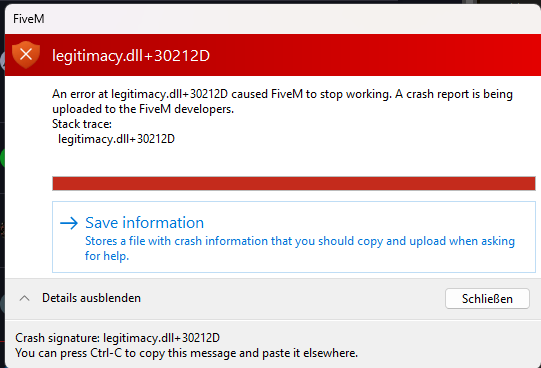
Windows version
Windows 11 Pro 25H2
System specifications
GPU: Ryzen 7900XT
CPU: 9 9850x3d
GTA V Version: 1.0.3258.0
OS: Windows
Antivirus software
windows
CitizenFX crash zip file (‘Save information’ on a crash)
CfxCrashDump_2026_07_05_12_33_23.zip (1.34 MB)
Log files
CitizenFX_log_2026-07-05T122041.log (74.7 KB)
