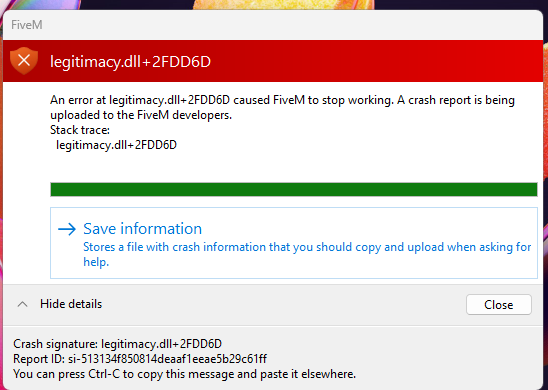
Crash on Startup || legitimacy.dll+2FDD6D

What is the issue you’re having?

Launched FiveM
Crashed
Error message in title
CFX ZIP attached below

What have you tried already to fix the issue?

Tried practically every fix on youtube to include:

Uninstall/Reinstall GTAV and FiveM

Cleared Cache

Deleted CitizenFX (no digital entitlements folders to delete)

Verified game files on steam

connected my email to every account

I don’t know what else to try at this point, worked yesterday just fine and it started today. Thanks for any help.

Error screenshot(s)

Windows version

Windows 11

System specifications

Build:
AMD Ryzen 9 7900X
NVIDIA GeForce RTX 3090
32 GBs of DDR5
Motherboard ROG STRIX X670E-F GAMING WIFI

Antivirus software

N/A

CitizenFX crash zip file (‘Save information’ on a crash)

CfxCrashDump_2026_03_31_23_05_30.zip (312 KB)

Additional comments

All Help is appreciated.

Hello, this is a friendly reminder because this is your first time creating a topic (or it has been a while since your last topic) in this category.

Please note that most of the support is provided by the Cfx.re community on a voluntary basis. We ask you to be patient; there is no guarantee we have a solution to your problem(s). To avoid unnecessary/duplicate topics, please browse the forums before creating a topic.

To improve your chances of your issue(s) being solved, please provide as much information as possible about the issue(s) you are having. Also —whenever possible— please use the template given to you when creating a topic.

Thanks for keeping these forums tidy!
:mascot:

2 Likes

Make sure neither FiveM, nor Rockstar Games Launcher is running.

  • Press Win + R, enter %localappdata%\DigitalEntitlements\ and click OK
  • Back up all the files in there, leave them in a separate directory.
  • Delete all the files inside of DigitalEntitlements.
  • Run Grand Theft Auto V once through the relevant launcher you used to install the game with.
  • Your FiveM client should now use your new identifiers, provided you actually have separate licenses.

You might also have to delete %appdata%\CitizenFX\ros_id.dat which is your Rockstar Social Club identifier.

1 Like

I have the same problem when i start launcher.

I crash automaticly with legitimacy error code

Cool, did you read what’s above?