What is the issue you’re having?
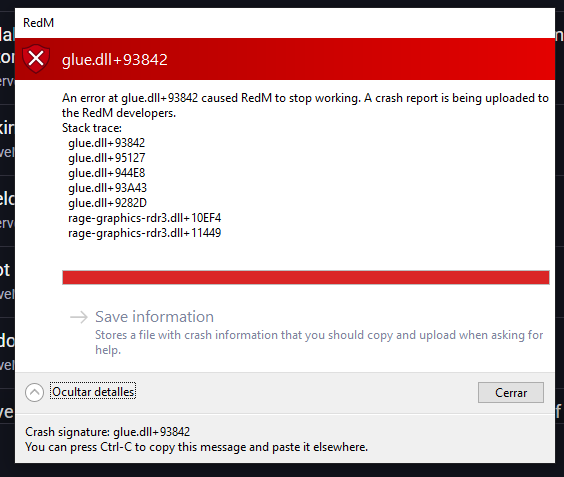
Hello,I am experiencing a persistent crash while trying to launch RedM. The client doesn’t even reach the server list; it crashes immediately during the initial loading screen.Crash Signature: glue.dll+93842Other files involved in Stack trace: rage-graphics-rdr3.dll+10EF4, rage-graphics-rdr3.dll+11449Game Version: Steam original version (The base game runs perfectly fine in Story Mode via Steam).OS: Windows 10 / 11Issue Details:When RedM tries to load, it crashes with the glue.dll error, and simultaneously, the Rockstar Games Launcher closes itself completely in the background. Sometimes it gives an ExitCode = 500 error instead.In the Rockstar Launcher settings, under “Installed Games”, only GTA V is listed. RDR2 is not showing up there, even though it is fully installed on Steam and runs fine from there.What I have tried so far:Reinstalled RedM and RDR2 completely.Deleted Rockstar Launcher local profile and cleared RedM cache.Switched RDR2 graphics API from Vulkan to DX12 in system.xml and via Steam launch options (-dx12).Deleted all sga_ shader files.Ensured neither Steam nor RedM are running as Administrator.Disabled all third-party overlays (Discord, GeForce Experience).Could you please help me figure out what is causing this conflict between RedM, the Rockstar Launcher, and the game graphics engine? Thank you.
Error screenshot(s)
Windows version
windows 10
System specifications
rizen 7 5700g ram 24 , rx580 8gb ssd 1 tb
Antivirus software
no
CitizenFX crash zip file (‘Save information’ on a crash)
CfxCrashDump_2026_07_09_09_10_27.zip (1.86 MB)
