IF YOU DO NOT FILL THIS OUT, YOUR TOPIC WILL BE UNLISTED AND CLOSED
To receive support, please fill out the following template, and remove this top text.
Environment questions
GTA V version: most recent version (reinstalled GTA 5)
Up to date:
Legit copy:
Purchased where - Steam
Windows version: WIN 11 Pro 23H2
Did you try to delete content_index.xml and try again? Reinstalled FiveM completley
System specifications:
CitizenFX crash zip file (‘Save information’ on a crash):
logs/CitizenFX_log files: No Log files were created
.dmp files/report IDs: no crash dump was created
If you can’t start the game at all
it starts
Important parts
What is the issue you’re having?
This ONE specific server, after about 10 - minutes all the textures get unloaded and get “smushy” then the “CNL Error Timeout” occurs
What are you trying to do?
Playing on this specific server, only there this error occurs, (played on more than 10 different servers)
What have you tried already to fix the issue?
Reinstall Windows, Reinstall Steam, Reinstall FiveM, Reinstall GTA V, Updated Drivers (GPU, Updated DirectX, deactivated IPv6 in the network adapter, changed DNS
Error screenshot (if any):
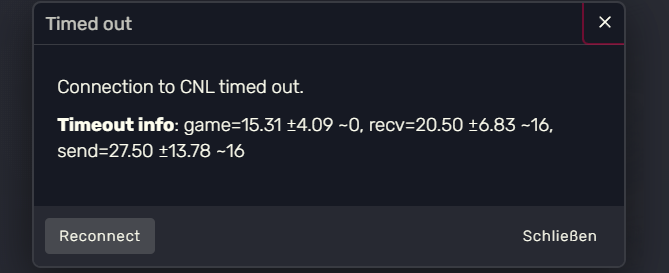
What did you do to get this issue?
play on the server, and run around
What server did you get this issue on? Be specific and name some, ‘all of them’ by itself isn’t useful!
“Rising Sun”
Additional comments
i have read different topics on here and basiclly tried all the soloutions
End note: this CNL time out error only occurs on THIS specific server, in a year of playing this did not happen on ANY other RP server it was played on (about 10 differnt servers)
CRASH DUMP:
CrashDUMP.txt (4.0 KB)
CitizenFX_log_2024-12-10T164101.log (997.0 KB)
