Automatic server backup powershell script i put together as a scheduled task. Easy way to ensure ALL of your server files are being backed up regularly. You can take it 1 step further and put the files into an FTP drive from the backup destination.
Powershell script to auto backup your FiveM Server.
Create a folder in your main server root (where the FX Server Starter Is) called backup. Edit the powershell script and change the source path to the folder you are backing up, for example: $sourcePath = “C:\MyServer\resources”
Change the destination path to where the backup should be stored: $destinationPath = “C:\Backups\ServerBackup_$backupDate”
The _$backupDate appends the backup time to the file.
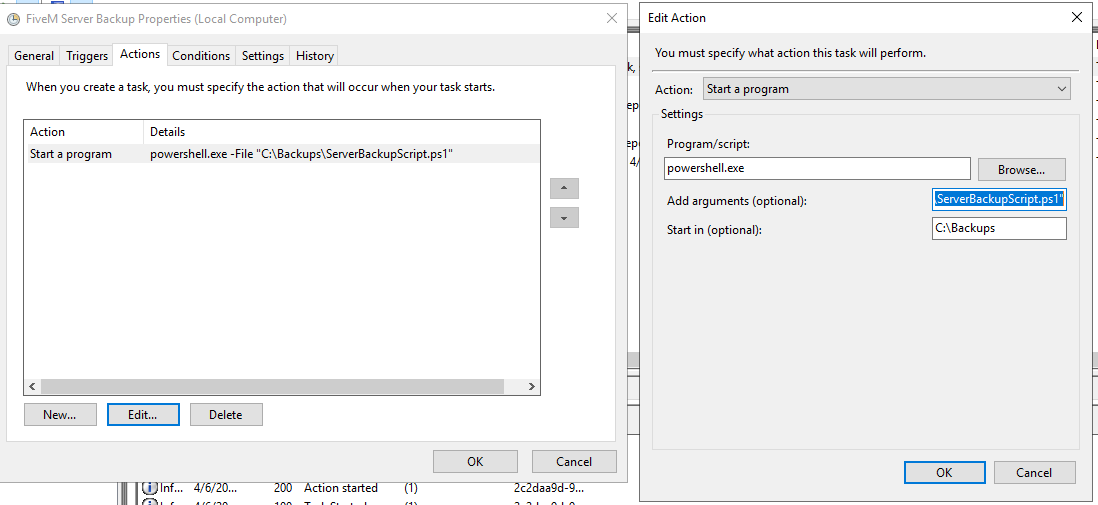
Open Windows Task Scheduler> Right Click > Create Basic Task > Name It > Trigger how often you want the backup to run > Action > Start a Program, type powershell.exe In the Add arguments box type -File “path to script”, for example: -File “C:\Backups\ServerBackupScript.ps1”, then for the “start In” box, put the path where the script runs from.
 [How to Automatically Backup phpMyAdmin |