Environment questions
GTA V version: yes
Up to date: yes
Legit or Pirate copy: legit
Purchased where - Steam/Rockstar Launcher/Epic: Steam/Rockstar
Windows version: 10
Did you try to delete content_index.xml and try again? no
System specifications:
CitizenFX crash zip file (‘Save information’ on a crash):
CfxCrashDump_2023_02_21_20_51_48.zip (1.7 MB)
logs/CitizenFX_log files:
.dmp files/report IDs:
Important parts
What is the issue you’re having?
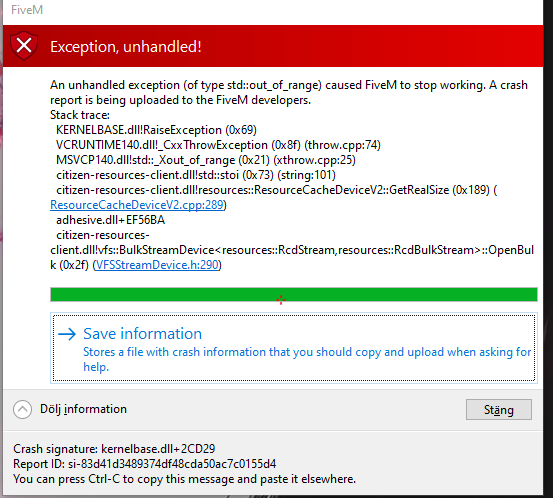
when i start editing a video in rock star editor crashes and i used to edit and film the video before the last update
What are you trying to do?
when i start editing a video in rock star editor crashes
What have you tried already to fix the issue?
deleted the mods files changed the files for FiveM last update
Error screenshot (if any):
What did you do to get this issue?
nothing it pop out when i updated the last update
What server did you get this issue on? Be specific and name some, ‘all of them’ by itself isn’t useful!
connect cfx.re/join/yxyo9m
–
