IF YOU DO NOT FILL THIS OUT, YOUR TOPIC WILL BE UNLISTED AND CLOSED
To receive support, please fill out the following template, and remove this top text.
Environment questions
**GTA V version:**1.0.2545.0.1
**Up to date:**yes
**Legit or Pirate copy:**Legit
**Purchased where - Steam/Rockstar Launcher/Epic:**Epic
**Windows version:**Windows10
Did you try to delete content_index.xml and try again? yes
**System specifications:**Single home
**CitizenFX crash zip file (‘Save information’ on a crash):**Already
**logs/CitizenFX_log files:**Already
**.dmp files/report IDs:**An unhandled exception (of type fmt::v8::format_error)caused FiveM to stop working. A crash report is being uploaded to the FiveM developers. Stack trace: KERNELBASE.dll!RasieException(0x69) VCRUNTIME140.dll!_CxxThrowException(0x8f)(throw.cpp:74) gta-core-five.dll!fmt::v8::detail::do_throw(0x2f)(format.h:87) gta-core-five.dll!fmt::v8::detail::error_handler::on_error(0x72)(format-inl.h:2553) gta-core-five.dll!fmt::v8::basic_printf_contextfmt::v8::appender,char::on_error (0x10)(printf.h:56) gta-core-five.dll!fmt::v8::detail::get_arg(0x83)(format.h:2067) gta-core-five.dll!fmt::v8::detail::vprint::__l2::::operator()(0xd2)(printf.h:382)
If you can’t start the game at all
GTA V folder screenshot:
GTA V/update/x64/dlcpacks screenshot:
Filepath to FiveM folder:
FiveM client folder screenshot:
Which antivirus/firewall software are you using?
Did you try to disable/uninstall your Anti-virus?
Important parts
**What is the issue you’re having?**I was playing on a server and i crashed
What are you trying to do?
What have you tried already to fix the issue?
reinstalling five m
-reinstalling game
Error screenshot (if any):
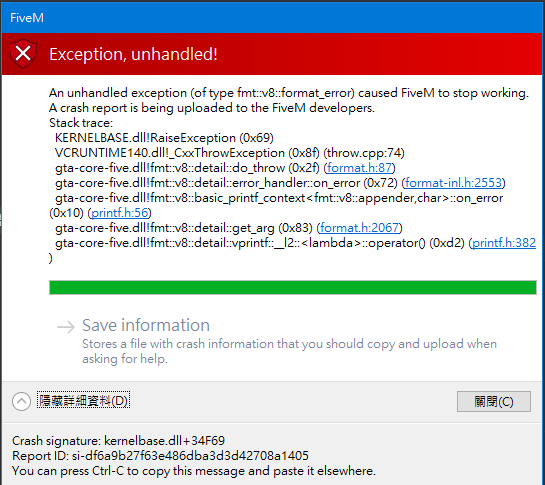
CRASH DUMP:
CfxCrashDump_2022_02_16_09_59_29.zip (1.6 MB)
What did you do to get this issue?
What server did you get this issue on? Be specific and name some, ‘all of them’ by itself isn’t useful!
pg-wuming RP The game crashes in the north central part of the game
