 Advanced Drone Script (Civilian & Law Enforcement)
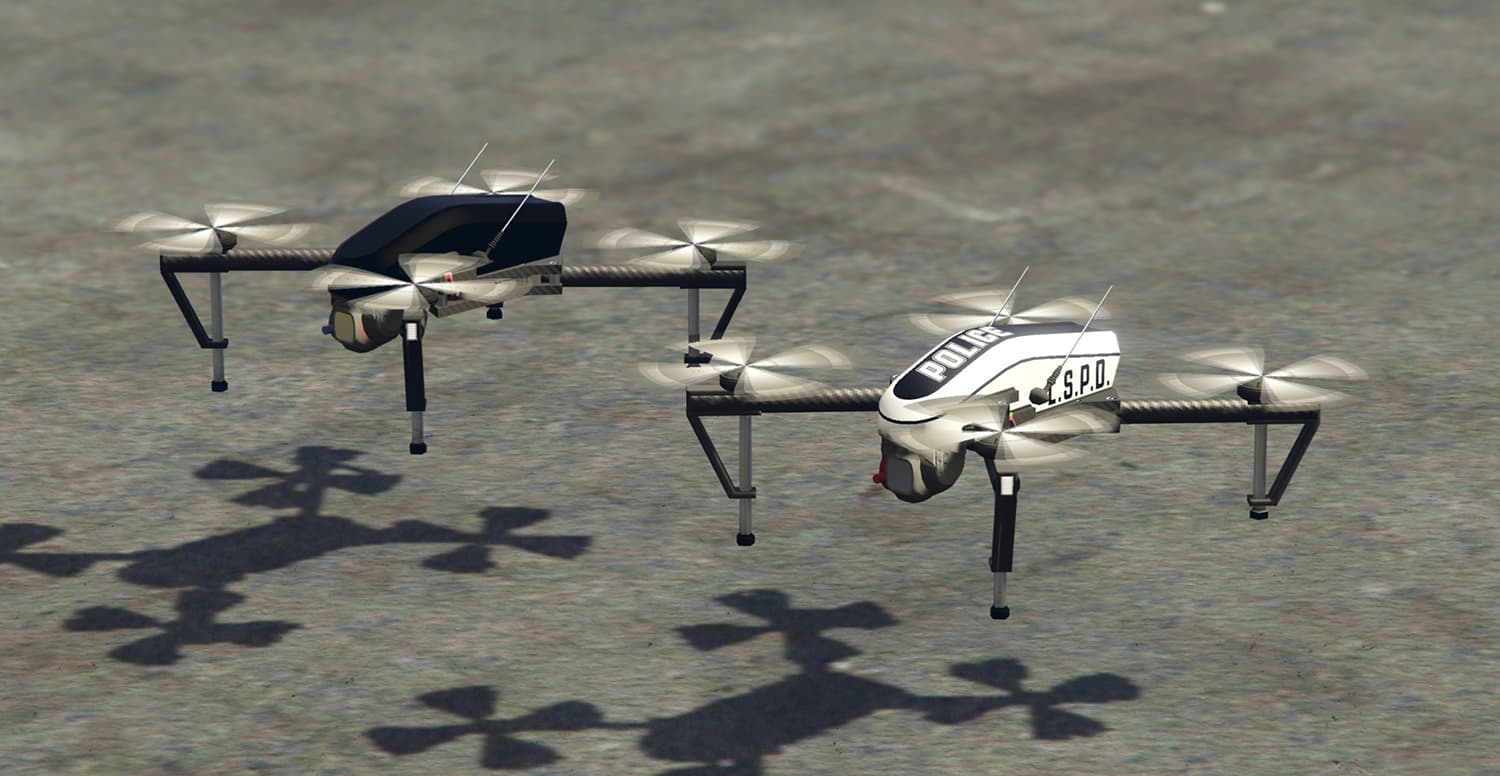
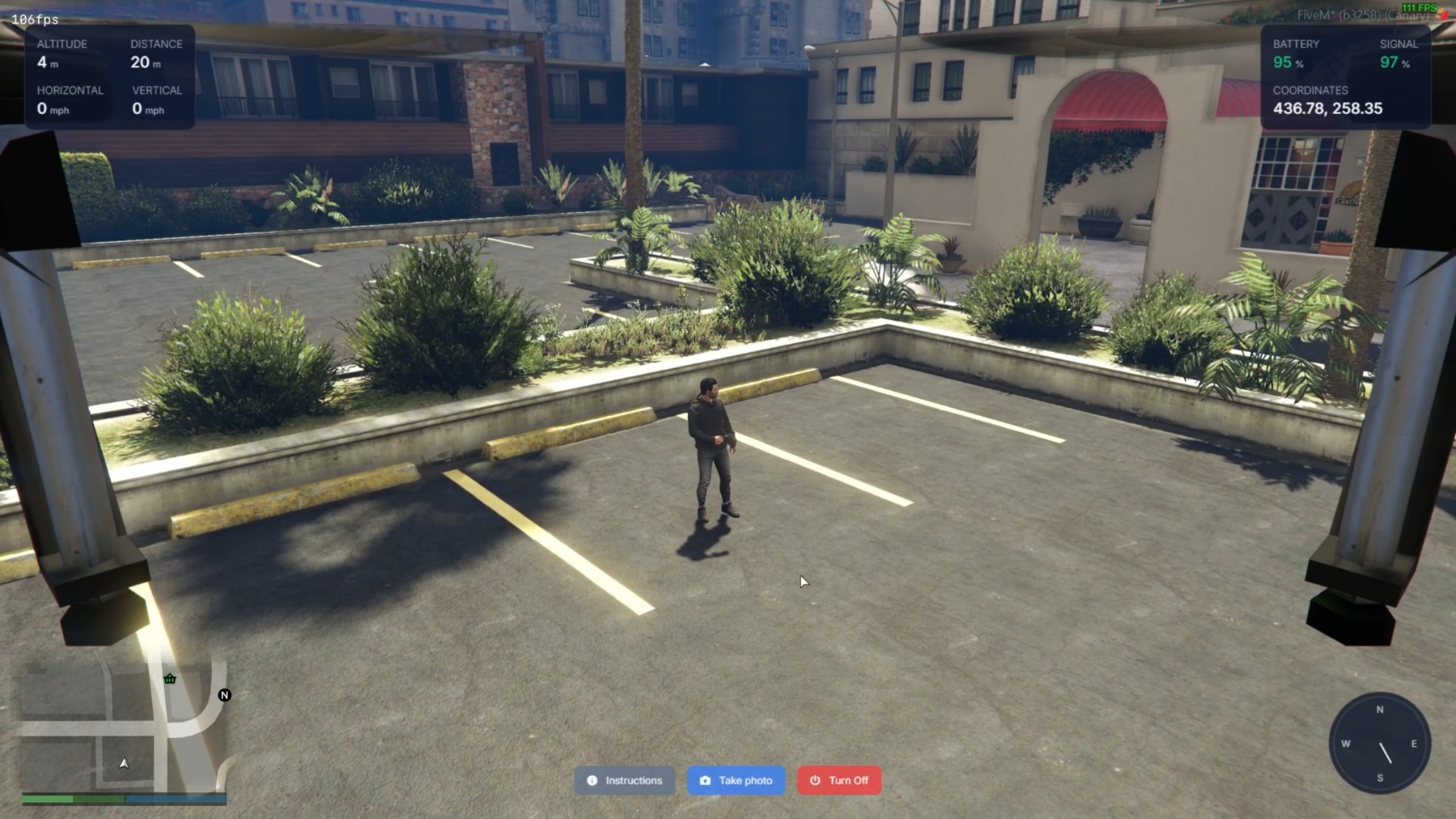
Bring immersive drone functionality to your FiveM server with this advanced drone system. Ideal for surveillance, tactical ops, or civilian exploration. Featuring smooth controls, a detailed and customizable HUD, damage handling, and ability to take pictures, this script enhances RP for both civilians and law enforcement.
 Get it here: gamzkystore.com
 Support: Discord
 Detailed preview: Youtube

Features
- Multiple Drone Types: Includes standard and police drones with unique ranges, flight time, and features.
- Civilian & Emergency Use: Easily restrict drones to jobs or open them up to all players. Fully configurable.
- Realistic Flight Controls: Custom-mapped controls with smooth throttle, yaw, pitch, roll, and camera movement. Also controller compatible.
- HUD Customization: Toggle components like compass, battery status, flight data, screenshot button, and more.
- Damage & Signal System: Drones take damage, show effects when hit or out of range, and can crash if misused.
- Night Vision (Emergency Drone): Enhanced capability for nighttime operations.
- Item-Based Usage: Integrates with inventory systems, making drones real in-game items.
- Command-Based Usage: If you don’t want to use items to activate drones, there is also an option to deploy them using commands.
- Optional Screenshot Feature: Take aerial shots in-game with optional screenshot system integration using Fivemanage.
- Controls: Choose between mouse controlled camera or keyboard (arrows).
Resmon: Idle: 0.00ms - When flying a drone: 0.08ms
Core/framework related functions are still accessible in the encrypted version, feel free to create a support ticket in our Discord in case of questions.
Config
Config = {
    useMph = false,        -- Set to 'true' to use miles per hour instead of kilometers per hour.
    rechargeTime = 240000, -- The time in milliseconds it takes to recharge the drone's battery after it runs out.
    pickupRange = 5,       -- The distance in meters from the player to pick up the drone.
    damageTimeout = 2000,  -- The time in milliseconds before the drone can take damage again after being damaged.
    showEffect = true,     -- Shows a screen effect if the drone is damaged and/or losing signal.
}

Config.MouseControls = {
    enable = true,      -- When enabled, camera is controlled with the mouse and HUD actions use keyboard keys 1-5.
    sensitivityX = 3.0, -- Camera yaw sensitivity when moving the mouse horizontally
    sensitivityY = 3.0, -- Camera pitch sensitivity when moving the mouse vertically
    keys = {
        157,            -- Keyboard 1
        158,            -- Keyboard 2
        160,            -- Keyboard 3
        164,            -- Keyboard 4
        165,            -- Keyboard 5
    },
}

Config.drones = {
    {
        itemName = 'drone',          -- The name of the item that be used in your inventory system.
        removeItem = true,           -- When set to 'true', the item will be removed from the inventory when the drone is spawned, and given back when the drone is picked up.
        -- command = 'drone',        -- Uncomment if you want to use a command to spawn the drone.
        flightTime = 240000,         -- The time in milliseconds the drone can be used before it runs out of battery.
        flyRange = 300,              -- The maximum distance the drone can fly from the player.
        health = 3,                  -- The health points of the drone. The drone will break if it reaches 0 health.
        components = {               -- Controls HUD elements
            ['flightdata'] = true,   -- Flight data (speed, altitude, distance)
            ['compass'] = true,      -- Compass
            ['status'] = true,       -- Battery status, signal & coords
            ['instructions'] = true, -- Instructions button
            ['screenshot'] = true,   -- Screenshot button
            ['nightvision'] = false, -- Night vision button
            ['thermal'] = false,     -- Thermal camera button
        },
        model = 'reh_prop_reh_drone_02a',
    },
    {
        itemName = 'emergencydrone',
        removeItem = true,
        -- command = 'emergencydrone',
        jobs = { ['police'] = 0 },
        flightTime = 240000,
        flyRange = 350,
        health = 4,
        components = {
            ['flightdata'] = true,
            ['compass'] = true,
            ['status'] = true,
            ['instructions'] = true,
            ['screenshot'] = true,
            ['nightvision'] = true,
            ['thermal'] = true,
        },
        model = 'ch_prop_casino_drone_02a',
    },

    -- Alternative models:
    -- xs_prop_arena_drone_01 (Medium size)
    -- reh_prop_reh_drone_02a (Large size, black)
    -- xs_prop_arena_drone_02 (Medium size)
    -- ch_prop_arcade_drone_01c (Small size)
    -- m24_2_prop_m42_drone_01a (Large size, black)
}

Config.Controls = {
    throttle = {
        up = { speed = 5, limit = 100, default = 61, controller = 32 },
        down = { speed = 8, limit = -120, default = 62, controller = 33 },
        reset = 4
    },
    pitch = {
        up = { speed = 5, limit = 300, default = 87, controller = 3 },
        down = { speed = 5, limit = -300, default = 88, controller = 4 },
        reset = 4
    },
    roll = {
        up = { speed = 5, limit = 300, default = 89, controller = 5 },
        down = { speed = 5, limit = -300, default = 90, controller = 6 },
        reset = 4
    },
    yaw = {
        up = { speed = 0.05, limit = 1, default = 52, secondary = 174, controller = 34 },
        down = { speed = 0.05, limit = -1, default = 51, secondary = 175, controller = 35 },
        reset = 0.02
    },
    camRotation = {
        up = { speed = 0.5, limit = 30, default = 172 },
        down = { speed = 0.5, limit = -90, default = 173 },
        reset = -1
    }
}

Config.Animations = {
    ['control'] = {
        dict = 'amb@world_human_tourist_map@male@base',
        name = 'base',
        flag = 51,
        prop = 'p_controller_01_s',
        bone = 28422,
        offset = { 0.0, 0.0, 0.0, 20.0, 0.0, 0.0 },
    },
    ['pickup'] = {
        dict = 'random@domestic',
        name = 'pickup_low',
        flag = 1,
    }
}

Config.Locales = {
    ['not_allowed'] = 'You do not have permission to use this drone.',
    ['cant_use_drone'] = 'You cannot use the drone at the moment.',
    ['battery_almost_empty'] = 'Your drone\'s battery is almost empty. Fly back as soon as possible to safely retrieve your drone.',
    ['battery_empty'] = 'Your drone has crashed. The battery has run out.',
    ['screenshot_copied'] = 'Screenshot link has been copied to the clipboard.',
    ['screenshot_failed'] = 'Failed to take a screenshot. Please try again later.',
    ['screenshot_fmsdk_missing'] = 'Screenshots are enabled but fmsdk is not installed. Please install fmsdk to use this feature.',
    ['screenshot_basic_missing'] = 'Screenshots are enabled but screenshot-basic is not installed. Please install screenshot-basic to use this feature.',
    ['drone_crashed'] = 'Your drone has crashed.',
    ['drone_damaged'] = 'Your drone has been damaged. Further damage will cause the drone to break.',
    ['drone_out_of_range'] = 'Your drone has gone out of range.',
    ['drone_almost_out_of_range'] = 'Your drone is almost out of range. Fly back as soon as possible to avoid losing control.',
    ['drone_exit_title'] = 'Disable Drone',
    ['drone_exit_description'] = 'If you disable your drone now, it will break. Fly back to the starting location to retrieve the drone.',
}
| Code is accessible | No, but there is an unencrypted version |
| Subscription-based | No |
| Lines (approximately) | 1752 |
| Requirements | ox_lib (But can be removed) |
| Support | Yes |