Prototype 3D GPS Route Renderer for FiveM (1.4)
Hi everyone,
I’m sharing a small prototype I built for FiveM: a 3D GPS route renderer.
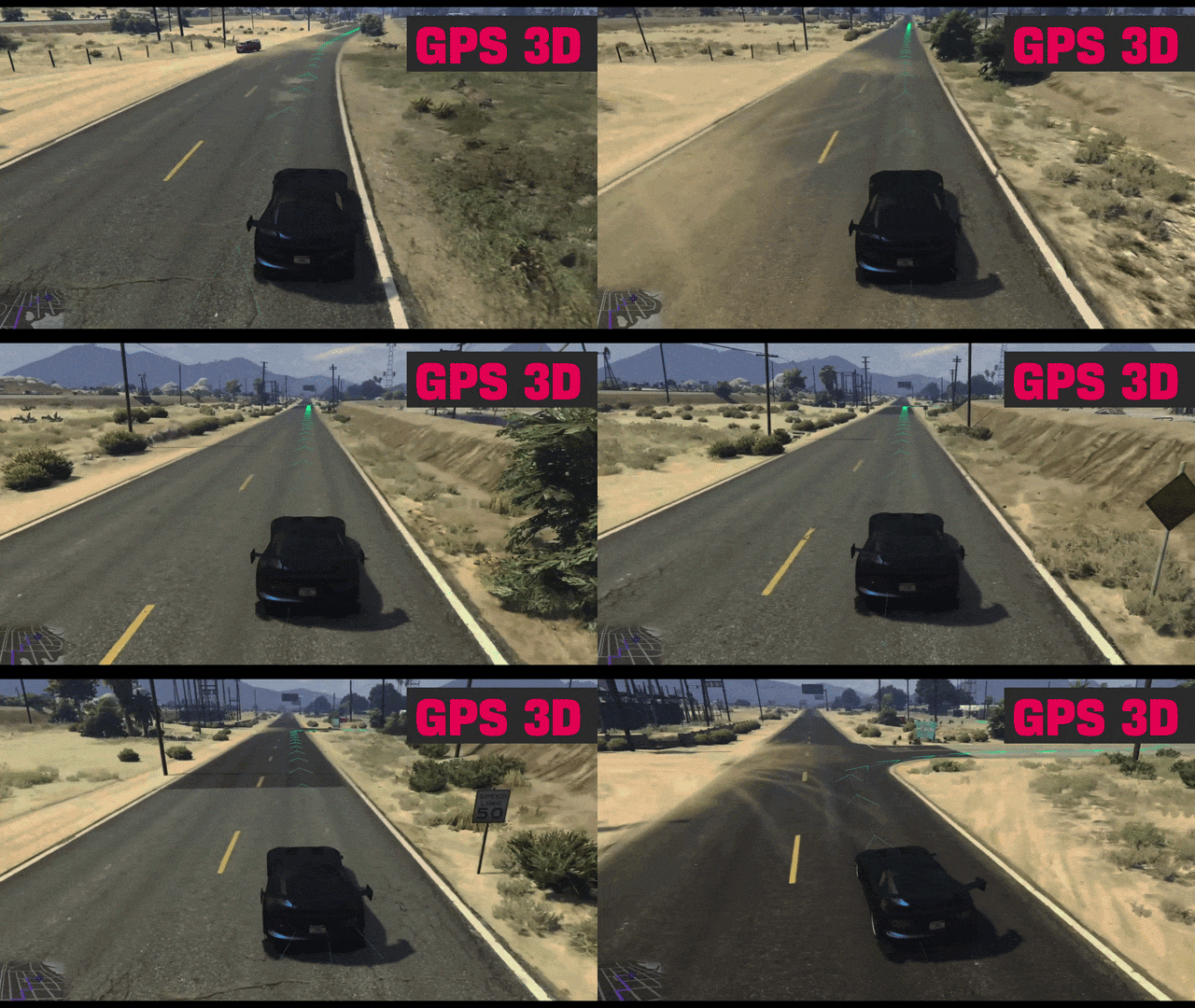
The idea is simple: it reads the active GTA route, samples positions along it using GetPosAlongGpsTypeRoute, and renders a lightweight 3D ribbon trail with directional chevrons above the road.
It’s still a prototype / visual experiment, but it is already functional and may be useful as a base for other routing or navigation ideas.
 The idea of the script is to shift the focal point from the bottom-left corner of the map to the center, giving the player better control and awareness of important nearby elements.
Features
- You have option to enable/disable 90% of features in client.script
- Reads active in-game GPS routes without taking control of them
- Supports both
USERroutes (manual waypoint) andMISSIONroutes (active blip routes) - Samples route positions using GTA/FiveM natives
- Draws a 3D ribbon trail above the road
- Draws directional chevrons using textured route presets
- Includes curve smoothing and junction handling controls
- Supports optional junction filtering to reduce visual clutter
- Uses ground probing and caching to keep the ribbon closer to the road
- Uses speed-based route sampling and update timing for better performance at high speed
- Includes near-car fade for a smoother visual start of the ribbon
- Supports color switching for
USERandMISSIONroute styles - Supports multiple texture presets for the 3D ribbon
- Includes in-game shortcuts for route switching, color cycling, preset cycling, GPS toggle, and FX toggle
- Includes bundled GPS activation/deactivation visual effects and sounds
- Shows an in-world mode hint above the vehicle when switching GPS mode
- Provides exports for enabling, disabling, changing route source, setting tracked blips, changing presets, and changing colors
- Does not delete, refresh, or rebuild external routes from other scripts; it only reads routes that are already active
Non-Intrusive Route Behavior
l2k_gps3d does not take ownership of external route systems.
- It only reads routes that are already available.
- It does not create or control another script’s mission logic.
- It does not clear external routed blips.
- It does not refresh or rebuild another script’s GPS route.
- Commands and shortcuts only affect the 3D ribbon, its style, colors, and bundled visual effects.
This means resources such as delivery, farming, mission, or postal scripts can keep their own route logic while l2k_gps3d only adds the 3D visual layer.
Commands
/gps3d— Toggle the 3D GPS on or off/gps3d_route manual— ForceUSERmode/gps3d_route blip— ForceMISSIONmode if a routed blip exists/gps3d_route toggle— Switch betweenUSERandMISSION/gps3d_route status— Show current source, preset, and route state/gpspreset index|next|prev|status— Change or inspect the current ribbon preset/gpscolordefault r g b [a]— Set theUSERroute color/gpscolormission r g b [a]— Set theMISSIONroute color
Geo Animation Commands (try create new ones)
/geoanim/geoanim on/geoanim off/geoanim status
These control the bundled AR animation module manually when needed.
Shortcuts
All shortcuts require an allowed vehicle and can be disabled in the config.
SHIFT + UP— Switch betweenUSERandMISSIONif another route is availableSHIFT + Y— Cycle the color of the current route sourceSHIFT + LEFT / RIGHT— Cycle the ribbon presetSHIFT + DOWN— Toggle the 3D GPS with cooldown protection when re-enablingSHIFT + U— Toggle extra geo animations used by GPS mode changes and reset the one-shot intro animation
Adding New Chevron Presets and Colors
- Add the new texture inside
stream/chevrons.ytd- use openiv/codewalker explorer - Add a new preset entry in
client.lua
Example:
[11] = {
    name = 'chevron_line_03',
    textureDict = 'chevrons',
    textureName = 'chevron_line_03',
},

1. Change the index number 11+
1. Use Unique name
1. textureDict = ytd file name. dont need change here.
1. textureName = 'chevron_line_03',  the name of texture inside chevrons.ytd. dont use .dds

## routeColorPalette:

1. Add new preset Colors

        { name = 'BLACK', color = { r = 0 g = 0, b = 0, a = 205 } },
 GitHub Download
Installation new 1.4
- Place
l2k_gps3din yourresourcesfolder - Add
ensure l2k_gps3dto yourserver.cfg - Start the server
- Set a normal waypoint on the map/ or mission waypoint
- Backup - we keep 1.2 as zip file if you want
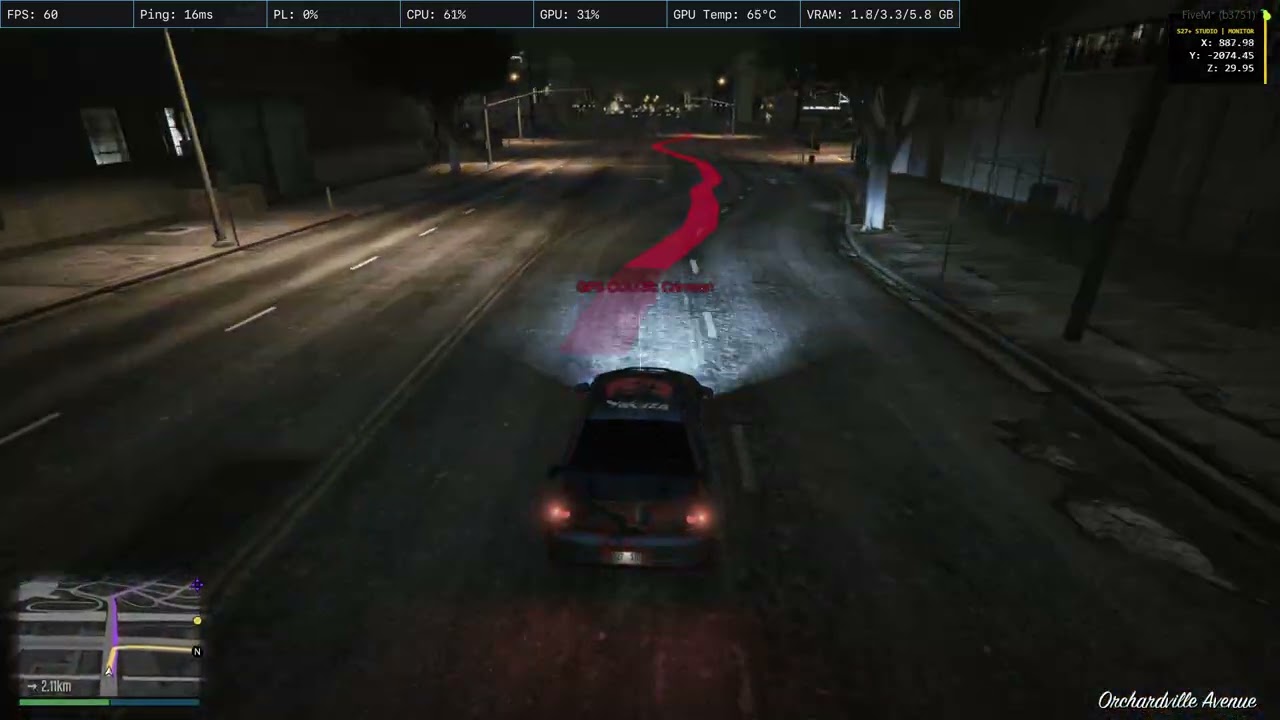
Video update 1.4 better 50% performance
Notes
- This is a visual prototype, not a replacement for the default minimap GPS
- It uses the route already calculated by GTA/FiveM
- It does not take ownership of external route logic
GAME DESIGN TIPS:
- AR Processing Unit: I suggest server owners require a “virtual part” (like an Augmented Reality Processing Unit) to be installed in the vehicle. Players could buy this at mod shops or from specialized groups to keep the UI/UX immersive and part of the world.
- Customization & Economy: Since this is a base framework, I didn’t force a specific interface. If you’re using the rect version, you can add new chevron shapes, different colors, and unique rendering formats.
- Monetization: You can use these visual variations to create different tiers of GPS units with different price points, enriching the server’s economy and overall game design.
UPDATE
1.1 - ADD NEW RENDER: DRAW RECT + UVMAP (WITH PNG CHEVRON .ytd)
UPDATE LOG: 1.2
New
- Added improved route persistence while staying on the current GPS path.
- Added route trim logic for passed points.
- Added route extend logic near the end of the visible path.
- Added per-point ground check support during route calculation.
- Improved off-route rebuild handling.
- Added speed-aware route update tuning.
- Added native Z debug helper for development/testing.
Visual
- Improved overall route stability.
- Reduced route jumping/moving while driving.
- Improved curve and junction behavior.
- Better control over what remains visible behind the vehicle.
Removed / Changed
- Cleaned up internal structure for easier testing and future tuning.
UPDATE LOG: 1.4
PATCH NOTES
1.4.0
Core
-
Reworked the 3D GPS into a cleaner
USERandMISSIONflow. -
USERfollows the player’s waypoint. -
MISSIONfollows an active routed blip from another script. -
multisupport stays disabled by default for a simpler and safer release path.
Visual
-
Ribbon rendering is now the default mode.
-
Added preset switching for different chevron ribbon looks.
-
Added independent
USERandMISSIONcolors. -
Added near-car ribbon fade for a cleaner visual finish.
-
Bundled AR-style geo animation profiles - TURN ON FIRST BOOT, TURN OFF/ON fast
Shortcuts
All shortcuts require an allowed vehicle and can be disabled in the config.
-
SHIFT + UP
Switch betweenUSERandMISSION. -
SHIFT + Y
Cycle the color of the current route source. -
SHIFT + LEFT / RIGHT
Cycle the ribbon preset. -
SHIFT + DOWN
Toggle the 3D GPS with cooldown protection when re-enabling. -
SHIFT + K
Toggle extra geo animations used by GPS mode changes. This also resets the one-shot intro animation so it can be shown again later.
Controls
-
Added shortcut-based route switching, color cycling, preset cycling and GPS toggling.
-
Added optional extra animation toggle with intro reset behavior.
-
Shortcuts only work inside allowed vehicle classes.
Performance
-
Added speed-based route sampling and speed-based route distance limits.
-
Reduced idle cost when the player is on foot or not in an allowed vehicle.
-
Ground probe cache cleanup was tightened to reduce unnecessary allocations.
Non-Intrusive Route Behavior
l2k_gps3d does not take ownership of external route systems.
-
It only reads routes that are already available.
-
It does not create or control another script’s mission logic.
-
It does not clear external routed blips.
-
It does not refresh or rebuild another script’s GPS route.
-
Commands and shortcuts only affect the 3D ribbon, its style, colors, and bundled visual effects.
This means resources such as delivery, farming, mission, or postal scripts can keep their own route logic while l2k_gps3d only adds the 3D visual layer.
LICENSE
This project is licensed under the MIT License.
Attribution
If you use this resource as a base for your own project, please provide visible credit to the original project and author. It would be greatly appreciated.
 Special thanks
Killernight: for the route logic contribution used in this update 1.2
| Code is accessible | Yes |
| Subscription-based | No |
| Lines (approximately) | 500 start - 3000 now |
| Requirements | None |
| Support | No |