Seems like the port 3030 is already in use, try run npx kill-port 3030 or restart your system or change the port from 3030 to something else.
1 Like
Still doesn’t work(same error). I also changed the port but it still has the same error
Try reinstalling the CAD, not sure why it’s happening
does this work with zap hosting or PhpMyadmin database ?
Yes, that should work.
thanks
Alright so I did that and made some progress and it seems to be working now but I still can’t login, I was getting a dberror but I fixed that but I still cant register or login 
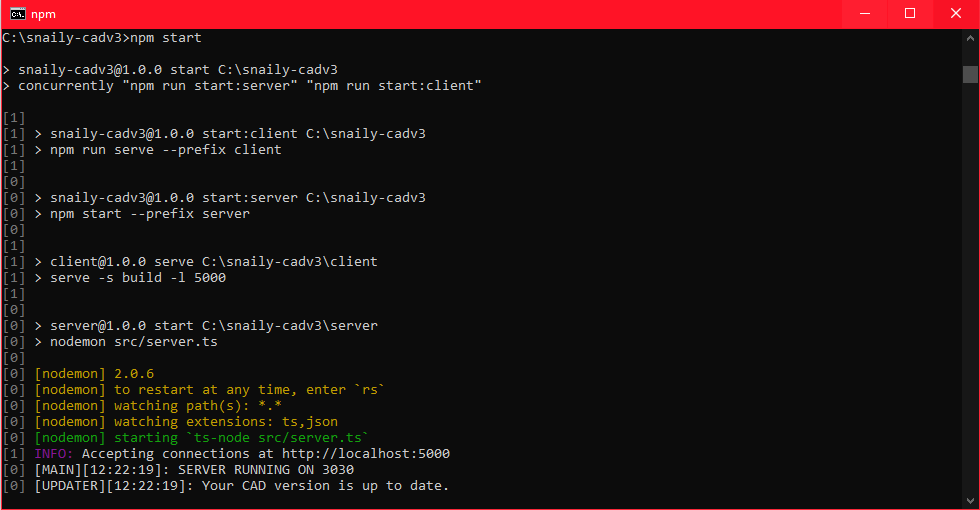
Make sure that your configs are correct, FYI: after you changed something in the client folder, make sure to run npm run build in the client folder again.
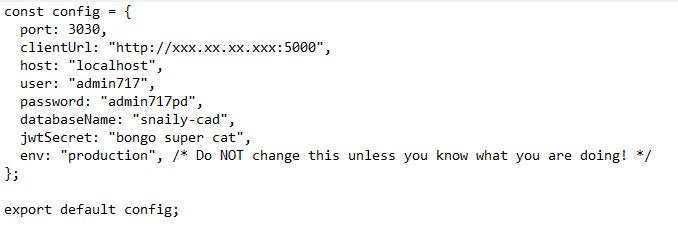

does this look correct?
I’m trying to language.json The English in it is changed to Chinese so that the Chinese content will be displayed when CAD runs, but that doesn’t work. Is there any way to solve it?
You need to run npm run build in the client folder after changing anything in the client folder.
It works. We’re using CAD now. It’s a great invention.
1 Like
Hello,I have an idea. Can I add a function that can monitor the real-time position of police officers in dispatch so that dispatchers can better use this CAD
The CAD is open source so feel free to create it and open a PR for it:)
A new version (1.1.0) was just released with a few bug fixes and 3 new additions! 
Version 1.2.0 has just been released with bug fixes and a ton of new features!
Also working to add a live map to the CAD 
Version 1.2.2
This release mostly has bug fixes from yesterdays release that I didn’t notice, thanks to the folks for finding them!
Version 1.3.0 has been release, Please read below
In this version (1.3.0), I’ve dropped client side rendering to help with the installations. (Guides have been updated to this release)
There’s only one “breaking change”, instead of going to localhost:5000, you’ll need to go to localhost:<port>, <port> is the port you have set in your config file.
If you don’t understand this, feel free to reply or join our Discord server for more help!
Thankyou.
Hello Casper,
I was wondering i used to use your CAD via hosting it with a VPS, would i be able to host this via webhost? I.E zaphosting
It’s this free??? LOL GG Very good script
2 Likes