What is the issue you’re having?
RedM consistently crashes during startup with:
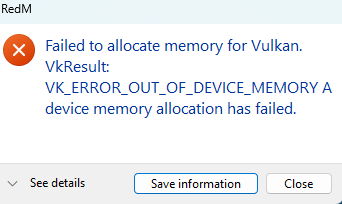
“Failed to allocate memory for Vulkan. VkResult: VK_ERROR_OUT_OF_DEVICE_MEMORY”
I own the standalone Red Dead Online version. It runs successfully using Vulkan: I can load into Free Roam and move around normally.
GPU: NVIDIA GeForce RTX 5070
NVIDIA driver: 617.14
Vulkan API reported by RedM: 1.4.351
RedM game build: b1491
Crash fingerprint: four-alanine-item / glue.dll+93802
The CitizenFX log detects the GPU, then reports the allocation failure approximately one second later. It does not record the allocation size or available VRAM.
What have you tried already to fix the issue?
Troubleshooting already attempted:
Clearing RedM cache, server-cache, and server-cache-priv.
Testing the Canary update channel.
Temporarily disabling implicit Vulkan layers.
Temporarily disabling Social Club’s Vulkan layer.
The latest dump confirms Medal, OBS, TikTok LIVE Studio, Steam Vulkan layers, and Social Club’s Vulkan layer are absent. The same allocation error persists. Steam’s ordinary gameoverlayrenderer64.dll remains loaded.
Error screenshot(s)
Windows version
Windows 11 Home, version 26H2, 64-bit OS build: 26300.9550
System specifications
CPU: Intel Core i7-13700F (13th generation)
RAM: 32 GB (31.85 GB usable)
GPU: NVIDIA GeForce RTX 5070
VRAM: 12 GB
NVIDIA driver: 617.14
Antivirus software
Microsoft Defender Antivirus (Windows Security)
CitizenFX crash zip file (‘Save information’ on a crash)
CfxCrashDump_2026_10_04_23_18_37.zip (2.07 MB)